Cannot login with local SQL user account

Hello,
I have created a local user insight Remote Desktop Manager using an SQL-Server 2014 as data source.
I do not use the integrated AD security (local user). I gave him admin-rights and checked "Create SQL-User".
I cannot connect the RDM instance to my SQL-Server with the "local" user set up on the SQL Server.
What am I doing wrong? Do I have to give the user special rights?
Wit the integrated security it works.
Version of RDM: latest beta, 11.1.11.0.
Regards,
Georg
All Comments (10)
Hello,
Have you created your database from RDM?
When you try to connect with the user that you have created, do you receive an error message?
Best regards,
Jeff Dagenais
I get "Login failed for user "[username]'.
I think it is something with the permissions ...
Hello,
Have you created your database from RDM?
Best regards,
Jeff Dagenais
Yes, I did this with RDM.
Hello,
Could you post a print screen of your data source configuration (File -> Data Sources) + a print screen of your Administration -> Users window please.
Best regards,
Jeff Dagenais
here we go...
08-04-2016 09-59-39.png
08-04-2016 09-49-17.png
Hello,
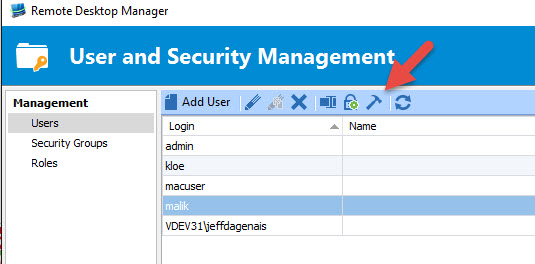
Could you try to select your user in Administration -> Users and press the Fix SQL Login.
When this is done, please try to reconnect.
Best regards,
Jeff Dagenais
2016-04-08_08-36-44.jpg
This did not work. :(
Anz other idea?
Could you try Microsoft SQL Management Studio to see if you can connection to the database?
David Hervieux
OK - I found the problem.
SQL Server was set to only authenticate users from the AD.
Local users were rejectected. Now it works.
Maybe you can write a hint in the Dialog-Box when you fix the SQL Server conneciton "Successfull. Please note: Set SQL Server to Active Directory AND local authentication when you have trouble logging in with local users" or something like this.
Have a nice weekend!
Cheers,
Georg