Best way to run RDM Windows on multiple monitors

I'm looking for advice on how to best use the real estate on two 1920x1080 monitors. I'm confused by settings like "Fit RDP window" and screen sizes "current work area size" and "current screen size" for RDP sessions.
What I'd like is for each session to open on the current screen, not maximized but using all of the available screen real estate (the equivalent of what you get when you drag the title bar to the top of the screen in Windows 8 or later). I'd also like the tab order (Alt-Tab) to rotate among the open sessions while the Windows key is sent to the remote host. (I'm not asking much, eh?)
No matter what combination of settings I've tried, I can't get this to work correctly. Best is "Fit RDP window" with "current work area size" but this produces a full-screen like session which needs to then be restored. Restoring the window does not then use the full display area. This results in extra clicks and drags to get it like I like it.
BTW, the Mac version doesn't do this any better.
Thx.
All Comments (5)
Hello,
Do you launch your sessions in embedded or external mode?
Best regards,
Jeff Dagenais
Undocked.
In my experiments, external mode looked like it simply runs the MSFT RDP client.
Hello,
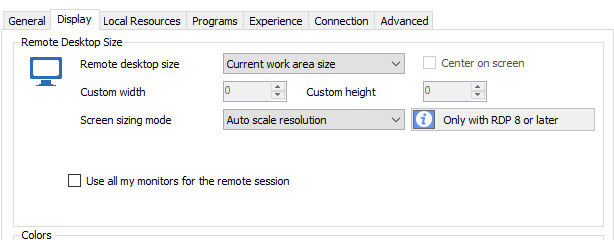
I don't know if this is what you are looking for, but could you try Current work area size with Auto Scale Resolution
Best regards,
Jeff Dagenais
2016-04-06_13-42-55.jpg
Thanks, but this still isn't what I want. As you can see in the attached screenshot, this combination of session settings produces a slightly larger than current resolution session. That means more clicking and adjusting.
I don't know why RDM cannot seem to produce a session that is both undocked AND maximized (that is, with the title bar and window controls showing). Also, it would be nice if the documentation on these settings and the results were complete and offered examples.

2016-04-06_13-48-49.jpg
Could you send as a private post an print screen of the whole desktop? It seems to be a bug with the size calculation.
David Hervieux