Remote Desktop Manager Mac hangs at startup since 3.5.1.0

Hello,
When i start Remote Desktop Manager Free Edition for MAC it hangs, i need to force quit the app.
I have removed the program from my Application folder, reinstalled it acts the same.
Attached you can find the error report.
I am need to go back to the Microsoft RDP :-(
Hopefully anyone has a suggestion what to do.
Regards,
Jeroen van Velzen
error.txt
All Comments (37)
Moved to Mac forum.
Could you also include the logs of the application?
They are described in http://helpmac.remotedesktopmanager.com/help_applicationlogs.htm
Thank you
Maurice
Hi,
I have the same problem after upgrade from 3.5.0.0 Enterprise to 3.5.1.0 Enterprise.
Rotating color wheel after starting the application, after a while the applications quits to the desktop.
Deleting the application and re-installing has the same result.
Now installed older version 2.5.0.0 and this works fine.
We use local MS SQL database as a datasource.
I use Mac OSX 10.11.4.
(Update: attached error log)
Please advice,
Best regards,
Freddy Lauwers

Error.rtf
Please find attached the application log.
The same as Freddy, i to have the rotating color wheel that spins endless.
Regards,
Jeroen van Velzen
RemoteDesktopManager.log
Hi Freddy Lauwers,
We've found your issue, it seems to be a bug related to the update checker when there is no internet connection. Did you have access to internet when you opened RDM? Regardless, the bug has been fixed internally and I'll inform you when it is available.
I'm sorry for the inconvenience.
Hi Jeroen van Velzen,
Your log doesn't seem to show anything after March 30. Are you using the last version of RDM Free (which is 3.5.1.0)? If so, was the application working correctly with previous version of the application?
Best regards,
Xavier Fortin
Hi,
Thank you for your reply.
I always have Internet on my computer.
We are behind a firewall, but regular protocols (HTTP / HTTPS / FTP / ...) are always allowed.
The connections to our internal SQL datasource is an internal LAN connection.
Also want to add that I exported the error log from the working version 2.5.0.0 that I installed to be able to work.
The time and date of the entry is when I updated to 3.5.1.0. I hope the crash registers anything in the error log because I can't do anything in the program.
Maybe this is why Jeroen has no recent entries in his log because the program crashes before it can write anything to the log...
Hope this helps.
Best regards,
Freddy Lauwers
That could be right. The app is not working now for a few days, it probably started around march 30.
When i open it i get a spinning color wheel and it just sits there.
Only thing i can do is force quit.
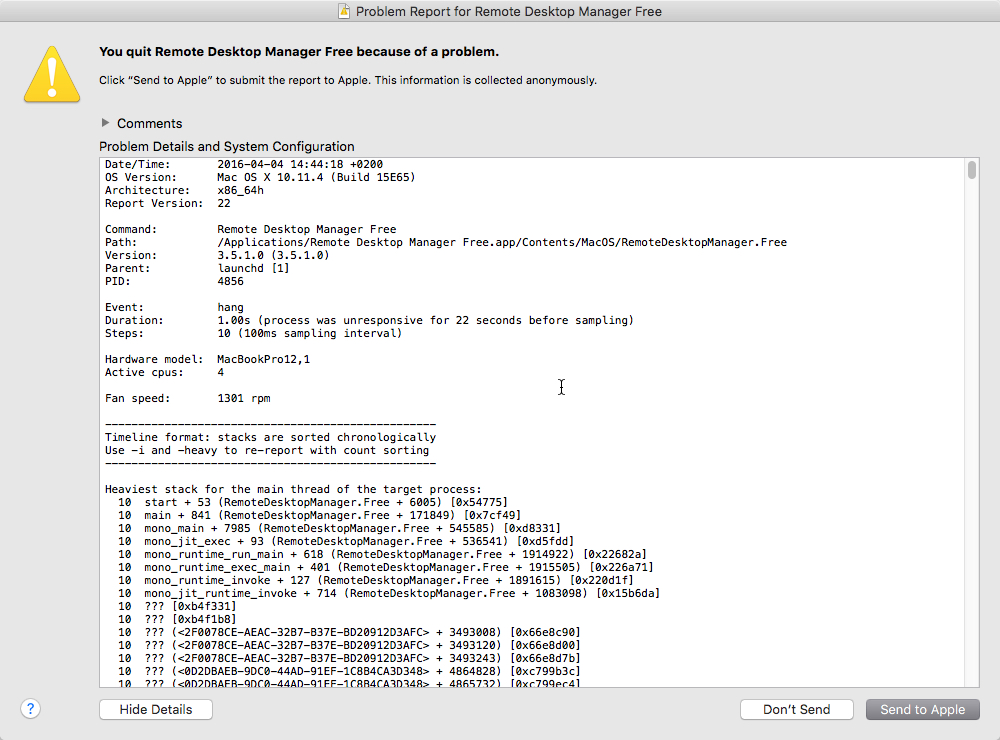
When i do that i get the following on my screen.
Attached the full error report my Mac generates.
full_error.txt
mac_error.jpg
Hi Jeroen,
Do you mind trying with our previous version (3.5.0.0).
You can download it here http://cdn.devolutions.net/download/Mac/Devolutions.RemoteDesktopManager.Mac.3.5.0.0.dmg
Best Regards
Benoît Sansregret
Freddy Lauwers,
I said the internet connection, but anything that prevent the specific connection would cause the same crashes. Could you try this version and tell me if this resolve your issue:
https://www.dropbox.com/s/ywg9uf4k2zrnzeg/rw.Devolutions.RemoteDesktopManager.Mac.3.5.1.0.dmg?dl=0
Jeroen van Velzen,
Could you also rename this following folder (anything will do, you can add backup at the end, like so com.devolutions.remotedesktopmanager.free backup):
/Users/<User>/Library/Application Support/com.devolutions.remotedesktopmanager.free
Afterward, start RDM Free again and tell me if it still hangs.
Xavier Fortin
Hi Jeoren,
Didn't notice you are using the free version here is the ink:
http://cdn.devolutions.net/download/Mac/Devolutions.RemoteDesktopManager.Free.Mac.3.5.0.0.dmg
Benoît Sansregret
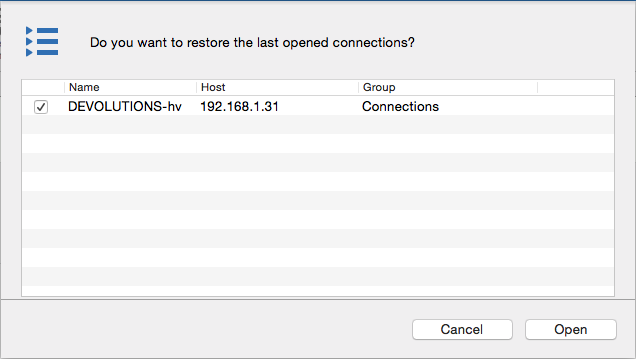
I had to open connections when I closed Remote Desktop manager 3.5.0.0, then I upgraded to 3.5.1.0. After the upgraded I started RDM, it asked to restore the last opened connections and almost immediately the dialog with the connection listed turned black (the part which listed the two connections). I couldn't click on any button and had to downgrade to 3.5.0.0. The version below also didn't fix the issue. I also tried to upgrade RDM without any open connections but this also resulted in remote desktop hanging after the upgrade.
The only errors in the log are "Failed to connect to the host (131084) but the database is local and I have an internet/network connection for sure.
Hello,
When i rename that folder i can start up fine. But i lose all my RDP connections and settings.
I installed the older version and replaced the newer install, this starts up just fine.
I have make an export of my settings with the older verison.
After doing this it seems in in-app updater is taking forever to get the update done. Perhaps there is something going on during this proces ?
I have installed the new version with a clean install folder and imported my settings.
All is wel now, thank you for your assistance.
Regards,
Jeroen van Velzen
Hi Ferry Tuijn,
Just to make sure, are you talking about this window:
Could you send me a print screen of this occurrence (the window turning black)?
Also I would like you to try the same thing I mentioned to Jeroen. I would like you to rename the folder /Users/<User>/Library/Application Support/com.devolutions.remotedesktopmanager or /Users/<User>/Library/Application Support/com.devolutions.remotedesktopmanager.freeif you're using the free edition (anything will do, it's just to make RDM recreate this folder). It will reset your preferences and your datasources configurations (you will be able to add the datasource back, it won't delete their content).
Xavier Fortin
OpenedConnections.png
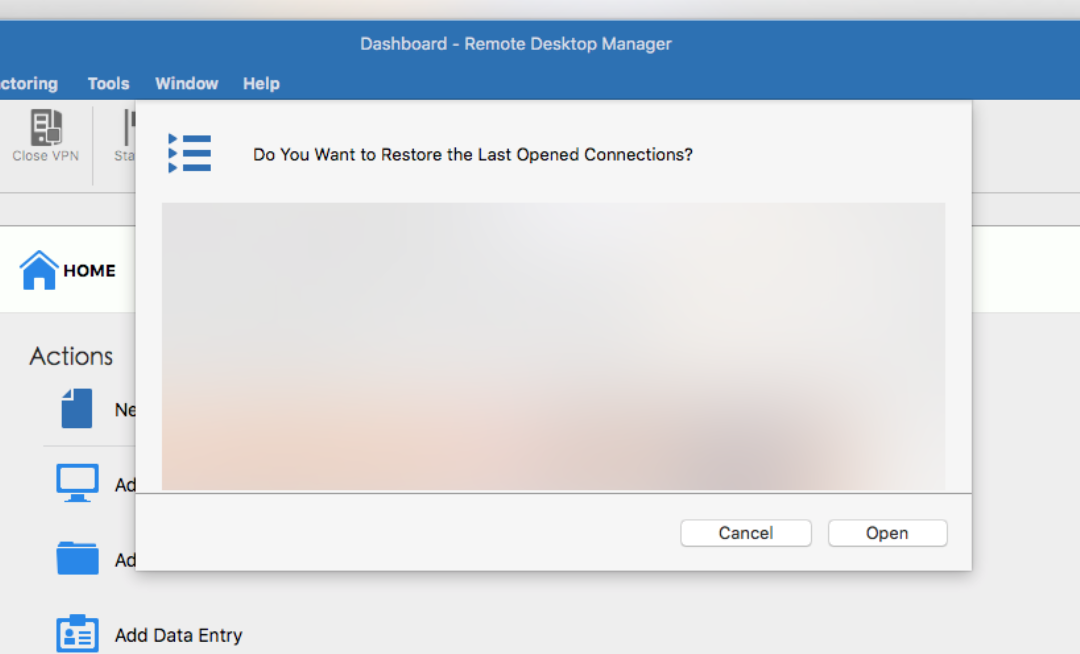
Yes, thats the Windows I mean, see screendump below. In the screendump the color changes to grey for some reason.
I renamed the folder /Users/<User>/Library/Application Support/com.devolutions.remotedesktopmanager and restored my data source and now everything is working fine. Thanks for your help.
Schermafbeelding 2016-04-05 om 14.37.41.png
Sorry for not responding. Two days out of the office.
I tried to use the file you provided, but same problem.
Color weel spins endless and have to force quit.
When I go back to 2.5 everything works just fine.
Version 3.5.0.0. enterprise will probably also work (what I was using before upgrade to 3.5.1.0) but I don't have the DMG anymore.
Hope this helps,
Greetings,
Freddy Lauwers
Hi Freddy Lauwers,
You seem to have another problem unrelated to the Error Log you've initially sent us. If you haven't done yet, I would recommend you trying the same thing as Jeroen and Ferry.
Try renaming the folder /Users/<User>/Library/Application Support/com.devolutions.remotedesktopmanager (you can simply add backup at the end). It will reset your datasources configuration and your preferences.
Tell me if the application start correctly afterward.
Best regards,
Xavier Fortin
Hi,
I'm also getting the same problem.
V 3.5.1 Enterprise for Mac.
Problem is the Backup function to cloud.
I just added flase to <RDMOAutomaticSignIn>false</RDMOAutomaticSignIn> in RemoteDesktopManager.cfg.
Not locking up any longer.
Looks like the update to v 3.5.1 causes a problem with cloud backup
Hi Stuart Smith,
Thank you for your assistance.
Indeed, when I open RDM (with RDMO Automatic Sign In enabled) without an internet connection (any other connection issues would probably result in the same behaviour), RDM open and immediately after it closes itself before I had the time to see the main window. Is this the behaviour you've observed?
Nonetheless, we're going to investigate the issue.
Best regard,
Xavier Fortin
Hi Xavier,
Not quite the same behavior.
I have an internet connect working fine.
I start the application and it immediately hangs the application, after about 5 minutes a message box pops up with connect time out message.
After clicking on OK button it locks up again.
I have to force quite, which is why I disabled the cloud backup
Regards,
Stuart
Could you send me a print screen of the said window?
And could you send me your application log? You can find it at the following location:
/Users/<User>/Library/Application Support/com.devolutions.remotedesktopmanager/RemoteDesktopManager.log
Xavier Fortin
Hi,
I tried what you asked, but renaming the folder and re-installing the application does not solve the problem.
After re-entering my MS SQL datasource (located on LAN server) I have the same problem.
As stated by Stuart Smith something broke between 3.5.0.0 and 3.5.1.0 because I could use 3.5.0.0 without any problem.
Probably because I'm behind our corporate firewall that block's all unnecessary ports to the Internet, RDM is timing-out on a connection it wants to make to the outside world...
Please advice.
Best Regards,
Freddy Lauwers
Hi Xavier,
Log attached.
Unfortunately im snowed under at the moment and cannot reconfigure remote destop manager with cloud back right now.
When I get the chance I'll send the print screen
RemoteDesktopManager.log
Freddy Lauwers,
The application started to hang after you added back your MS SQL datasource? Is there anything new in your log file? You can find it here:
/Users/<User>/Library/Application Support/com.devolutions.remotedesktopmanager/RemoteDesktopManager.log
You can send it to me via private message.
Stuart Smith,
Thank you, we'll look into it.
Xavier Fortin
Maybe, we've been pondering about it since hearing about these issues. That's part of the reason I made everyone clean there configurations folder. Have you made sure you reenabled the RDMOAutomaticSignIn value in your configuration file?
Xavier Fortin
Thanks for reminding me..
No I had not re-enabled.
Problem still exists, as soon as you re-open the app after configuring AutomaticSignIn it hangs.
For everyone else in this thread I post the text in my pm to Xavier without the requested files:
Hi,
This is the requested file.
Also a screenshot of the error I get now.
Behaviour is different after re-install of the version you provided with dropbox link. With the version downloaded from the website the color wheel would not stop spinning and Mac OSX shut down the Application after a few minutes).
This is what I did:
- Deleted folder as requested by you under Library
- Re-installed the Application V3.5.1.0
- Started Application
- Recreated MS SQL Datasource
- Verified SQL server Connection -> OK
- Selected the database from SQL server
- Verified Database Connection -> OK
- Exit Application
- Start Application
- RDM interface opens, but rotating Color Wheel
- After about 5 minutes, I get the error you can seen on screenshot1 (but SQL/Database was connected and verified OK earlier)
* When I click OK, Color wheel starts spinning again with same error after 5 minutes
* When I click GO OFFLINE, Color wheel starts spinning again, BUT after a few minutes I can see my all Sessions (Offline) see screenshot2
- I close RDM
- Uninstall version 3.5.1.0 (without removing the folder in Library)
- Install version 2.5.0.0 (can't find download link to 3.5.0.0 enterprise)
- Start RDM
- Up and running with no errors and all sessions visible within 5 seconds...
Hope this helps.
Best regards,
Freddy Lauwers
Freddy Lauwers,
The reason you're not having the exact same problem with the version I packaged for you is because there was two bugs. The one that crashed the app which was fixed in said package and the timeout one on your SQL Server which we are currently investigating.
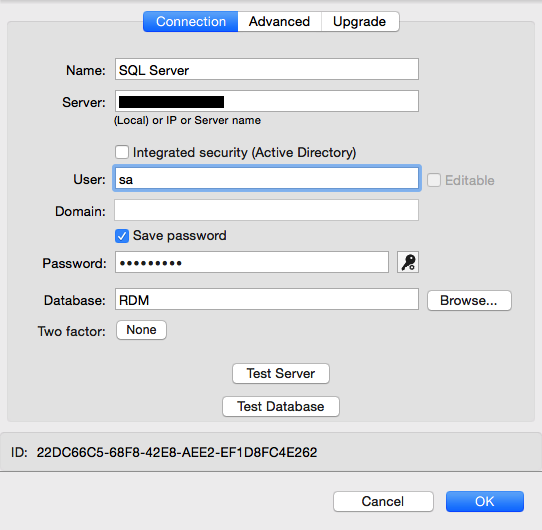
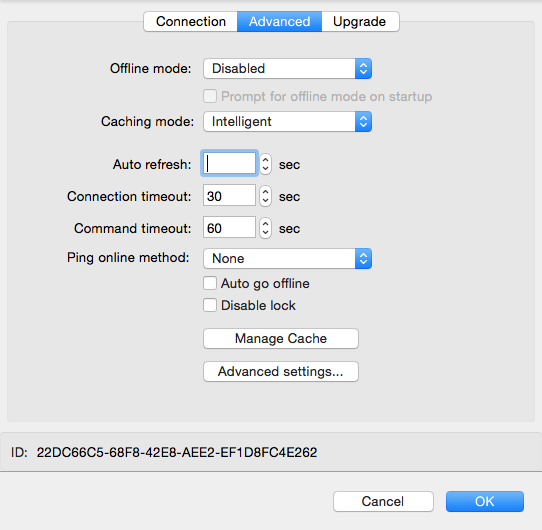
Can I know the details of your Datasource configuration? Are you using integrated security? Prints screen of your configuration pane (like the following) would help:
You can send them to me via private message. You can hide any fields don't want to share.
Any other information you think would be relevant about the datasource, server, etc. would be appreciated.
Here is a link to RDM version 3.5.0.0:
http://cdn.devolutions.net/download/Mac/Devolutions.RemoteDesktopManager.Mac.3.5.0.0.dmg
Xavier Fortin
SQL Pane 2.png
SQL Pane 1.png
Stuart Smith,
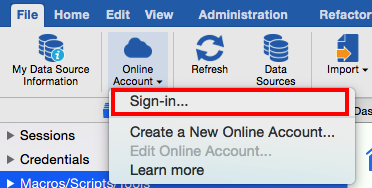
Have you tried manually signing in to your RDMO Account:
Is it hanging when you're trying it?
Best regards,
Xavier Fortin
RDMO Sign In.png
Hi Xavier,
I can manual sign in ok and setup the backup.
Everything works fine.
But if I setup for Autologin and close the app and re-open, it will hang forever.
Hi Xavier,
Thank you for providing the 3.5.0.0 enterprise link.
As expected, upgrading 2.5.0.0 to to 3.5.0.0 runs fine now.
I'll pm you the requested screenshots.
Beste regards,
Freddy Lauwers
Hi Freddy Lauwers,
I've sent you a private message with two small apps and instruction to test the connection to SQL Server. I would like you to try them and inform me of the result.
Best regards,
Xavier Fortin
Hi Freddy Lauwers and Stuart Smith,
I've build a version with a modification that I think should fix your issues (be aware that this modification will not be in the next official release (3.5.2.0)).
I would like both of you to download and install it:
https://www.dropbox.com/s/pqre160wbdb92jg/Devolutions.RemoteDesktopManager.Mac.3.5.2.0.dmg?dl=0
Close the instance of RDM if it is opened.
Afterwards, I would like you to open your configuration file manually (/Users/<User>/Library/Application Support/com.devolutions.remotedesktopmanager/RemoteDesktopManager.cfg) and add the following line between the <Option></Option> tag:
<EnableActionQueue>true</EnableActionQueue>
You can put it at the end, just over the </Option> line, like so:
<AllowTabArrangement>true</AllowTabArrangement>
<AllowTabUndocking>true</AllowTabUndocking>
<EnableActionQueue>true</EnableActionQueue>
</Option>
Save the file and start RDM again, tell me if you're still experiencing hangs.
Best regards,
Xavier Fortin
Hi Xavier,
The modified version works for me....
What was the change you made ?
Did you have to change the initization modules for starting a connection to a remote data source ?
Regards,
Stuart
Nothing like that, no. It seems it was more of a general problem with the app on some machines (I couldn't reproduce it on my Yosemite MacBook Pro but I could on an El Capitan virtual machine). The problem seemed to occur on any web requests done while other actions where being performed at the same time (though I suspect it could affect other kind of action than web requests). To be fair, it's a very weird issue that I suppose appeared through recent update in our development framework and (I suspect, though I may be wrong) on El Capitan.
We've queued the actions so that they no longer occur simultaneously.
Xavier Fortin
Thanks Xavier, and yes I'm running El Capitan.....
Hi Xavier,
I tested your build and changed the cfg file.
I can confirm that this fixed the problem.
When the final build of 3.5.2.0 is published, we should just uninstall this version and reinstall the official release?
Thank you for your support & great product!
Best regards,
Freddy Lauwers
No, sadly, this specific change won't be available in the Public Release of RDM 3.5.2.0. We'll have to wait for the 3.5.3.0 before it is available in the public release. This beta version should contains all the features of the actual 3.5.2.0 though.
I'll inform you when the 3.5.3.0 will be available.
Best regards,
Xavier Fortin