Error with embedded firefox and proxy

Hi,
if I configure an embedded web browser session, set Firefox as the browser and set a proxy, then no content tab becomes visable. RDM tries to start the session, it shortly changes the button "Open Session" to "Close Session", but nothing more happens.
The configured URL is a http-url (no ssl). The proxy and the URL are working in a normal browser window. It makes no difference if I choose MozNET R19.8 or geckofx. RDM version is 11.1.0.0 on Windows 7 64 Bit. This error happens with the 32- and 64-bit version of RDM. Firefox version is 45.0.1. Antivirus is disabled. Team Viewer is not installed on the system.
Output of the debug log:
Starting process
PID: 9732
MainWindowHandle: 0
Wait 100ms
Wait 100ms
Wait 100ms
Wait 100ms
Wait 100ms
Wait 100ms
Wait 100ms
Wait 100ms
Wait 100ms
Wait 100ms
Wait 100ms
Wait 100ms
Wait 100ms
Silent: System.InvalidOperationException: Process has exited, so the requested information is not available.
at System.Diagnostics.Process.EnsureState(State state)
at System.Diagnostics.Process.get_MainWindowHandle()
at Devolutions.RemoteDesktopManager.Frames.Embedded.FreEmbedded32Cmd.ProcessVisibleChanged()
Process has exited.
Is this a known problem and what can I do to resolve that? Do you need more information?
Best regards,
Andreas
All Comments (2)
Hello,
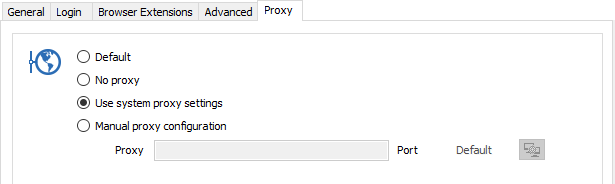
Can you try to set the Proxy in the Web Browser session as Use system proxy settings?
Best regards,
Érica Poirier
2016-04-01_9-51-34.png
Hi Erica,
yes, if I add the proxy as system proxy and set use system proxy settings it would work. But this proxy is session dependent, I can not use it as proxy for the whole system.
Best regards,
Andreas