Right click server -> Logoff fails with "ashutdown /l"

Brand new user (i'm on the enterprise 30 day trial)
Just like with this link:
https://forum.devolutions.net/messages.aspx?TopicID=24626&
When I go to shut down the server it always adds an 'a' to the beginning of the command:
"ashutdown /l"
Windows cannot find 'ashutdown'. Make sure you typed the name correctly, and then try again.
I didn't want to necro the other thread but I'm seeing the same issue.
Thanks!
All Comments (18)
Hi,
What OS do you use? We are unable to reproduce it and we need some clues.
David Hervieux
Hi David
I'm on windows 7 professional
the servers i work on are 2008 r2
David, just a thought -
i used the enterprise edition at my old job and i never had this issue back then.
this is a new job i'm at and i'm trying to talk the boss into getting me a license - is it possible this is only an issue with the trial version by chance?
English or another language? It's not related to the trial license for sure.
David Hervieux
Hi David,
Yep i'm using the English version.
And ok just a thought on the trial license - no biggie
Any other ideas?
Thanks!
Hi,
Could you try the new beta to see if it's fixed? We have changed the way with send the keystrokes.
David Hervieux
Trying now - will let you know.
updated to beta 11.1.11 and it still tries to log out with ashutdown /l
Hi Tom Carson,
As you already know it, to send the log off command we open the Run Dialog by sending the WINDOWS + R keys. Because of the off chance that the Dialog could already be open, focused and the textfield content not selected we send the CONTROL + A keys to select the entire content of the textfield so it is overridden when writing the shutdown /l command.
In your case the CONTROL key doesn't seems to either be sent or well received, do you have any idea why? If you use the CONTROL + A shortcut yourself, does it works?
Nevertheless, we're going to add an option to disable this.
Best regards,
Xavier Fortin
I'm honestly not sure xavier - it's windows 7 professional and it was freshly imaged prior to me working on the machine. I imaged it myself.
Is it possible to just skip the ctrl+A step and just open a new run command each time regardless of what is already open? Windows can open several run commands without issue.
I mean - the command is to log out right so does it matter if there are extra run cmd windows open?
As stated above, don't worry, we are going to add an option to disable this step. I was intrigued as to why the Control key wasn't send successfully.
Best regards,
Xavier Fortin
ok thanks xavier - will that appear in a beta release first?
Yes, it should be done for the next beta release. We'll inform you when it is available.
Xavier Fortin
Ok great thank you Xavier!
I'm working around this issue by using Group Policy Preferences to copy C:\Windows\System32\shutdown.exe to C:\Windows\System32\ashutdown.exe.
Works well at the moment!
I would like to be able to modify the logoff macro somehow or have a custom option so that additional steps could be taken.
Sorry,
I seem to have missed the last beta release. The option to disable the sending of the CONTROL + A keys is in the last beta version (v11.1.12.0).
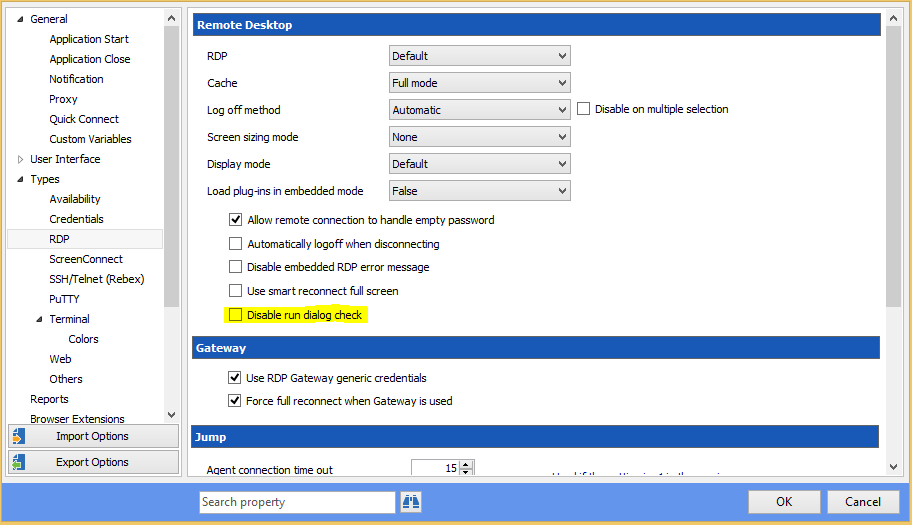
You can find this option in Options > Types > RDP. The option is Disable run dialog check:
Checking this option will stop sending CONTROL + A before writing the command.
Best regards,
Xavier Fortin
DisableRunDialogCheck.png
Thanks Xavier - this is awesome :)
You rock!!
Tom