Active Directory Synchronization

Hello,
I have question regarding AD Synchronization.
Usual I use Remote Assistance to connect on customer computers.
I sync Remote Desktop Manager with my AD successfully, but all computers accessible to connect only by RDP (by default). Is there any option to change connection type for that sync in order to be able connect by Remote Assistance?
Thanks in advance!
All Comments (8)
Hello,
You must create a template and adjust the synchronizer to create sessions based on that template.
The template choice is in the "Settings" tab of the sync.
Best regards,
Maurice
Hello,
Thank you for your help.
I'm found the template.
But now I faced to one other issue. I try to use variable in template to receive the computer name or IP address for hosts, but can't get right one.
Can you please help ?
Hello,
What type of sessions are you trying to create? RDP?
If you leave the host field empty in your template, does it synchronize the sessions properly?
Best regards,
Jeff Dagenais
Thanks, I am already find the solution.
In my template for Remote Assistance I use $NAME$ variable in Offer Assistance --> Computer or IP Address field.
Then, when I create the sync for AD in Settings tab I set Session name as Common Name and Host as Same as Session Name.
In this key, i receive host name and able to connect them (the remote assistance should be activated and on users computers and have current options to allow Remote Assistance Offer. I done it by GPO)
Hello.
I have a problem with my AD Sync.
When I select "Synchronize Automatically" option, after some time I get many same objects (computers) in my folders. Is it possible to avoid duplicates ?
Thanks in advance
@Vahan,
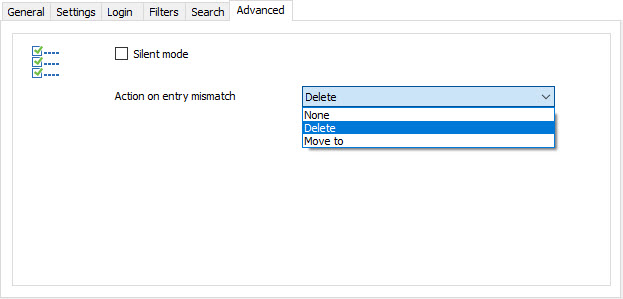
To avoid duplicate entries, go in the Advanced tab of your Synchronizer session and select Delete or Move to in the Action on entry mismatch field.
This should do the trick.
Best regards,
Jeff Dagenais
2016-10-17_08-30-35.jpg
Thank You!
Unfortunately I have no this option in Advanced tab. I guess that I use an old version.
@Vahan,
What version of RDM are you using?
What type of data source are you running?
Best regards,
Jeff Dagenais