Export list of Users to Excel (including their security groups)
Export list of Users to Excel (including their security groups)

Hi,
I've searched for two hours now but I can't find the answer anywhere so I'll try here, if it's even possible:
I would like to export our entire user database to Excel. A list that includes: Full name, User name, Associated security group
I know how to export a single Security Groups list of users, but we have a lot of groups and also that export doesn't include Full Name.
Is this possible?
Thank you
All Comments (8)
Hello,
What type of data source are you using?
Are you using PowerShell to export users with the associated Security Groups?
With PowerShell, you can export the FirstName and LastName properties from the PSUserInfo object.
Best regards,
Érica Poirier
When I export users with the associated Security Groups I just click on user administration and then choose the security group and "Assign rights". In that menu I just export it to xls.
Is there a guide on how to export this kind of list with PowerShell?
Thank you for answering
BR
Tim
Hello,
There is no guide on how to export this kind of list with PowerShell. But here is a small PowerShell script to export this list. You have to run it under the PowerShell (RDM CmdLet) that you will found on Tools->PowerShell (RDM CmdLet). Also this script will only works if you only assign Security Groups to Users and no Roles have been defined.[CmdletBinding()]Param( [Parameter(Mandatory=$False,Position=1)] [string]$DestFileCSV)if ($DestFileCSV.Length -eq 0){ # Default CSV export filename $location = Get-Location $DestFileCSV = Join-Path $location "\ExportFile.csv"} $users = Get-RDMUser$secGroups = Get-RDMSecurityGroup$line = "First Name,Last Name,UserName,Security Groups"Out-File -FilePath $DestFileCSV -InputObject $lineforeach ($user in $users) { $line = "$($user.FirstName),$($user.LastName),$($user.Name)" foreach ($grpinfo in $user.GroupInfos) { $sgName = $secGroups | Where-Object {$_.ID -eq $grpInfo} $line += ",$($sgName.Name)" } Out-File -FilePath $DestFileCSV -InputObject $line -Append}Write-Host "Done!!!"If you want to run this script on an external PowerShell session, you have to load the RDM snap-in before. You can find information about it on this post. You can also consult our Online Help about PowerShell Scripting.
Best regards,
Érica Poirier
Hi,
I tried but I got some error
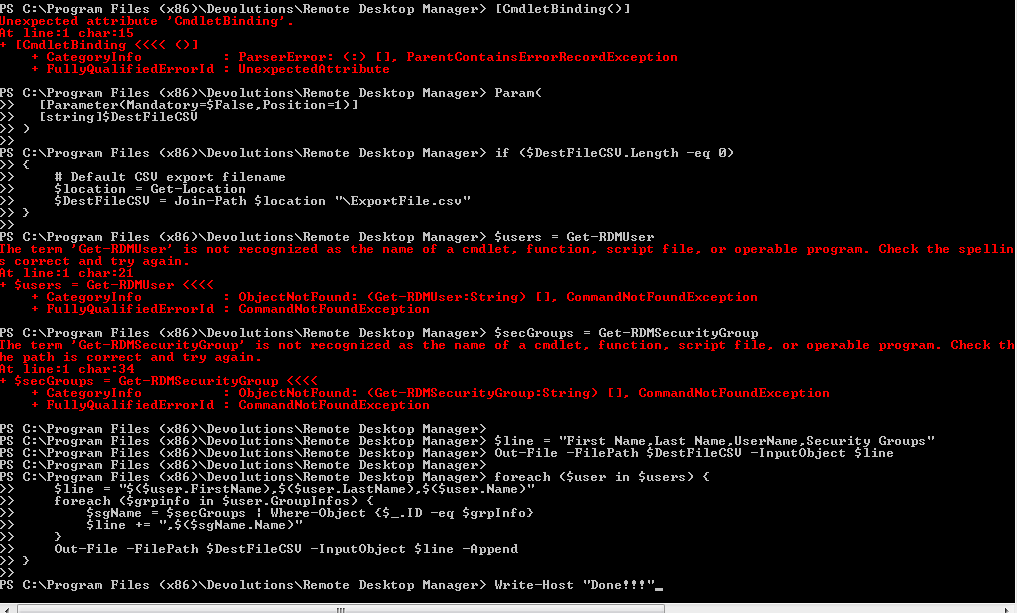
Capture.PNG
I forgot to mention that I'm using RDM on a Citrix server so maybe the path is wrong or something?
What RDM version do you use?
PS: By the way I already have added a feature request to create report for that.
David Hervieux
I have 10.6.4.0
Hello,
You have to save this script in a file and run it from the PowerShell (RDM CmdLet). I attach the script file to this post.
Also, if you still get the error Get-RDMUser is not recognized as the name of a cmdlet, it is because the RDM snap-in is not correctly loaded.
When you open PowerShell (RDM CmdLet) from the Tools menu, do you get an error?
Best regards,
Érica Poirier
GetUserSecGrp.ps1