Proxy-Configuration without Domain

Hello
I would like to add the cloud database as a data source. Only I can get always get the error message (407) proxy authentication required.
I have configured them as follows:
Can you help me here?
Greeting
Dietmar
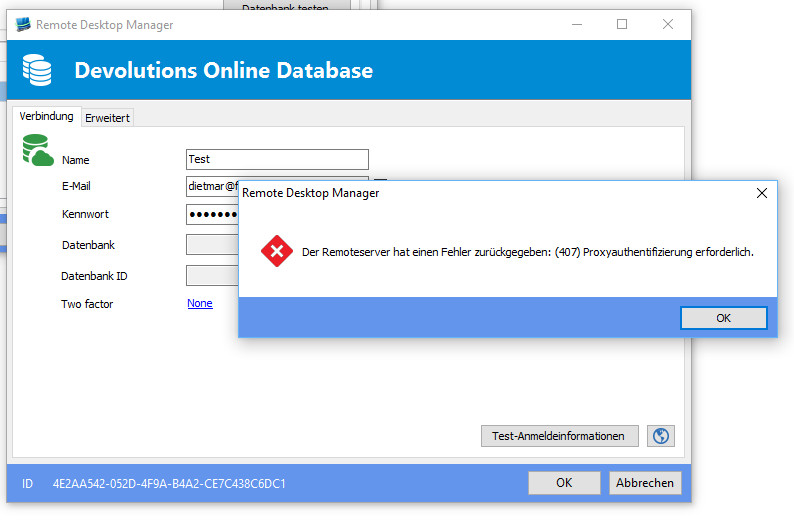
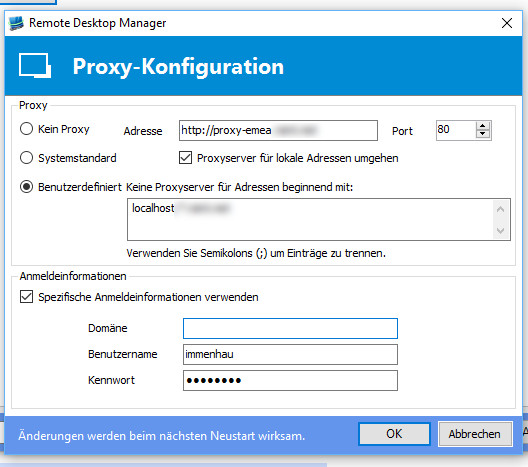
2016-03-24_100745.jpg
2016-03-24_101021.jpg
All Comments (6)
Hello,
What version of RDM are you running?
From your computer, do you have access to https://cloud.devolutions.net?
Best regards,
Jeff Dagenais
Hello,
i have the RDM-Version "Enterprise Edition 11.1.0.0" and an account for the https://cloud.devolutions.net is also available. There I set up a database.
Dietmar
Hello,
In File -> Options -> General -> Proxy, have you tried to select System Default instead of Custom?
Best regards,
Jeff Dagenais
Hello,
I have select the Custom-Config (see Image 2016-03-24_100745.jpg in the start post).
Here the Error-Message:
WebException - Der Remoteserver hat einen Fehler zurückgegeben: (407) Proxyauthentifizierung erforderlich.
bei System.Net.HttpWebRequest.GetRequestStream(TransportContext& context)
bei System.Net.HttpWebRequest.GetRequestStream()
bei System.Web.Services.Protocols.SoapHttpClientProtocol.Invoke(String methodName, Object[] parameters)
bei Devolutions.RemoteDesktopManager.RDMOProxy.RDMServices.GetDataSources(String userName, String password)
bei Devolutions.RemoteDesktopManager.Business.DataSources.RDMOServicesSafe.cad3d1f473eda07cc75bf50f61d12457e.cd4fd22405e70c7a6f08ec8850756dc51()
bei Devolutions.RemoteDesktopManager.Business.DataSources.RDMOServicesSafe.c5f4f6c72c053c0cd60a62abeeaa43fdf[cb75a0a5d15a1ad8b8a8a5e57cca214a3](cca50375c36c5ee259719071eaa09af1e`1 c6cc9ab02b2ea9ccd42c7c0497677bcc2)
bei Devolutions.RemoteDesktopManager.Business.DataSources.RDMOServicesSafe.GetDataSourcesSafe(String loggedUserName, String loggedPassword)
bei Devolutions.RemoteDesktopManager.Business.DataSources.RDMOConnectionDataSource.GetDataSources(String server, String userName, String password)
bei Devolutions.RemoteDesktopManager.Frames.DataSources.FreRDMODataSource.c32bef616985b907cc5e294e3eb5d281a(Object c19f185fd70cefc696ba148af1c4faf54, EventArgs cf1018bb83ec7debd818319fd3cb4844e)
bei System.Windows.Forms.Control.OnClick(EventArgs e)
bei System.Windows.Forms.Button.OnClick(EventArgs e)
bei System.Windows.Forms.Button.OnMouseUp(MouseEventArgs mevent)
bei System.Windows.Forms.Control.WmMouseUp(Message& m, MouseButtons button, Int32 clicks)
bei System.Windows.Forms.Control.WndProc(Message& m)
bei System.Windows.Forms.ButtonBase.WndProc(Message& m)
bei System.Windows.Forms.Button.WndProc(Message& m)
bei System.Windows.Forms.Control.ControlNativeWindow.OnMessage(Message& m)
bei System.Windows.Forms.Control.ControlNativeWindow.WndProc(Message& m)
bei System.Windows.Forms.NativeWindow.Callback(IntPtr hWnd, Int32 msg, IntPtr wparam, IntPtr lparam)
Dietmar
Hello,
i have found the probleme. If I remove the option "Proxyserver for local Adress..." then i have a connections to Cloud Database.
Dietmar
Hello,
Thank you for the followup. Glad that is now working.
Best regards,
Jeff Dagenais