Private Key Not Loading

https://db.tt/B9eJwEsQ
https://db.tt/k1V0VbxW
https://db.tt/xnfC7qCo
I am also never asked for the passphrase, so I know it isn't loading. Then when I go to use it in an SSH session, the session starts and finishes right away without a connection.
Should the key be auto-loading? Should I get asked for my passphrase? Shouldn't it then show up in the key agent manager window?
All Comments (6)
If I manually load the private key, I am asked for the pass phrase and it does show up in the window. However, when I attempt an SSH session now RDM just hangs.
===update=== It eventually unlocks and a see a long series of errors in the terminal before it closes saying that the pass phrase is wrong. Which leads me to believe that it isn't using the key agent (as the key is loaded there).
=== update 2 === I was using 32-bit RDM on a x64 box. Using the x64 RDM I am now getting prompted for pass phrase. However, when I try to run the SSH session it just locks up.
https://db.tt/4tehwcss
Hello,
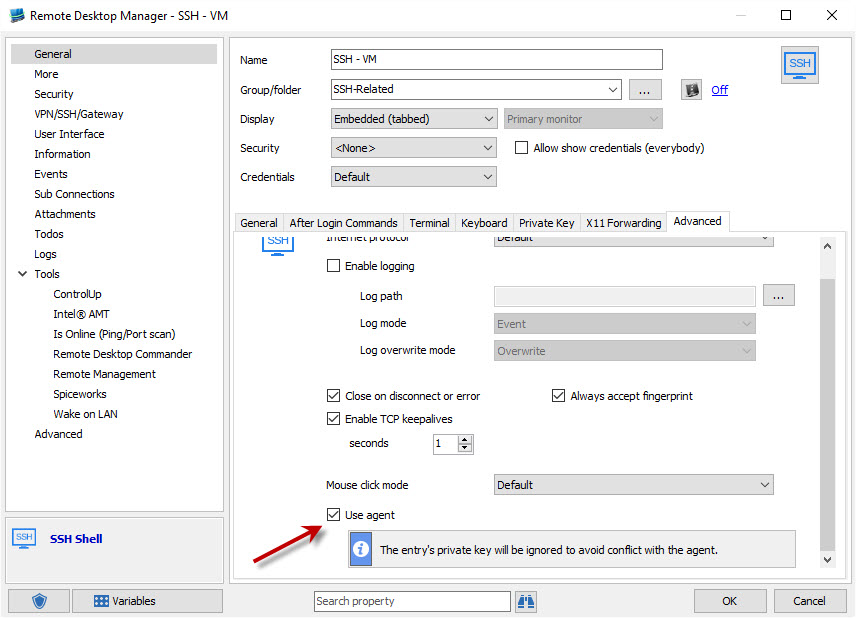
When opening a session in which you want to use the key agent, did you make sure to check the "use agent" box:
For the automatic key loading I think there might be an issue with the personal private key. We'll take a look at this.
Regards,
Hubert Mireault
2016-03-23 07-36-17.jpg
I did not check the Use agent checkbox. I didn't know it was there. If I manually load my key into the agent and check use agent it will work.
But I found a probable bug. When it does so, it is *also attempting* to open the key file from the private key tab. I know this because I have it to prompt me for the passphrase. That doesn't come up. Then there is a warning shown in the SSH terminal. Unable to use key file "c:\.....". Which sounds like, even though it says "The entry's private key will be ignored to avoid conflict with the agent", it is still trying to open the private key file.
I can confirm that the prompt for the passphrase happens but the private key shouldn't be used unless it can't find anything that can login in the agent. The terminal is based on PuTTY so it operates with the same workflow as PuTTY (fortunately in certain parts, unfortunately in others).
This prompt shouldn't happen in the latest version (beta 11.1.9.0) and it should use ONLY the key in the agent or only the one in the entry if not using the agent, but there is an issue with the key agent in that version causing it not to work properly, issue which we're currently working on. We're hoping to have it fixed by next release and I think this will solve your issues in that case.
EDIT: I can't seem to reproduce the issue anymore and everything works fine on 11.1.9.0. Could you try it out?
Regards,
Hubert Mireault
Hi Hubert,
I'm on trial now and have similar problems with SSH sessions + key stored in PrivateVault.
Where can I download 11.1.9.0 beta?
Hello,
You can download the latest beta (11.1.16.0) here http://remotedesktopmanager.com/Home/Download#beta Just scroll down and you'll see the orange button for the beta version.
Regards,
Hubert Mireault