override username doesn't appear to be working

I am setting a username override for my personal private key. However, the username is not used when I attempt to login. It asks me for my username.
All Comments (11)
Hi,
We will investigate. Thank you
David Hervieux
Hello,
What entry type are you using and what RDM version are you on? I'm unable to reproduce the issue with beta 11.1.9.0 with both the SSH Shell and SSH Shell (Rebex) entry types and it works.
Regards,
Hubert Mireault
I am using Putty. Maybe that's it.
I have RDM v 11.1.0.0
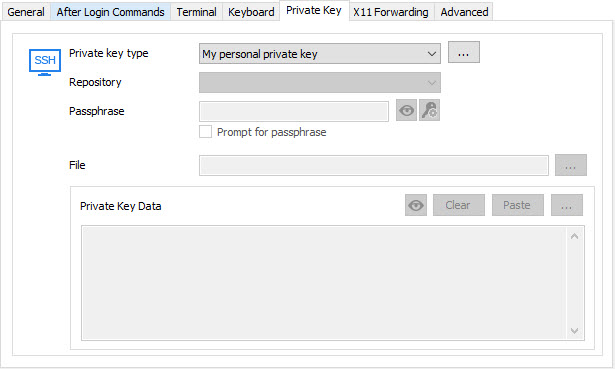
I believe using private keys with PuTTY isn't supported, you would have to use either the rebex terminal or the SSH Shell (which is our own integration of PuTTY) if you want to use the "my personal private key" option. Those two options have a "Private key" tab where you can choose "my personal private key" for your case or another suitable option.
Regards,
Hubert Mireault
2016-03-22 14-50-08.jpg
When I try with Rebex I get "String cannot have zero length. Parameter name: userName".
I am setting the Override Username, but I don't even remember setting my default/normal/regular username anywhere? Could that be it?
Also, I am not setting it on the Private Key tab. I am setting it on Credentials.
When I try regular SSH I get an error. I sent the bug report in. Here is the error:
FileNotFoundException - The specified module could not be found. (Exception from HRESULT: 0x8007007E)
at System.Windows.Forms.UnsafeNativeMethods.CoCreateInstance(Guid& clsid, Object punkOuter, Int32 context, Guid& iid)
at System.Windows.Forms.AxHost.CreateWithLicense(String license, Guid clsid)
at System.Windows.Forms.AxHost.CreateInstanceCore(Guid clsid)
at System.Windows.Forms.AxHost.CreateInstance()
at System.Windows.Forms.AxHost.GetOcxCreate()
at System.Windows.Forms.AxHost.TransitionUpTo(Int32 state)
at System.Windows.Forms.AxHost.CreateHandle()
at System.Windows.Forms.Control.CreateControl(Boolean fIgnoreVisible)
at System.Windows.Forms.Control.CreateControl(Boolean fIgnoreVisible)
at System.Windows.Forms.AxHost.EndInit()
at Devolutions.RemoteDesktopManager.Frames.Embedded.FreEmbeddedSshTerminal.c49f0ccb73296dc8b9a91a4b256a04664()
at Devolutions.RemoteDesktopManager.Frames.Embedded.FreEmbeddedSshTerminal..ctor(EmbededConnectionResult embededConnectionResult)
at Devolutions.RemoteDesktopManager.Business.Connectors.EmbeddedSshTerminalConnector.CreateFrame(EmbededConnectionResult result)
at Devolutions.RemoteDesktopManager.Business.Connectors.EmbeddedConnector.Connect(Connection connection, OpenConnectionMode openConnectionMode)
at Devolutions.RemoteDesktopManager.Managers.ConnectionManager.OpenConnection(Connection connection, OpenConnectionParameter parameter)
at Devolutions.RemoteDesktopManager.Managers.ConnectionManager.OpenConnections(Connection[] connectionList, OpenConnectionParameter parameter)
at Devolutions.RemoteDesktopManager.Managers.ActionManager.c2d3a897d165d9e56a0d53f388986ac51(Connection[] cfabc0254f46d7d8ae5a71db9e5a0b5b5, OpenConnectionMode c602973c05c2f5870e41c508b048b13c5, IConnectionSource c5b7a41272702648f46cf77ee6b3a92cb)
at Devolutions.RemoteDesktopManager.Managers.ActionManager.OpenConnections(OpenConnectionMode openConnectionMode, IConnectionSource source, Boolean checkOpenedConnection)
at Devolutions.RemoteDesktopManager.Managers.SessionMenuManager.c552f6de7933b91b08a4107f7410f30d0(Object c19f185fd70cefc696ba148af1c4faf54, EventArgs cf1018bb83ec7debd818319fd3cb4844e)
at System.Windows.Forms.ToolStripItem.RaiseEvent(Object key, EventArgs e)
at System.Windows.Forms.ToolStripMenuItem.OnClick(EventArgs e)
at System.Windows.Forms.ToolStripItem.HandleClick(EventArgs e)
at System.Windows.Forms.ToolStripItem.FireEventInteractive(EventArgs e, ToolStripItemEventType met)
at System.Windows.Forms.ToolStripItem.FireEvent(EventArgs e, ToolStripItemEventType met)
at System.Windows.Forms.ToolStripItem.PerformClick()
at Devolutions.RemoteDesktopManager.Frames.FreDashBoardBase.ButtonOnClick(Object sender, EventArgs eventArgs)
at System.Windows.Forms.Control.OnClick(EventArgs e)
at DevExpress.XtraEditors.BaseButton.OnClick(EventArgs e)
at DevExpress.XtraEditors.BaseButton.OnMouseUp(MouseEventArgs e)
at System.Windows.Forms.Control.WmMouseUp(Message& m, MouseButtons button, Int32 clicks)
at System.Windows.Forms.Control.WndProc(Message& m)
at DevExpress.Utils.Controls.ControlBase.WndProc(Message& m)
at DevExpress.XtraEditors.BaseControl.WndProc(Message& msg)
at System.Windows.Forms.Control.ControlNativeWindow.OnMessage(Message& m)
at System.Windows.Forms.Control.ControlNativeWindow.WndProc(Message& m)
at System.Windows.Forms.NativeWindow.Callback(IntPtr hWnd, Int32 msg, IntPtr wparam, IntPtr lparam)
Tech supt help me get rid of the error. But I still get prompted for username with SSH as well.
https://db.tt/VuhoOuv8
https://db.tt/M811fPGR
https://db.tt/uePyTv5U
Thanks for the screenshots, I understand what the issue is. You absolutely need to specify the private key in the private key tab, you can't use it by specifying it in the credentials. You can leave the credentials as "default" rather than "my personal credentials" and enter nothing for the username/password, then enter "my personal private key" in the private key tab and it should work as expected.
Regards,
Hubert Mireault
What is the credentials used for then? I got a feeling you are going to tell me I need to RTFM. Which is just fine. In fact I am off now to RTFM. ;-)
You aren't wrong in thinking the credentials is for, well, specifying the credential. :) It's a little misleading but even though we classify private key entries as "credentials" they shouldn't be used in the credentials spot, rather in the private key spot. We currently can't support them in the credentials spot due to a few problems that would arise in our architecture.
"Credentials" are for specifying a username/password/domain combo typically. You could have a KeePass entry with a username/password put in the credentials and it would use these to login to the SSH, and also specify a private key to use in the private key section for example. Hopefully this answers a few questions! The manual is of course always there and we always seek to improve it and make it easier to find the required information http://help.remotedesktopmanager.com/
Regards,
Hubert Mireault