Upgraded to 11.1 and lost the ability to see full RDP name under favorites
Upgraded to 11.1 and lost the ability to see full RDP name under favorites

We have a large list of RDP clients so I mainly work out of my local favorites group. After upgrading to 11.1 and moving RDP clients into my favorites group it looks like the favorites group only displays the first 15 characters of the client name. Previous versions you could slide the window to the right so you could see the entire name. The feature is still in place under the recently used tab but not under the favorites tab. This is a problem as many of our RDP names have the same beginning and the entire name needs to be seen. I have spent a lot of time in the configuration screens setting things back to classic and going through other options but can't find any way to display more that 15 characters for the RDP name in favorites.
All Comments (2)
Hello,
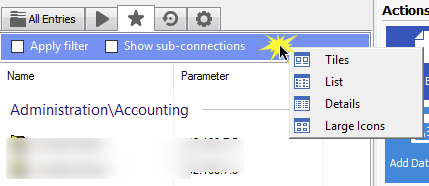
Right, I had encountered this issue during a demo and had forgotten to look into it. It turns out that there is a popup menu when you right-click in the header
The one you are looking for is probably "Details"
Best regards,
Maurice
favorites.png
I must admit that I do not understand why the "List" layout doesnt take the full width of the panel. Maybe there's a limitation with the UI library that we are using, I will inquire about this.
Maurice