Version 3.5 crashes to desktop

I use a pw to unlock the app at start up. As soon as i would enter the pw I would see the layout of the app and then it closes. Same result with the pw disabled. i reverted to 2.5 and that works. I would like to see if the previous 3.x build works, but can't seem to find a download URL. I don't mind installing 3.5 and sending the logs, but i need a version to revert back to in case I need to use the app.
All Comments (14)
forgot to mention the Macbook is running 10.11.3.
Hi,
Has the problem started with the version 3.5.0.0? Here is a link to the version 3.0.11.0:
https://www.dropbox.com/s/zdnq0j8n2vxx9gu/Devolutions.RemoteDesktopManager.Mac.3.0.11.0.dmg?dl=0
You can backup your app simply by moving the Remote Desktop Manager.app from your Applications folder to somewhere else or just rename it.
Since the app closes after startup you can find the log at the following location:
/Users/Devolutions33/Library/Application Support/com.devolutions.remotedesktopmanager/RemoteDesktopManager.log
Try reproducing the issue before sending me this log (via private message).
Best regards,
Xavier Fortin
One last thing, are you talking about the password set under the security tab in the preferences?
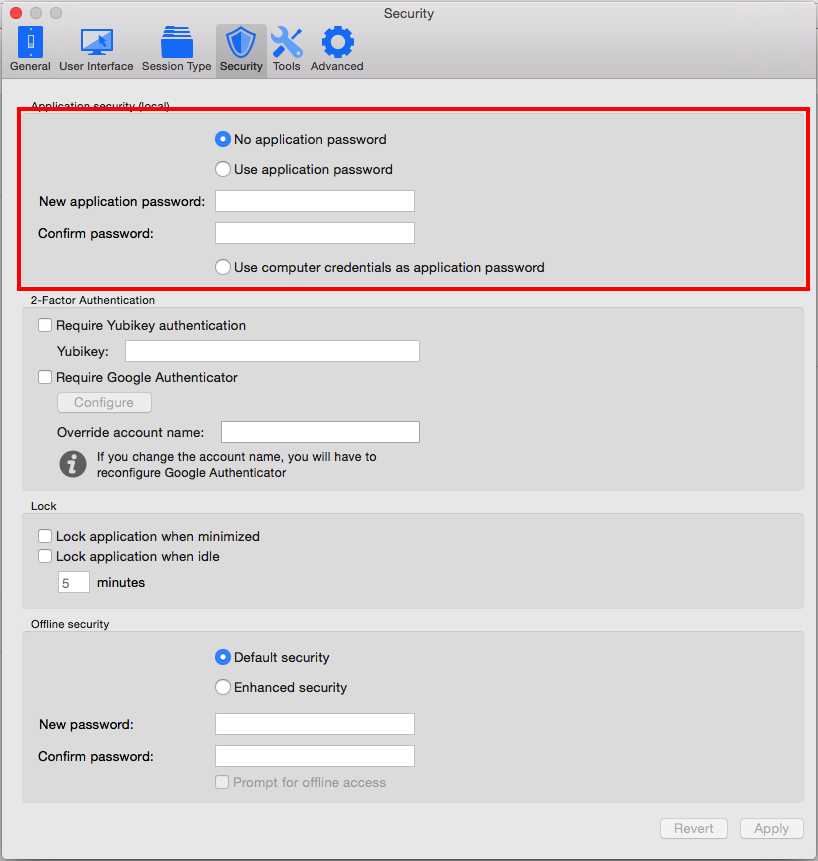
Xavier Fortin
ApplicationPassword.png
Xavier,
The issue did start with 3.5. Even with out the startup password turned off, the result was the same. The app would crash right after it loaded. Version 2.5 got me running again. I found a URL to 3.10 in another post you commented on. So, 3.10 did not have the issue. I installed 3.11 and it also did not have the issue. now the shocker, I installed 3.5 after the 3,11 install and it did not have the issue. It would seem either the 3.10 or 3,11 fixed the issue. It seems that way. I will PM you the log.
Thank you, I will look it up.
I'm glad your issue is fixed in the mean time.
Xavier Fortin
The same issue is back. Reverted back to 3.0.11 and it is also having the same issue..
Hi,
Sorry that you're still experiencing issues. Can you point out the last thing you did before the issue came back?
In the mean time, let's try something else. Could you go to this folder: /Users/<User>/Library/Application Support/com.devolutions.remotedesktopmanager and rename it (you can rename it however you like, I often just but backup at the end, like so : com.devolutions.remotedesktopmanager backup).
This will force RDM to recreate the basic config. It'll therefore reinitialize your datasources list and any other preferences (Don't worry, that's the reason we rename the previous folder instead of deleting it).
Tell me if the application start after this.
Best regards,
Xavier Fortin
Hi I have the same problem. When I rename the folder the Program start again. But when I import my old Database Ihave the same Problem again.
Best regards
Nils
It starts one time and then it crashed again and i must rename the folder
going back to 3.5.0.0 everything works fine.
Hi,
May I ask what kind of datasource you were using (XML, SQLite, SQL Server, etc.)? Was there a password on the application?
If you are willing to reproduce the issue, I would like to make you try something.
While the app is still working, open it, go into the preferences under the Advanced tab and change the Debug level value to 5119 or click on the Flags button and make sure all elements are checked:
Afterward, close the app and reinstall the version that crashed at startup. Make sure it still closes at startup.
Open it through command line (in Terminal.app) in this manner:
open "/Applications/Remote Desktop Manager.app/Contents/MacOS/RemoteDesktopManager"
If your Remote Desktop Manager app isn't in your Applications folder, you will want to change /Applications/Remote Desktop Manager.app for the actual path of your application.
Running the command should open a new Terminal window and Remote Desktop Manager. Once Remote Desktop Manager crashes again, copy the content of the said opened Terminal window and send it to me via private message.
Best regards,
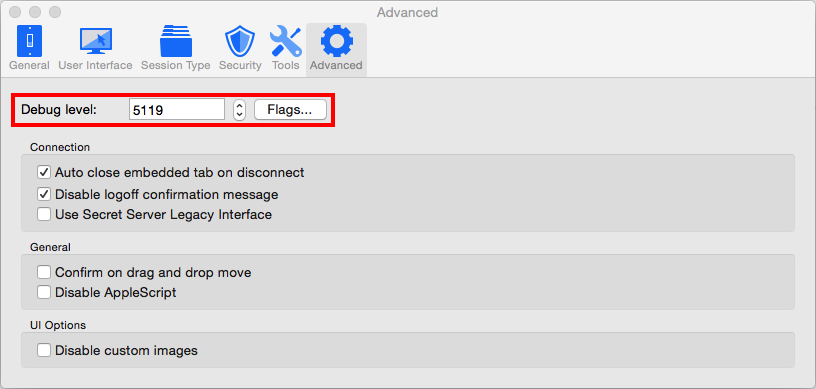
Xavier Fortin
DebugLevel.png
Hello Xavier,
I have the same problem: With 3.5.0 it was OK to start using an XML database. With 3.5.1, the RDM was not starting and canceled with no reaction. Then I updated to 3.5.2 the same problem. Or I don't wait long enough, as it takes up to one minute to start.
I clean my system (10.11.4) and remove all file that refer to devolution or RemoteDesktopManagern then reinstalled RDM and started the program. Even the first start of RDM 3.5.2 takes a long time. I think almost 1 minute. Then I created one entry, tested it and closed the app. Restart RDM and it takes the same time (almost 1 minute) to start.
Then I tried the same with a MySQL datasource. The same problem.
I have the log from RDM with the file extension .hang.
I"m also ready to make some furthertests.
Best regards,
Alex
Hi Alexander,
Your problem looks like something else that was brought to our attention in another thread. I would like you to follow the instructions in this thread:
https://forum.devolutions.net/topic24891-remote-desktop-manager-mac-hangs-at-startup-since-.aspx?page=1#post92934#post92925
It is the fourth post on the linked thread. The post include a link to a custom version of RDM 3.5.2.0. You'll need to download it and follow the instruction.
Tell me if it fixed the issue.
Best regards,
Xavier Fortin
Sorry for the delay, but this seems to of resolved my issue. I'm currently running 3.5.2.
"In the mean time, let's try something else. Could you go to this folder: /Users/<User>/Library/Application Support/com.devolutions.remotedesktopmanager and rename it (you can rename it however you like, I often just but backup at the end, like so : com.devolutions.remotedesktopmanager backup)."