RDP screen draw really slow on MAC version
I am using RDM Enterprise on a 2014 MacBook Pro (fastest model) with 16GB RAM and 1TB SSD drive.
When I use RDM to remote desktop to a windows server or workstation on a local 1GB network, the screen redraws are extremely slow. I believe I am using the latest versions of everything, but would like to know what to look for to try and resolve the issue. It has become unusable for me. Using standard MS RDP for the MAC works very fast.
An example just for testing is that if I play a video in a session via RDM, it takes about 10 seconds to play 1 second of video. While this is playing, the screen will not accept any other input like mouse clicks, etc. This happens in embedded, external, and docked modes.
If I play the same remote video from MS RDP without using RDM, it runs at almost the proper frame rate.
I haver red about 64bit vs 32bit differences in the Forum, but didn't know if that applied to the Mac.
What settings can I look at to see if I can make this work?
Thanks
All Comments (14)
Hi Bryan,
The difference between 64 bits and 32 bits doesn't apply on the Mac version.
There 2 places where you can change various setting to improve the performance:
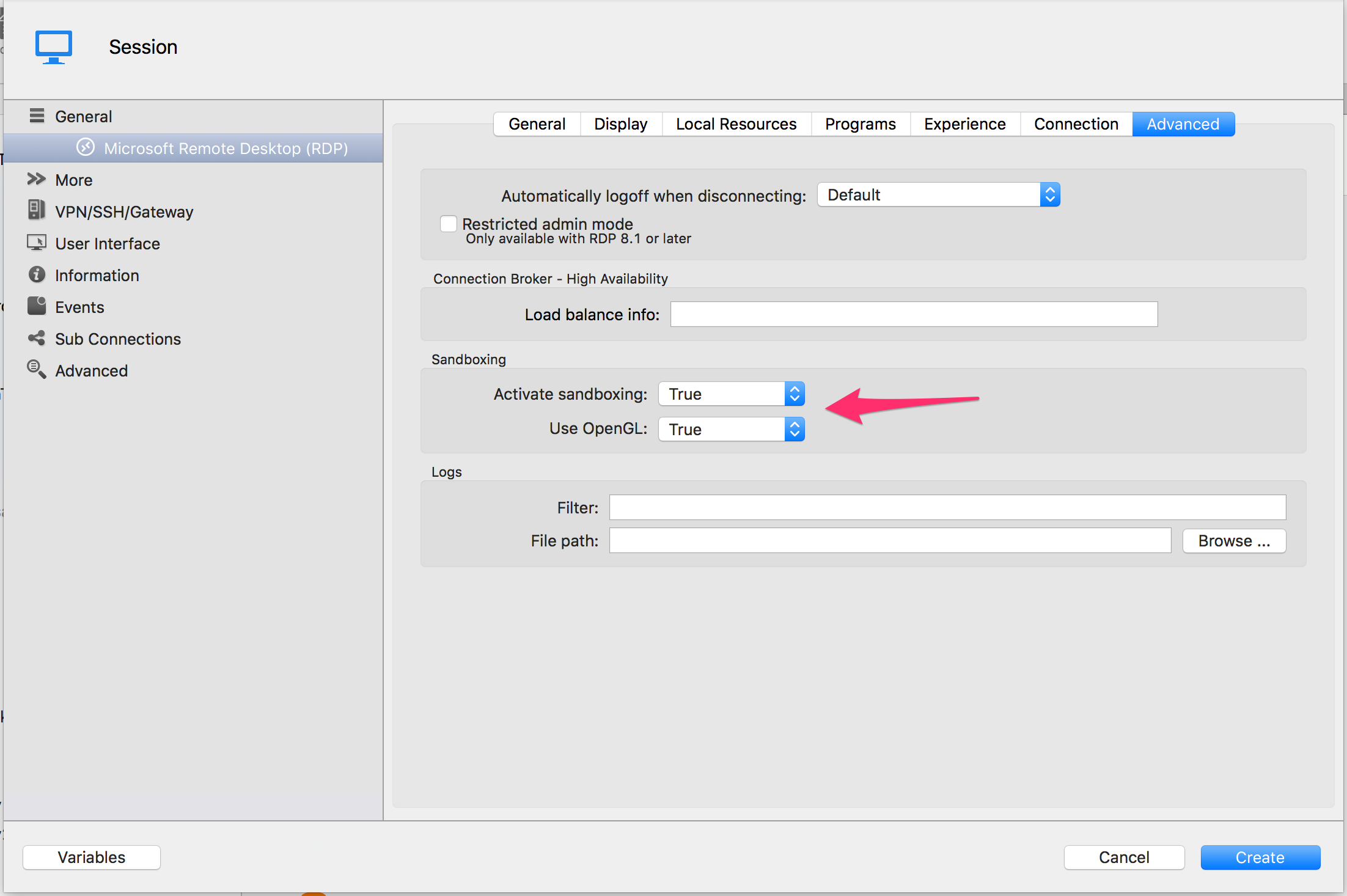
-In the Advanced tab setting both Sandboxing and Open GL to true will make RDP session drawing code to use Open GL (which should be fatser).
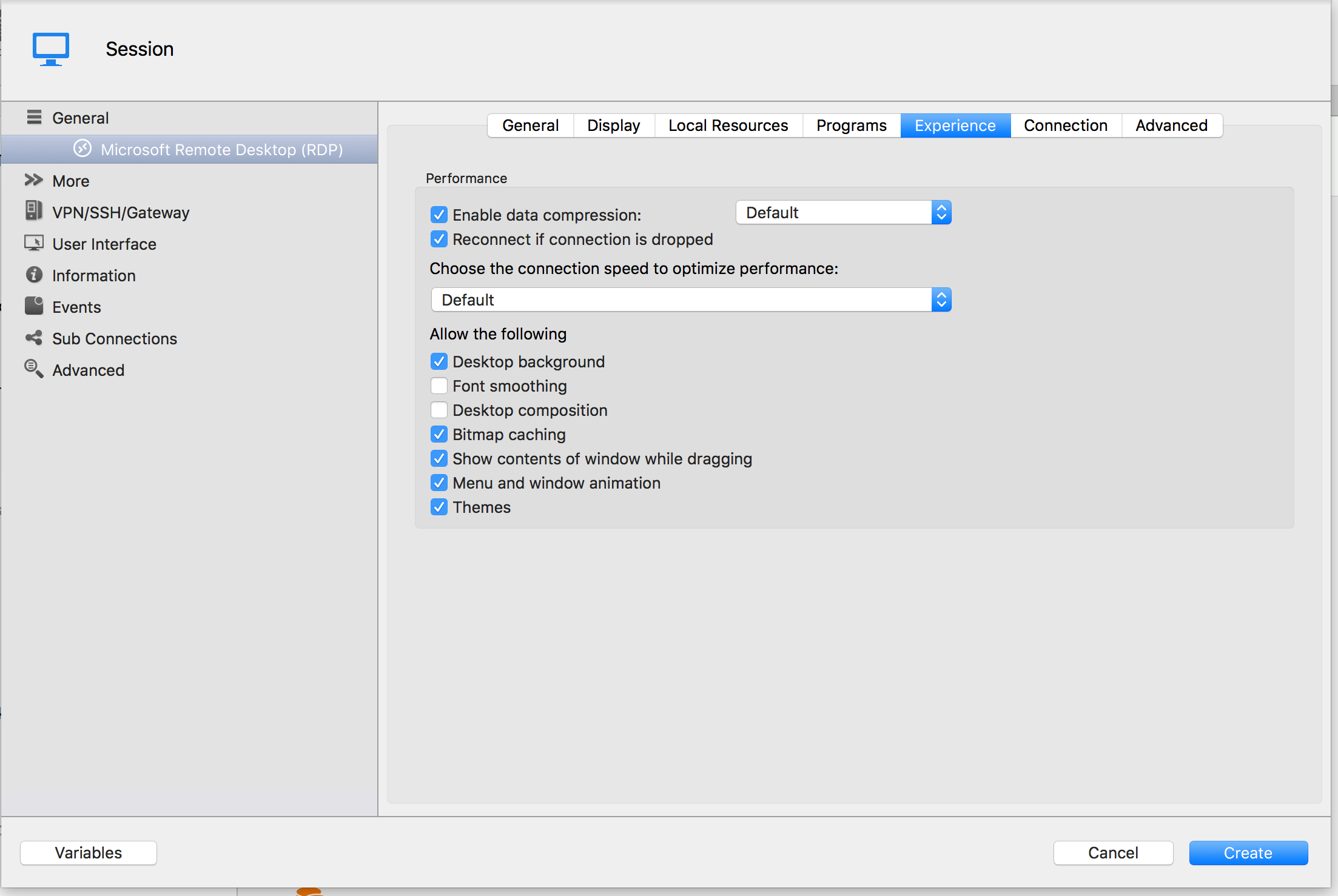
-In the experience tab many of the settings there influence the performance.
Tell me if this helped you
Benoît Sansregret
Experience.png
OpenGL.png
Hello Benoit,
We have several folks using the Mac version of RDM to RDP into remote Windows 10 virtual machines. This video performance problem was brought to my attention recently, and I was going to create a new forum post about it, but then discovered this one, so I'll just latch on to it.
I tried the suggestion of setting the Sandboxing and OpenGL settings to True, and while that does seem to help a little, the video performance is still far from acceptable. Changing the RDP "engine" and color-depth settings in the RDM connection entry also doesn’t help. What does help, is to change the "display" option for the RDM connection entry to "external," as that makes the connection open with the Microsoft RDP client. With the Microsoft RDP client, high resolutions and 32-bit color can be used, and the video performance is very good.
I've also tested connecting to physical Win10 PCs, both local and remote, and the video problem exists with those as well, so the issue seems to have nothing to do with virtualization or network latency, and everything to do with video rendering by whatever "engine" RDM for Mac is using.
Is it possible for the Mac version of RDM to "integrate" with Microsoft's RDP in the OS, like the Windows version of RDM does? Then "embedded" and "undocked" connections in RDM should be just as good as with the "external" Microsoft Remote Desktop client.
For the record, I LOVE Remote Desktop Manager (and primarily use the Windows version, which doesn't have this issue), and would LOVE to see the Mac client be just as great.
Many thanks for your help!
Jim
P.S. If it would be helpful to post a video demonstrating the performance differences between RDM for Mac, and Microsoft's Remote Desktop app, I'm happy to do that!
Hi Jim,
Thanks for your detailed post about your situation.
On the Windows version we use a control to display the RDP session made by Microsoft.
Unfortunately, on the Mac version this control is not available.
We instead rely on freeRDP an open source implementation of the RDP protocol.
I will show your post to our in house specialist of freeRDP and see if we can manage to bring ourselves closer to the MRD performance.
Best Regards,
Benoît Sansregret
Thank you Benoit, good to know, and it never hurts to ask!
One more thing you could try.
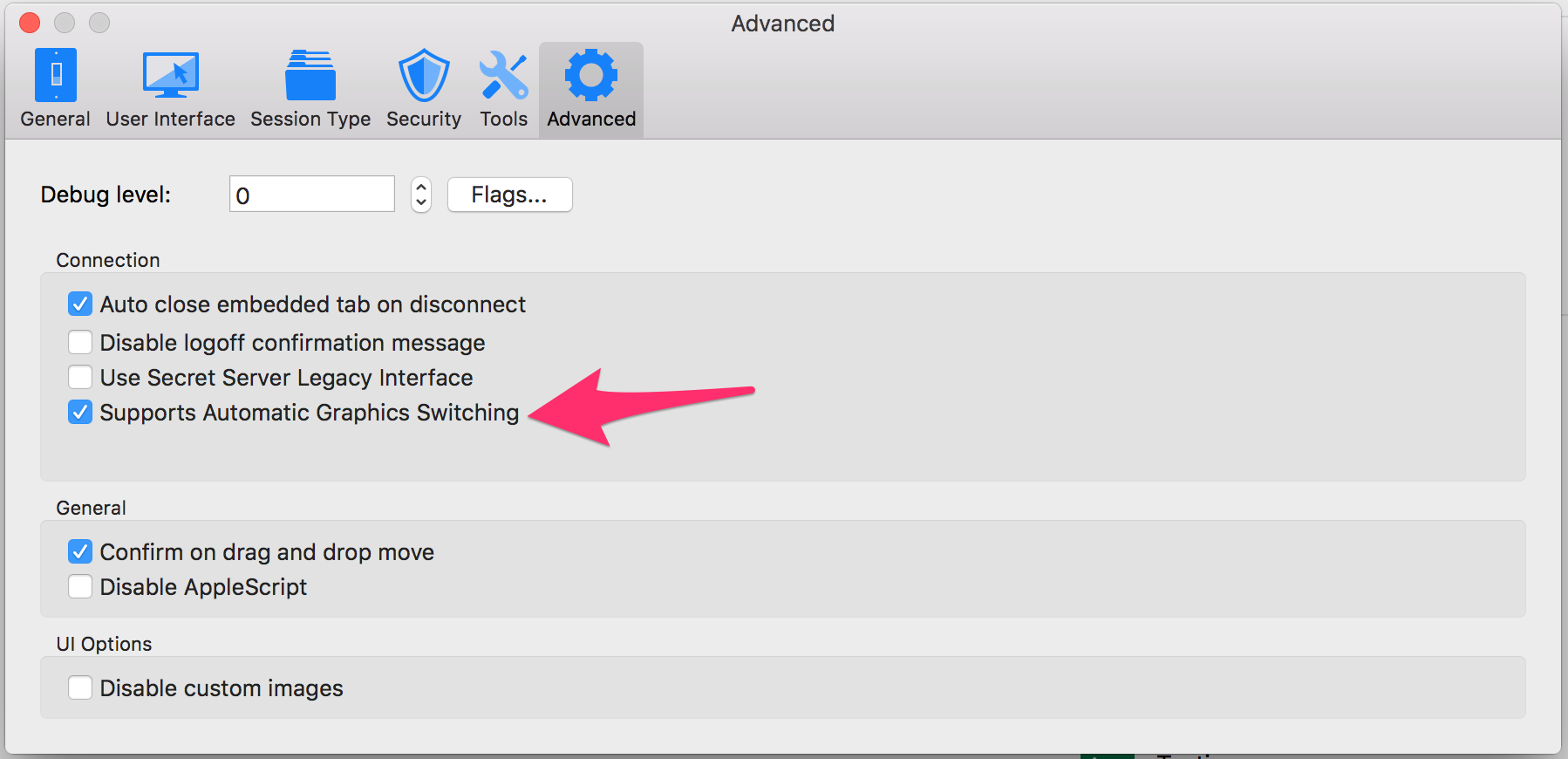
There is a new option in the advanced preferences.
Check it and restart the app.
It has helped a few users with general performance issues.
Benoît Sansregret
Advanced Graphics 20160425.png
Thanks Benoit,
I tried enabling that and restarted RDM, but sadly it didn't seem to help much. As one of my colleagues put it, the "dot-matrix-printer-screen-draw" is still there.
Thanks for digging in!
Jim
Thanks for trying.
We'll keep you posted about our progress.
Benoît Sansregret
Hello!
I hadn't used RDM for Mac for a while, but after updating to version 3.5.3.0 today, Windows 10 sessions are fast now!
You must have made some improvements?
Hi,
We added support to more codecs which improve greatly session on Windows 10 computers.
Glad you enjoyed!
Benoît Sansregret

I will say I have the same problem. I have tried all of the suggestions in this thread and the performance is bad enough that I use the Microsoft RDP client on my mac. I love the product on my windows machine but on the OS X side it's a struggle. Specifically I do quite a bit of work form the command line when i'm RDPed to a machine. I will type into my cmd window in the RDP session and it will draw the characters quite slowly if at all. Sometimes I need to move around my cmd window get it to refresh and show what I have typed.
I am running v. 3.5.3.0 of Remote Desktop Manager
Hello stchizen,
Could you try RDM Mac 3.5.4.2.
You can download it here - http://mac.remotedesktopmanager.com/Home/Download
Best regards,
Jeff Dagenais
O wow, with 3.5.4.2 it is running much better. Curious that when I did "check version" while running 3.5.3.0 it didn't find the new version but it was obviously available on the website.
I've been trying 3.5.4.2 this morning, and like previous 3.5.x the screen draw is dramatically improved over prior versions.
I find the Mac version just fine for managing servers of any Windows version. The most "taxing" seems to be Windows 10, and I find that experience to be inferior to the Microsoft client (not with video performance per se, but more that clicking and interactions are not as precise).
For Mac people in our organization that "live" in Windows 10 machines for part of their job, they use the Microsoft client, but then use RDM for "everything else" (including running the Windows version of RDM inside that remote Windows 10 machine).
@stchizen Unfortunately, that is caused by our file distribution system. It may take up to 24h before a new version is detected by the app. Normally this is not an issue and that's why we try to notify our users when they are waiting for a fix.
@JimHarle Thanks for reporting this we'll see what we can do about this.
Benoît Sansregret