Private Vault Search not working with Variables

Using $NAME$ or $COMPANY_NAME$ does not appear to work as a search string for Private vault search.
I created a command line session and used an echo script to verify that $COMPANY_NAME$ was the same was the value I entered in the Credentials section.
All Comments (5)
Hello,
Could you post a print screen of your private vault tree?
David Hervieux
Here you go, its pretty simple. Only 2 items in it so far. The 1st item is the I'm trying to use.
In the all entries window I have the following (sorry no picture)
Sessions
-folder1
--folder2
---Husky (This is a Company object, but have tried as a folder object)
----Server1
----Server2
----Server3
----Server4
----Server5
----Etc
All of the server entries have inherited set and the Husky folder I have Private vault search for Credentials and have tried: $NAME$ and $COMPANY_NAME$. Both just prompted me for the credential to select. I could then select the Husky credential and it worked fine. However if I typed Husky in instead of $NAME$ or $COMPANY_NAME$ it correctly selects the right credential
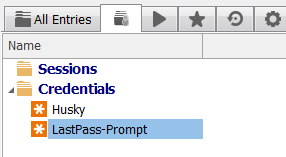
PVault.PNG
This is expected behaviour unfortunately. The Private vault can't retrieve the variable from the other global connection list. I'm not sure how easy this will be to implement.
Regards
David Hervieux
We investigated and fortunately, it won't be too difficult to do :) Variable resolving for the private vault search should be available in the next version of RDM.
Regards,
Hubert Mireault
Cool, Thanks!