Something wrong with adding a new connection

Hi, I tried to create a new RDP connection in my database in specific group, but when I tried to save it, I received the message "Adding entry in this group is not allowed".
I have all connections sorted in groups (folders) and I can create a connection in other groups, but not in this one. I know that this is some kind of setting, but I am not able to determinate which one and how to change it. The group was created as other groups and there are some connection present in that group.
Can someone please help me?
Thank you.
All Comments (7)
Hello,
What version of RDM are you running?
What type of data source are you using?
Is your user an RDM administrator?
Best regards,
Jeff Dagenais
Hello,
We are using RDM 11.1.0.0 - I think that is lastest. It is connected to SQL database.
I am a RDM Administrator. I can add a connection to other groups; only one is problematic.
Regards,
Elvis
Hello,
Could you post a print screen of your File -> My Data Source Information report please.
Best regards,
Jeff Dagenais
Print screen is in attached file.
Info.PNG
Hello,
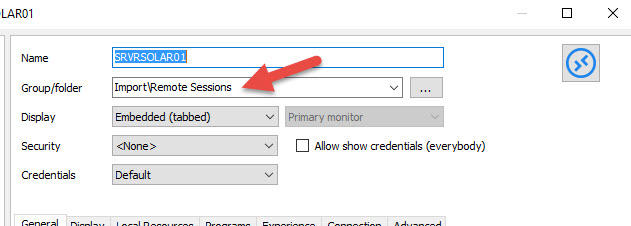
If you create a new session and type the Group/folder manually, are you able to create the session in the appropriate folder?
Best regards,
Jeff Dagenais
2016-03-07_12-15-12.jpg
Hello,
No, I am not able to add or change anything on any element in group. I receive the same error.
But I deleted the original group and recreate new one with the same name and settings. I was able to copy all connections from old group to new one and later to delete original group.
Now the new group is working fine. I am able to do everything.
Thank you for help, but I needed to update connections and this was the quickest way.
Regards,
ELvis
Hello,
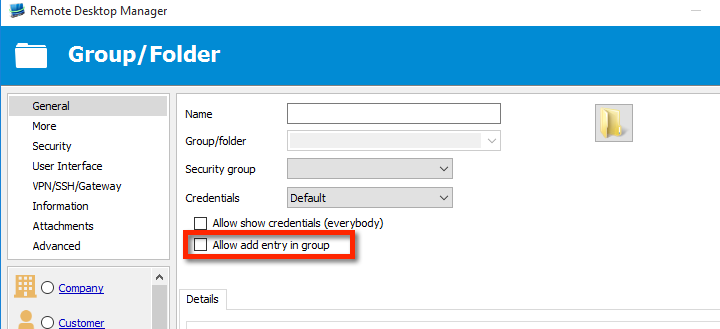
It must have been something really simple like this option being unchecked :
Maurice
entry.png