Browser

Hi,
Can i choose a different browser by URL ?
example:
www.google.fr with Chrome
www.bing.fr with Internet Explorer
regards
Vincent
All Comments (13)
Hi,
You need to create two entry in RDM. One per url
David Hervieux
hi,
ok, but where is this option for choose the browser per url ?
thanks
hi Vincent,
the browser selection is right below the URL.
see the image at the bottom of the help page:
http://help.remotedesktopmanager.com/sessions_webbrowser.htm
BR
Guenther
hi
ok, but my entries are "WEb" and not "web browser (http/https)" ....
I must change all my entries ...
Can i change with a batch edit all my "web" entries to "web browser (http/https)" ???
Thanks
vincent
hi Vincent,
what is the exact entry type? is it "Citrix (Web)"? Can you provide me with a screenshot as i could not find any session type "Web".
AFAIK you cannot batch edit session types.
KR
Guenther
Hi,
This the entry WEB:
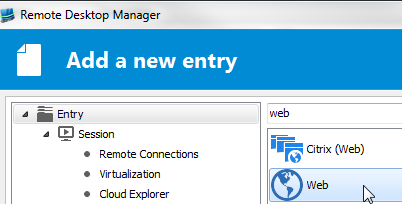
entry_web.png
hi Vincent,
i'm sorry i can not help you here as i do not see this session type (i've also tried the latest beta).
what version of RDM are you using?
BR
Guenther
my version is the latest beta 11.1.6.0 in 64 bits
regads
We currently don't have a mechanism to batch edit a "Web" session to "Web browser (http/https)".
We will add this in the next-next beta (v11.1.8.0). Doubtful we get it in for today's v11.1.7.0 beta release.
Best regards,
Stéfane Lavergne
Well, i have exported the data from "web" , compute a csv and import it with a "web browser " template .
regards
Vincent
Very smart, that's a quick way around the limitation. Well done.
Best regards,
Stéfane Lavergne
I know you found a workaround, but we decided to add two batch actions to convert to Web Browsers from Web data entries and the other way around, since it can be useful in the future, and simpler through a batch action.
Cheers,
Hubert Mireault
yes it's easier ;)