KeePass: "Skip" or "Parent" instead of "Inherit" as credential
KeePass: "Skip" or "Parent" instead of "Inherit" as credential

hi!
we are using the "$GROUP$" filtering method with KeePass and are creating a structure like the following (with the credential settings):
Client A (KeePass Group)
Client A\Domain Controllers (Inherited)
Client A\Terminal Server (Inherited)
Resulting in the need to create these very same groups in KeePass as it passes "Client A\Domain Controllers" to KeePass.
We'd need a credential type "Parent" which then uses the group name "Client A" when a session is started within any of the subfolders.
Or is there another way we could make this work without duplicating each entry?
KR
Guenther
All Comments (16)
i'm trying to experiment with other variables than "$GROUP$" for KeePass, but all i get is "cannot find any matching credentials" ...
is there a way to debug what credential entry is requested by RDM from KeePass?
KR
Guenther
Hello,
I'm not sure to completely understand what you mean by group filtering. Could you give more information?
David Hervieux
hi David,
the goal is to configure only one credential within RDM and all the credentials stored in personal KeePass-files/-databases.
so we have set up a credential as follows:
within KeePass we created one entry "Client A" with the admin-user and password for this very client domain.
the session-structure in RDM looks like:
Client A
Client A\test.example.com
Client A\Domain Controllers
Client A\Domain Controllers\ad01.example.com
where:
"Client A" is a Group with the credential setting: "Credential repository" > "Keepass (Group)"
"Client A\test.example.com" is a RDP session to a test server in the clients domain where the credential setting is: "Inherited"
-> this works as expected. The KeePass-entry "Client A" is found and the admin-user is logged on
"Client A\Domain Controllers" is a Group with the credential setting: "Inherited"
"Client A\Domain Controllers\ad01.example.com" is a RDP session to a domain controller with the credential setting: "Inherited"
-> this does not work as it now looks for a KeePass-entry "Client A\Domain Controllers". But we want it to look for the parent folder name "Client A" only. Session in folders within "Client A" should all use/ask for the Keepass-entry "Client A".
We want to skip that second folder so it is not submitted to KeePass.
I hope this explains our problem more detailed.
BR
Guenther
hi David,
do you need more information on this?
KR
Guenther
Hi,
I think I do. I will assign this to Hubert. we will verify if the variable is resolved
David Hervieux
hi David,
hi Hubert,
great thanks!
it would also be good if you could see in the tree-view what each folders (and sessions) credential setting is. so you can easily see what the configuration is like for each node.
BR
Guenther
PS: i added a feature request for this feature here
Hello Guenther,
From what I can understand you would need a variable or an option that gets the root group of the connection using that keepass entry?
So for example, if the keepass entry is used by a connection located in the ClientA/LocationA group, that variable or option would return ClientA for its value to be used in the filtering method?
Regards,
Hubert Mireault
hi Hubert,
yes that's what i meant. but it'd be great if it could respect the inheritence meaning: it may not always be the root folder-object but could turn out a bit more complex. for example:
ClientA/LocationA => sesions within that folder should return "ClientA"-credential
ClientA/LocationA/FloorA => sesions within that folder should return "ClientA/LocationA"-credential
ClientA/LocationA/FloorB => sesions within that folder should return "ClientA/FloorB"-credential
so skipping specific folders would be great and/or setting specific "Credential-Search-Values" per folder might also work ...
KR
Guenther
hi Hubert,
could you please give me an update on this?
BR
Guenther
Hello Guenther,
I'll have to talk to David about it but I should give you some news today.
Regards,
Hubert Mireault
We discussed and I'm not sure how feasible this is in our architecture. The flexibility required is a little much so the best way to do this would be to duplicate entries to achieve what you want with the $GROUP$ variable. There isn't an easy way right now to allow to skip folders on demand. Sorry about that.
Regards,
Hubert Mireault
Hi Hubert,
could you implement it you said with a new variable that "gets the root group of the connection using that keepass entry"?
If not: could you provide me with information how I could debug the queries sent to KeePass? So that I can play around and see what suits us best?
Thanks in advance!
KR
G.
Hello,
We might have a solution for implementing a set of variables for the "connection using the credential". If that works we would be able to implement getting the group, name and other info, including a "root group". For the "root group" it would only take the first group of the connection so this is a little less flexible than what you described before:
ClientA/LocationA/FloorA -> A connection in there would return "ClientA" for the variable.
ClientB/LocationB -> A connection in there would return "ClientB" for the variable.
And so on. Can you confirm if this would be appropriate?
Regards,
Hubert Mireault
We decided it would be a good idea in other use cases to implement LINKED_OWNER variables so we will definitely have this for the next version. It will be available for credential entries. This will include the $LINKED_OWNER_ROOT_GROUP$ variable which will take the first group in the hierarchy without its children. So if your connection is in FolderA/FolderB, it will return FolderA.
We will also add $ROOT_GROUP$ so you can use that directly in an RDP entry too.
Regards,
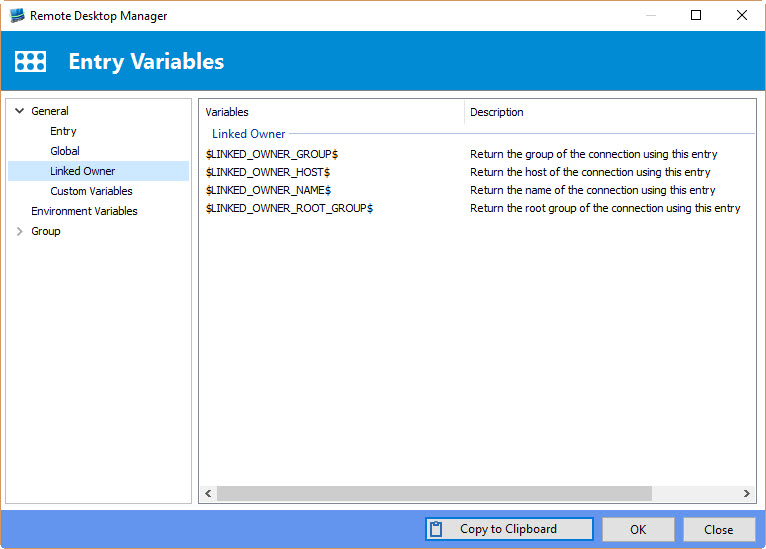
Hubert Mireault
2016-03-21 10-17-59.jpg
hi Hubert,
sorry for not coming back on your previous post!
I did some testing and this works as expected. we changed our structure to work with this feature.
thanks alot!
KR
Guenther
Happy to see it works! :)
Regards,
Hubert Mireault