arrow key does not work

when i logged on to a linux server,try to edit a file via vim,
but the arrow key does not work,
did you have any idea with that?
All Comments (6)
You're talking about the SSH Shell connection, right?
If so, we do have some issues with our terminal (especially regarding the vim editor) and are working on it. If it is of any help to you, pico seems to work fine for me.
Best regards,
Xavier Fortin
yes,i used ssh shell connection,is there any temporally solution to avoid this pb?
and is there any way to run a script to automatically run "su - root" and input root password?
i used securecrt to connnect to linux server when i worked on windows platform,
it's very convenient to connect with normal account and "su - root" automatically,
and now i worked on mac,and i really need this function
Hi,
The problem with vim has been fixed internally and should be available in the next release (which should come very soon).
As for automatically sending command to the terminal, we don't support SSH Shell After Login Commands yet. You could use a Macro, but note that it would require you to write your password in plain text in the Macro command, I would therefore not recommend it. If security is not a concern for you in this case, I can give you instruction. We will try to add the missing features as soon as possible.
And we do support SecureCRT if you were wondering.
Best regards,
Xavier Fortin
yes,pls give the instruction,as far as now,i do not have any idea of macro programing ,
but if it's the only solution,it's the best solution.
about the securecrt,it's a good software,it's powerful,
but i prefer to use remote desktop manager,use built in features,
hope it could be as powerful as securecrt in the nearly future,
and thanks for your help
Hi,
Under the connection Events -> After Connect there should be a more secure way to do it (with encrypted password field), alas, the {Delay} key code doesn't seems to work and we will need it for the macro. I'll fix it, but it won't be available in time for the next release.
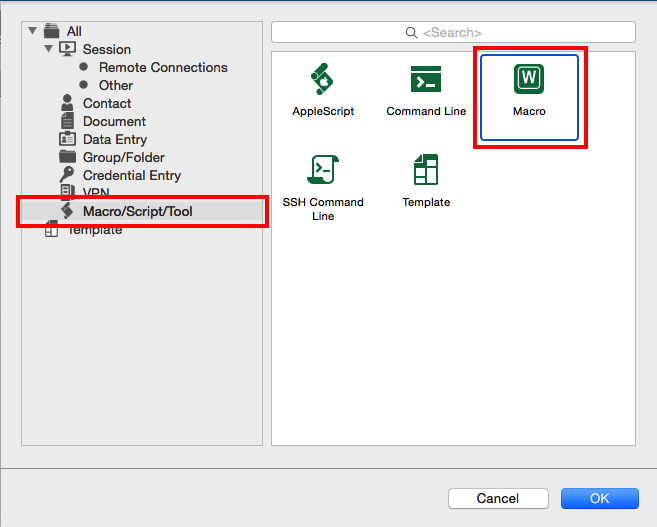
In the mean time, I'll give you the far less secure way of doing it successfully. First you'll need to create a macro session. Right click in the connection tree and click on New Entry. After this, select Macro in the list (you can filter all the Macro/Script/Tool session in the left pane):
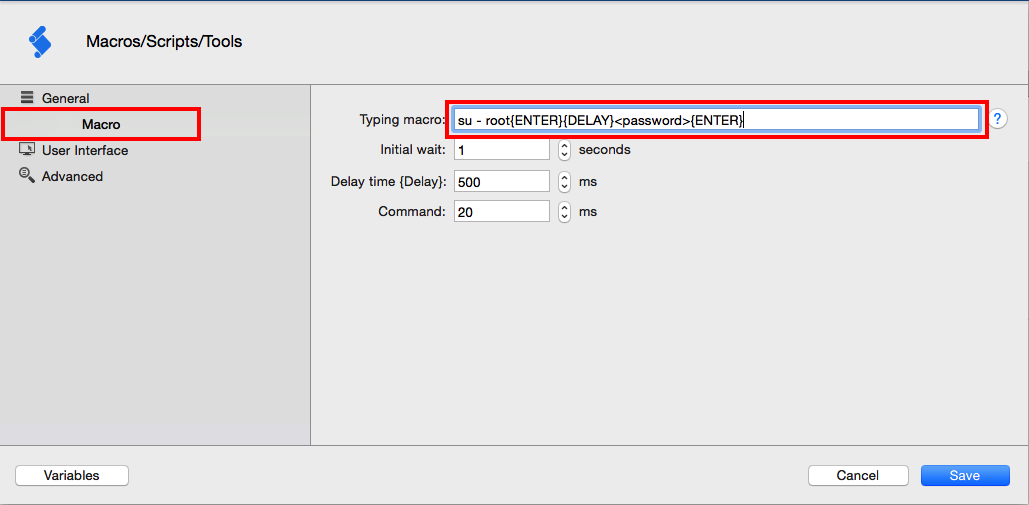
Then, you'll want to name the session. Afterward, select Macro in the left pane and enter su - root{ENTER}{DELAY}<password>{ENTER} in the Typing macro field (replace <password> with your root password, be aware that your password is in plain sight):
Initial wait is the delay in second after the opening of the session before the Macro is executed. Delay time is the time in milliseconds were the macro execution will be halted for each occurrences of {DELAY} in the macro. You can modify those values to suit your need if they don't seems to be long enough.
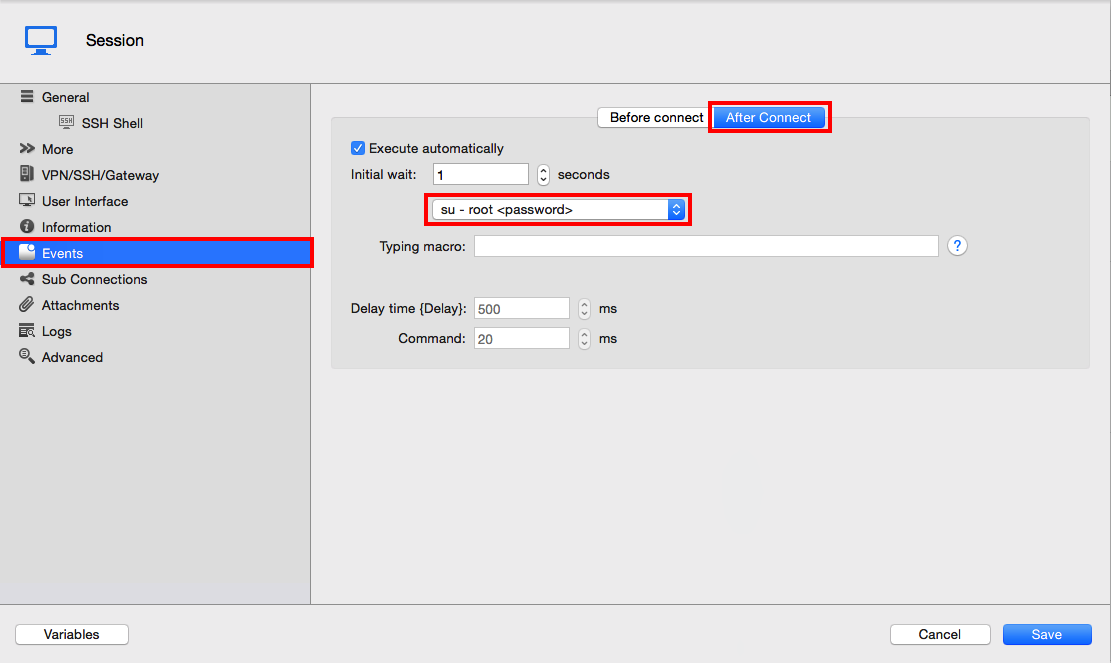
In the end, you'll want to tell your SSH Shell connection to run this macro after connecting. In your SSH Shell connection edition screen, choose Events in the left panel and then select the After Connect tab. Check the Execute automatically check box if it isn't checked and select the previously created Macro in the Pop Up Button underneath. Save your connection:
Starting it should now run su - root and pass it your password.
Best regards,
Xavier Fortin
EditSSHShellConnection.png
CreateMacro2.png
CreateMacro1.png
Hi,
The last version of RDM (3.5.0.0) is now out and contain the fix for vim and now support {DELAY} key in connection After Connect Events. You can download it at the following URL:
http://mac.remotedesktopmanager.com/Home/Download
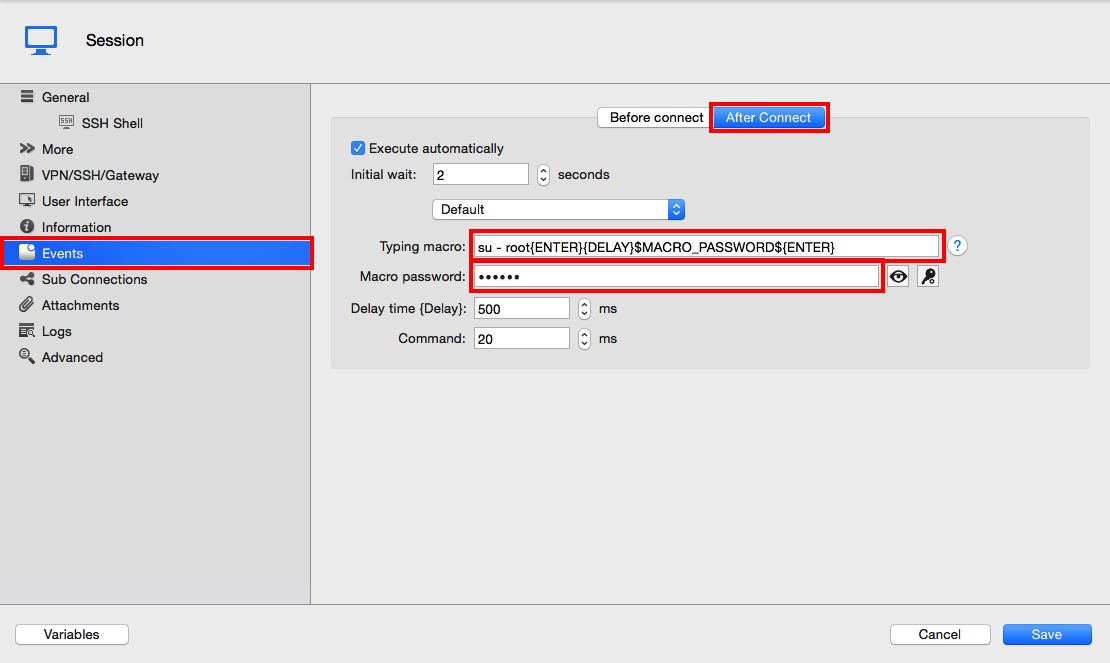
To set (in a far more secure way) the macro directly in your SSH Shell connection open your connection settings. In the left pane, select Events and then select the After Connect tab. Write the following line in the Typing macro field:
su - root{ENTER}{DELAY}$MACRO_PASSWORD${ENTER}
Then set the Macro password field to the value you want to replace $MACRO_PASSWORD$ with. The password will therefore be encrypted in you connection and only decrypted when the macro is executed. This way is far more secure then the preceding one.
I suggest setting the Initial wait to 2 seconds or more (1 second didn't seems to cut it for me).
Best regards,
Xavier Fortin
SSHShellMacro.png