Extra field for Column Chooser: Is Virtual Machine
0 vote

Hi,
In the field in the sessions 'Is Virtual Machine', we have listed our VMWare servers.
It would be great if we could have this field in the Column Chooser.
Now we duplicate the value in Is Virtual Machine to Custom Field 1, which works, but we have to enter the information twice.
Kind regards,
Ray
All Comments (20)
Hi,
I will try to add this for the next release.
David Hervieux
Thank you, that's great!
Any progress on this?
Hello Raymond,
Unfortunately we haven't yet included this but we'll work on adding the "Is virtual machine" checkbox value to the column chooser for the next beta version. Look forward to it! :)
Regards,
Hubert Mireault
Hi there-
Any updates on this? To clarify, I dont believe the OP was looking to add the check box to the field chooser, but rather the value in the Server field when using this option. As the OP does, we also store the VMware machine name in the Server field and it would very helpful to view this as a column (we're also currently using a custom field as well to get around this issue).
Thanks!
@Timothy
What version of RDM are you running?
In RDM 12.0.8.0, you can add the Is virtual machine column in the Navigation pane. Right click on the name column and select column chooser to add the column.
Best regards,
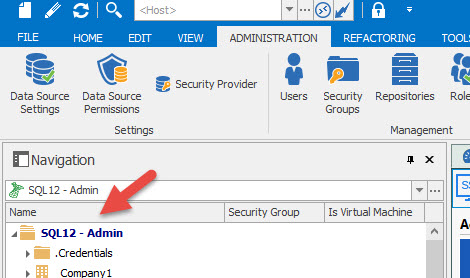
Jeff Dagenais
2017-02-20_20-05-45.jpg
I'm on 12.0.11.0, and I don't have the Is Virtual Machine in column chooser. Also, the column I would like to see is listed as Server under the Is Virtual Machine heading.
So, in this image, I would like to see the VM001 in the list.
rdm.jpg
@Raymond,
What do you have in column chooser? Strange that you don't see Is virtual machine. Here's what you should see
Could you post a print screen of yours. Please note that you need to do a right-click on the Name column in the Navigation Pane and select Column Chooser.
Best regards,
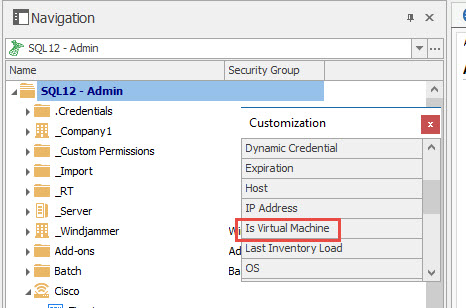
Jeff Dagenais
2017-02-21_07-41-39.jpg
Attached...
rdm.jpg
@Raymond,
Is it possible that you are doing your right-click -> Name -> Column Chooser in the Dashboard instead of the Navigation Pane?
Best regards,
Jeff Dagenais
I see what you mean now. I have an option for Is Virtual Machine in the Navigation Pane.
I'm looking for the Server (under Is Virtual Machine) in the content pane, when I click on a folder in the navigation pane!
Hello,
I had a chat with our engineering department and this column will be added to the Dashboard as well.
Best regards,
Jeff Dagenais
That's great, thank you!
This is exactly what we're looking for as well.
Great news! Thanks!
I was playing around a bit with the "Is virtual machine" field [rdp entry\asset\network], but I'm not entirely clear about the content pane. Could you perhaps provide an illustration?
Also, if I understood correctly, under server/type, I can enter anything I want?
What might be useful, though, is if, for instance, I mark an RDP entry as having the Hyper-V role, the other entries under "Is virtual machine" would automatically list that Hyper-V server.
Additionally, it would be great if these virtual machines were somehow linked to their Hyper-V host, so that when you navigate to a specific Hyper-V host entry, the related virtual machines are displayed.
This would be particularly useful if you have several Hyper-V hosts, but different users are located on those hosts.
Regards,
Darko Bazulj
https://triton-grupa.hr
Hello Darko, I'll go over your points.
> Also, if I understood correctly, under server/type, I can enter anything I want?
Yes, that is correct. It's meant to be an informative field and doesn't impact functionality.
> What might be useful, though, is if, for instance, I mark an RDP entry as having the Hyper-V role, the other entries under "Is virtual machine" would automatically list that Hyper-V server
Maybe I misunderstand your point, but if you have already entered a value in the Server or Type fields, they will be listed for your other entries in the same vault: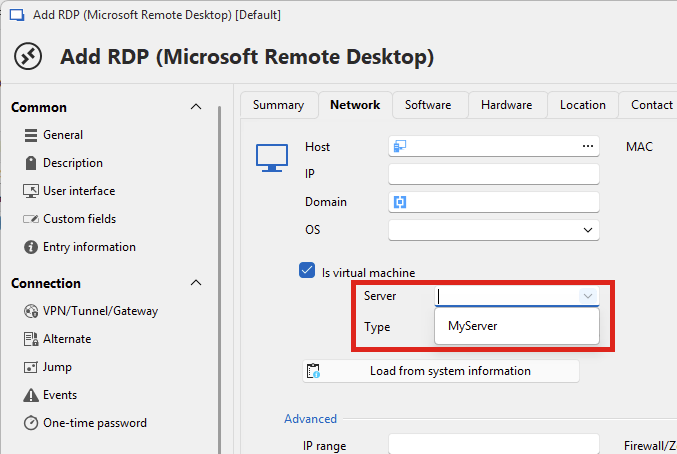
> Additionally, it would be great if these virtual machines were somehow linked to their Hyper-V host, so that when you navigate to a specific Hyper-V host entry, the related virtual machines are displayed.
Thank you for the suggestion. We will keep this in mind when further improving our products. For now I would recommend organising your vault in a way that conveys this information. For example you could create an entry for your Hyper-V host, and make its related VMs sub-entries. That way, you could easily see what entries are hosted on that Hyper-V host by looking at your structure.
Regards,
Hubert Mireault
d1603f02-5712-4597-84c7-0394bf6e31d3.png
>> What might be useful, though, is if, for instance, I mark an RDP entry as having the Hyper-V role, the other entries under "Is virtual machine" would automatically list that Hyper-V server
>Maybe I misunderstand your point, but if you have already entered a value in the Server or Type fields, they will be listed for your other entries in the same vault:
Idea was if on RDP entry under Software you select that server have Hyper-V role it will be automatically shown under servers when you check "Is virtual machine".
I know I can enter server name under Network > Is virtual machine > Server but that is manual and not connected in any way.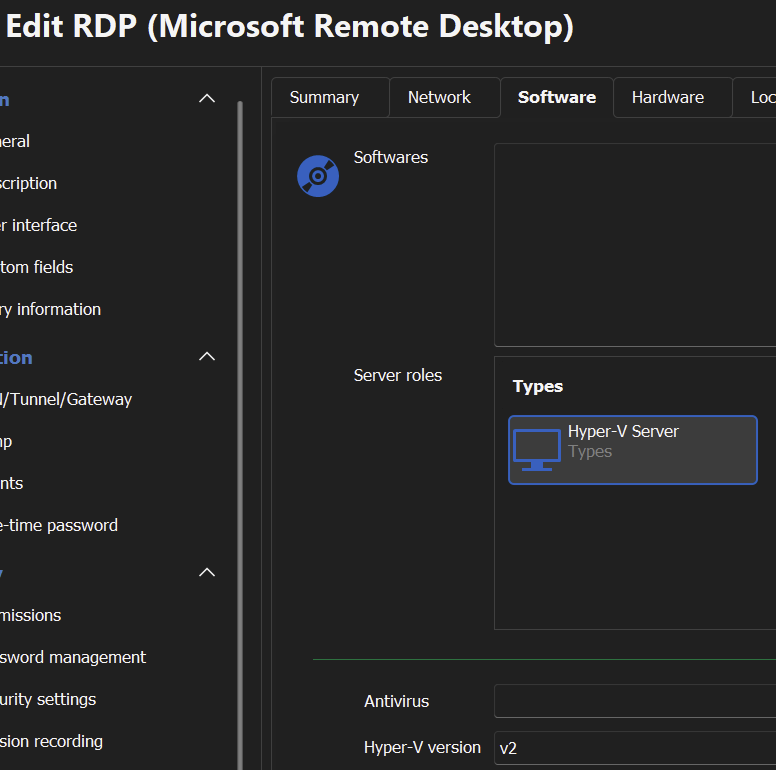
> For example you could create an entry for your Hyper-V host, and make its related VMs sub-entries. That way, you could easily see what entries are hosted on that Hyper-V host by looking at your >structure.
That is maybe fine if this is for our company but we have different clients and they share hyper-v servers, and we have organization by clients in o.
It would be better to have logical connections instead of physical organization.
Regards,
Darko Bazulj
https://triton-grupa.hr
6816f2d7-d84a-478d-8679-d623237883c2.png
Thank you for the additional information. I think I understand what you mean.
So the complete flow would be something like this:
- You have a HyperV (or other type) server. To identify it, you configure its server role in the asset section of the entry, like this:
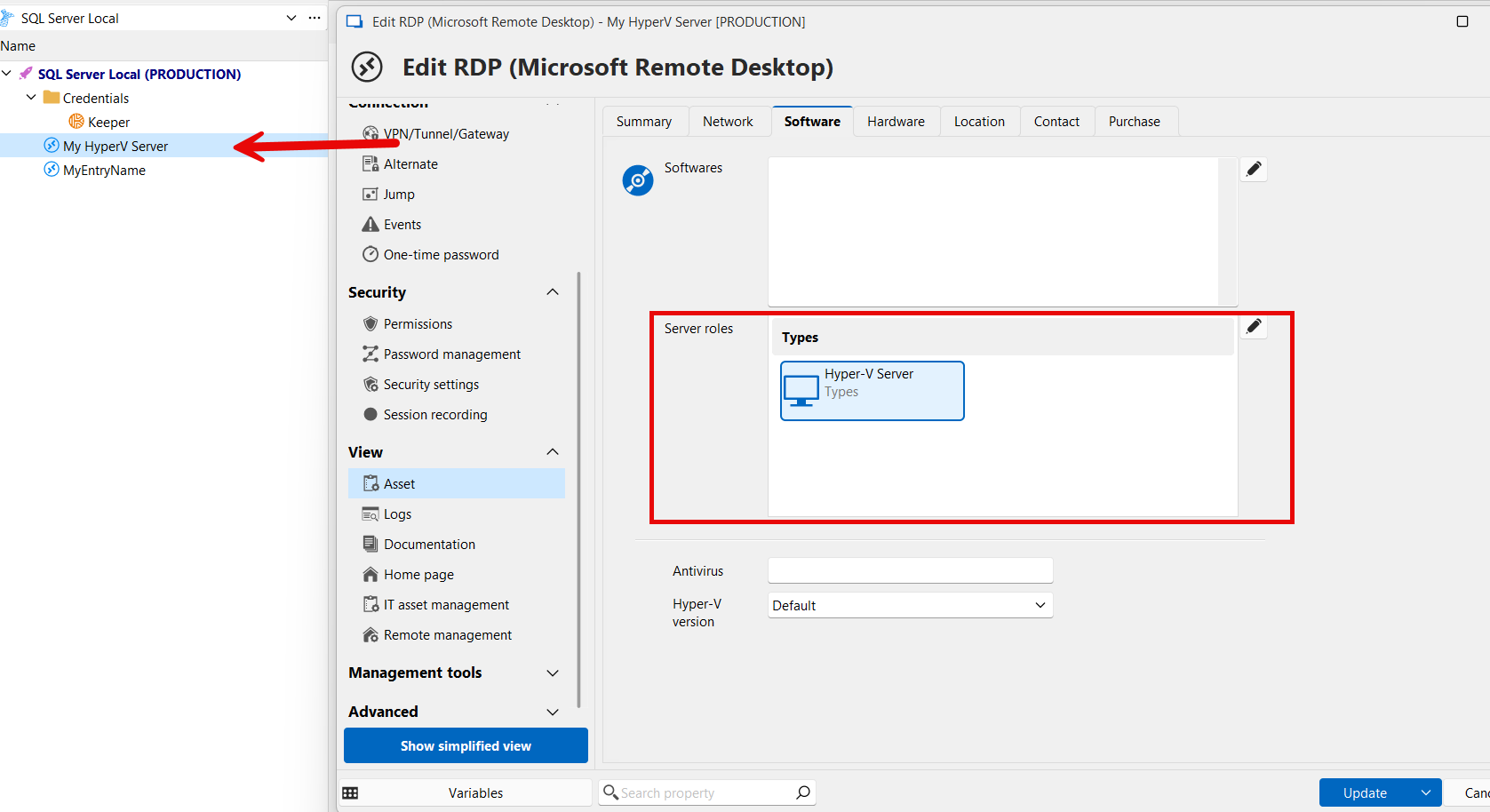
- Then, in other entries, you would automatically get this "My HyperV Server" entry to be listed in the "server" asset field:
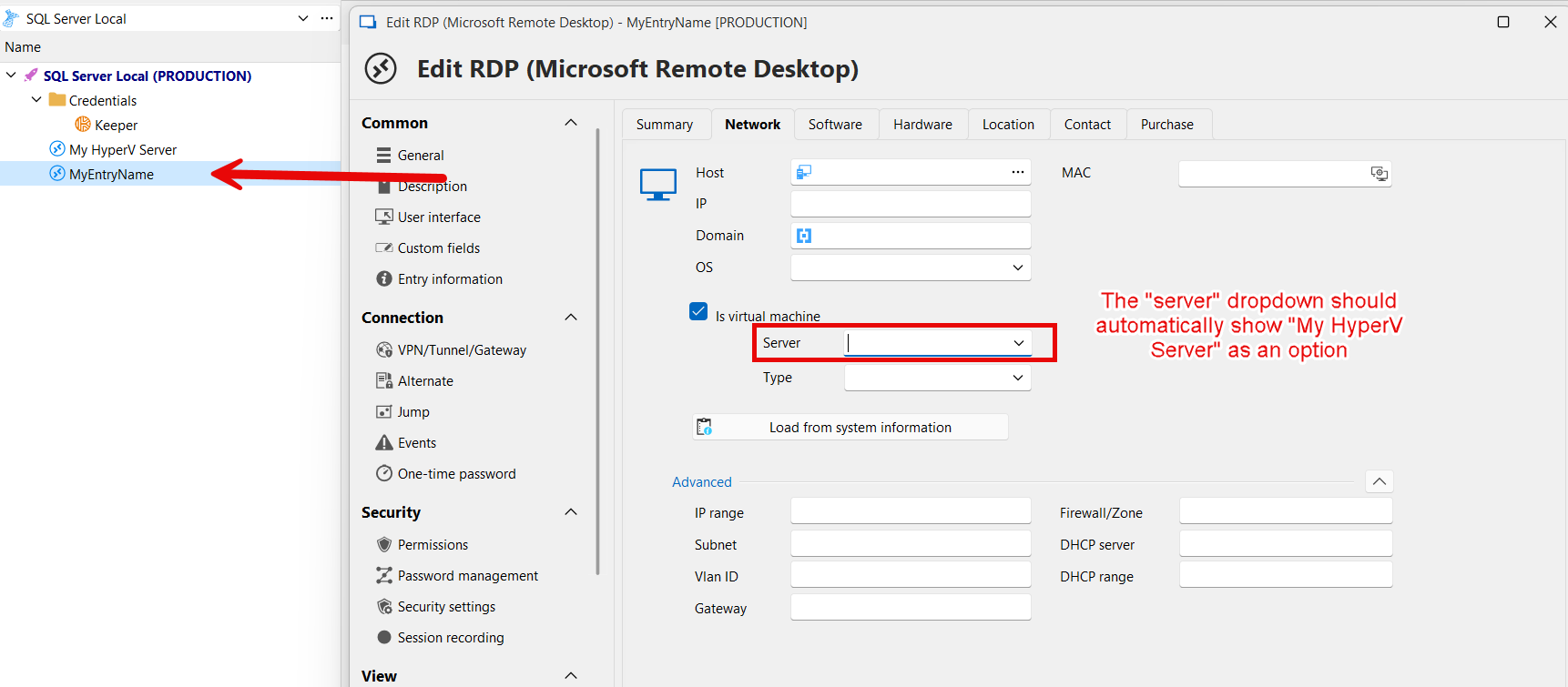
- Finally, you would like a way to easily see all of the entries that refer to that server through that field. For example, having a tab in the dashboard of the server that lists these entries:
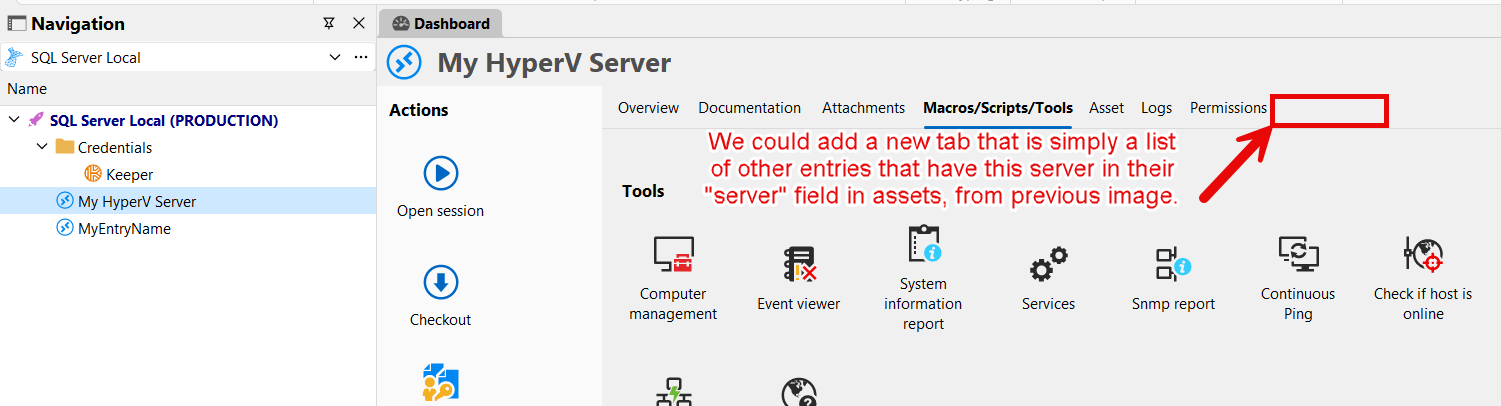
Can you confirm that this is what you're looking for?
Regards,
Hubert Mireault
83e0b2e9-76a2-433f-a92d-a4aa1dd34cff.png
ffd7984b-2423-4660-a65a-4948985a688b.png
501d8400-3e32-4ff5-b341-81cc58f1cdda.png
yes that looks fine.
This way we have some kind of connection between entries.
I would also ask about next part which I don't see in my RDM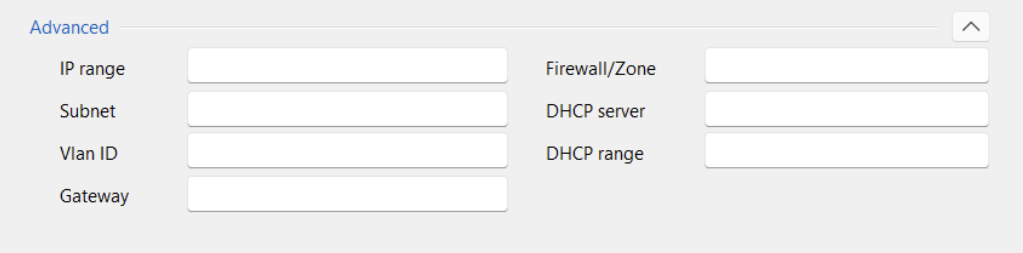
I see like next, no advanced part.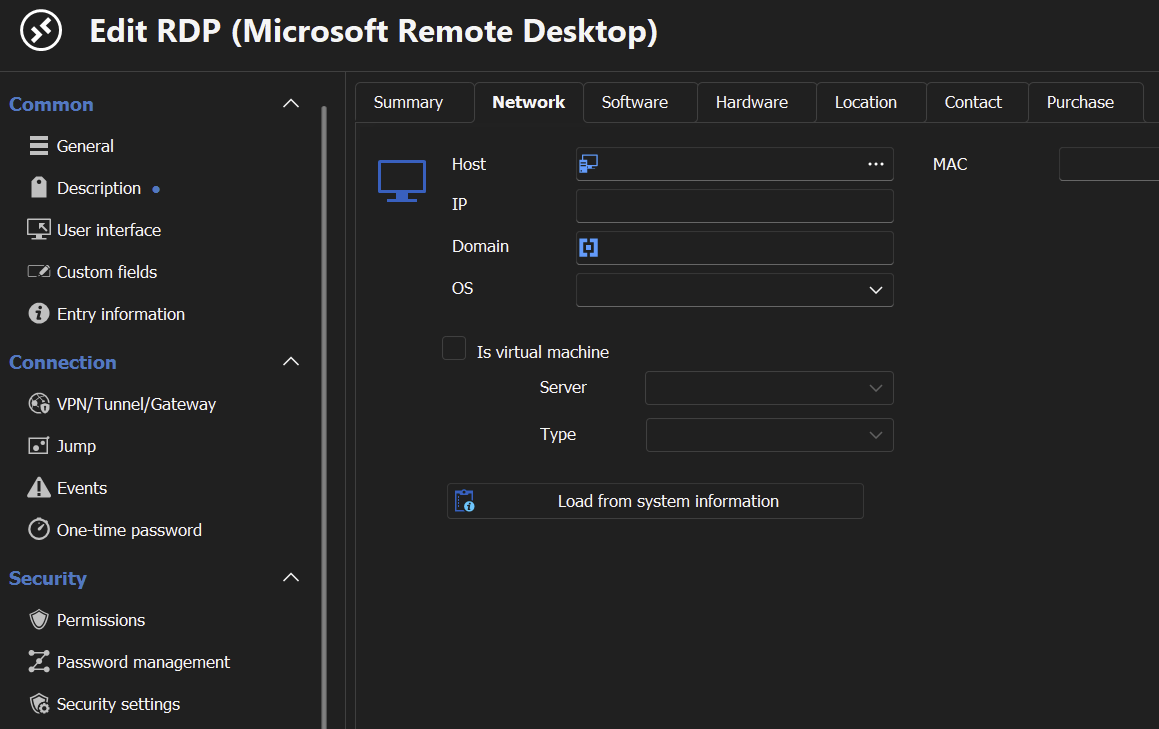
Regards,
Darko Bazulj
https://triton-grupa.hr
5f92a448-4c64-4309-85e0-955aed560a36.png
de592ff2-822f-4f48-96a1-b5a0ea9f8b1c.png
Perfect, I will open an improvement ticket for this.
As for the additional fields in the "advanced" section, I took these captures with our internal build of our next major release, 2025.1. You can look forward to having these new fields starting with that version. Sorry for the spoiler. 😉
Regards,
Hubert Mireault