Ctrl + arrow keys do not work with RDP in 3.0.10.0

When connecting to a Windows Server, Ctrl- + arrow keys (Left/Right/Up/Down) no longer works. They simply do nothing.
All Comments (2)
Hi,
Was it working in previous version? I know that by default does shortcut are used by Mac OS for mission control features. As far as I can remember, those never worked for me since I use those features. Though, you can disable them in System Preferences.
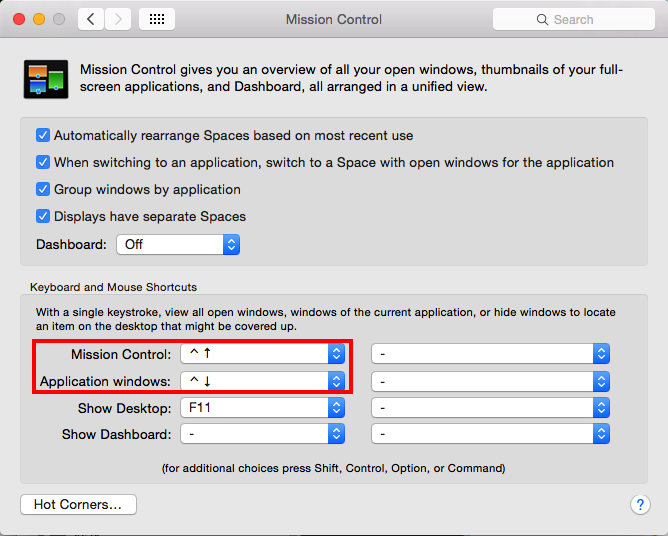
Under Mission Control, you can replace the Mission Control and Application windows value to - to disable it or some other suitable keys:
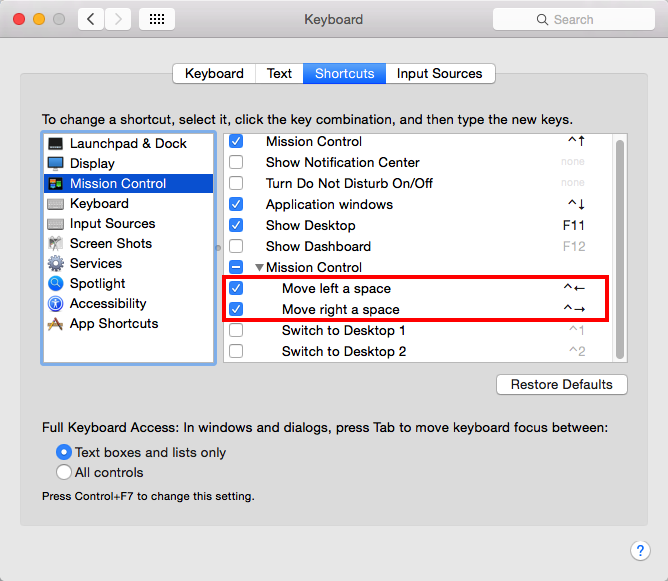
Under Keyboard -> Shortcuts -> Mission Control, you can disable Move left a space and Move right a space:
After disabling those shortcuts, you should be able to use them in your RDP session.
Best regards,
Xavier Fortin
Keyboard Shortcuts.png
Mission Control.png
D'Oh!!! Xavier, my mistake, I just got a new MacBook Pro, and I didn't think to turn them off like I had on my old one... Thank you!