Remote Desktop Crashes Frequently

Remote Desktop Manager Enterprise Edition
11.1.0/0 64-bit
.NET Runtime v4.0.30319
Remote Desktop: 10.0.10586.0
This application is crashing on my system about every 5 minutes when I have remote connections open.
The client locks up entirely and eventually I have to kill the task at which point windows event log shows:
____ BEGIN PASTE_____
Event 1002, Application Hang
The program RemoteDesktopManager64.exe version 11.1.0.0 stopped interacting with Windows and was closed. To see if more information about the problem is available, check the problem history in the Security and Maintenance control panel.
Process ID: 148c
Start Time: 01d16360d580f8ca
Termination Time: 14
Application Path: C:\Program Files (x86)\Devolutions\Remote Desktop Manager\RemoteDesktopManager64.exe
Report Id: 94f37333-cf54-11e5-9bff-acfdcea6d493
Faulting package full name:
Faulting package-relative application ID:
____ END PASTE _____
This has happened 3 times now in a 13 minute interval, sometimes the app will recover from the hanging and continue but usually only once and then it crashes on the next lock up. This issue has been around since we purchased this product over the summer, but it was so infrequent that it didn't really bother me. Now it's a bit frustrating, the good news is that the app does prompt to re-open the previous sessions, so it is crashing gracefully enough to recover nicely.
One more piece of information is the we at PPS use the same shared SQL Lite database to store all our connections in, with our own credentials stored locally.
We are all accesing this share database across a mapped network share.
Please let me know if I can provide more information or possible enable some debugging on my system for you.
Thanks!
All Comments (16)
Hi Adam,
Could you try RDM 32bit to see if you get the same problem. I can't find anything useful from this log. Perhaps we could find more details in the application logs located in the Help ribbon.
Regards
David Hervieux
Hey David,
My co-worker has tried the 32-bit version and it was still problematic for him.
The Application Log in the Help UI is showing some issues, I have exported it as csv and attached it.
Thanks for the quick reply!
RDM-Debugging.csv
David,
My co-worker Chris, stumbled over an article with the list of supported databases and it states that the recommended database is SQL for multi-user, That is totally an option for us and we will migrate to SQL and see if our problems go away.
Thanks!
I see from your log that you use an SQLite database on a shared drive? I think that could be the source of your problem. SQLite does not support to be shared by multiple users.
Could you try to setup a SQL Server Express instead?
David Hervieux
You were faster than me. SQL Server Express is free and it works great.
http://www.hanselman.com/blog/DownloadSqlServerExpress.aspx
David Hervieux
Thanks we are already done doing the conversion, very easy, that should fix the issue.
Thanks!
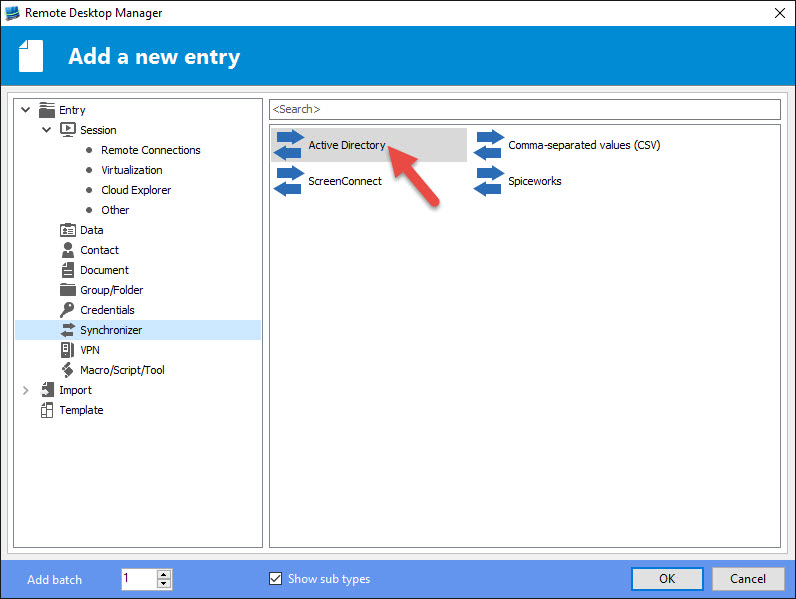
In a separate request, do you have a good link to importing systems from Active Directory to RDM?
Hello,
You can try our AD Synchronizer feature to import computers from AD to RDM
Best regards,
Jeff Dagenais
2016-02-09_14-05-48.jpg
Thanks!!! You guys are great!
Thanks for all the help, guys!
Everything was going great, but I had one crash at home last night over VPN, using the new Microsoft SQL Server data store.
Version 11.1.0.0 64-bit
Found this in the Application Log:
System.Threading.ThreadAbortException: Thread was being aborted.
at Devolutions.RemoteDesktopManager.Forms.FreEmbeddedPing.c2952427fa0b5f54be04062b8ee75a3c0(Object cbcdd630d8130248e0038683dd70dbb22)
at System.Threading.ExecutionContext.RunInternal(ExecutionContext executionContext, ContextCallback callback, Object state, Boolean preserveSyncCtx)
at System.Threading.ExecutionContext.Run(ExecutionContext executionContext, ContextCallback callback, Object state, Boolean preserveSyncCtx)
at System.Threading.ExecutionContext.Run(ExecutionContext executionContext, ContextCallback callback, Object state)
at System.Threading.ThreadHelper.ThreadStart(Object obj)
I don't think it's related but this issue is fixed internally.
David Hervieux
Sorry I mean the issue from your log.
David Hervieux
If it helps, I found this entry in the Windows Application event log:
The program RemoteDesktopManager64.exe version 11.1.0.0 stopped interacting with Windows and was closed. To see if more information about the problem is available, check the problem history in the Security and Maintenance control panel.
Process ID: 19c4
Start Time: 01d164800f9d4d06
Termination Time: 11
Application Path: C:\Program Files (x86)\Devolutions\Remote Desktop Manager\RemoteDesktopManager64.exe
Report Id: fcd8e7bd-d077-11e5-9c4b-acfdcea6f905
Faulting package full name:
Faulting package-relative application ID:
What data source type do you use?
David Hervieux
We're using the Microsoft SQL Server data source.