Unable to create user or change role

Hi,
I got an error when i try to create a new user.
I'm administrator.
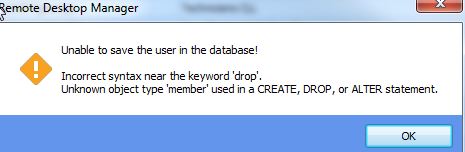
errorcreateuser.jpg
All Comments (16)
Hello,
What version of RDM are you running?
What type of data source are you using?
Maurice
11.0.19.0
and
MSSQL
see log
[2016-01-22 11:10:12 - 11.0.19.0]ERROR System.Data.SqlClient.SqlException (0x80131904): Incorrect syntax near the keyword 'drop'.
Unknown object type 'member' used in a CREATE, DROP, or ALTER statement.
at System.Data.SqlClient.SqlConnection.OnError(SqlException exception, Boolean breakConnection, Action`1 wrapCloseInAction)
at System.Data.SqlClient.SqlInternalConnection.OnError(SqlException exception, Boolean breakConnection, Action`1 wrapCloseInAction)
at System.Data.SqlClient.TdsParser.ThrowExceptionAndWarning(TdsParserStateObject stateObj, Boolean callerHasConnectionLock, Boolean asyncClose)
at System.Data.SqlClient.TdsParser.TryRun(RunBehavior runBehavior, SqlCommand cmdHandler, SqlDataReader dataStream, BulkCopySimpleResultSet bulkCopyHandler, TdsParserStateObject stateObj, Boolean& dataReady)
at System.Data.SqlClient.SqlCommand.RunExecuteNonQueryTds(String methodName, Boolean async, Int32 timeout, Boolean asyncWrite)
at System.Data.SqlClient.SqlCommand.InternalExecuteNonQuery(TaskCompletionSource`1 completion, String methodName, Boolean sendToPipe, Int32 timeout, Boolean asyncWrite)
at System.Data.SqlClient.SqlCommand.ExecuteNonQuery()
at Devolutions.RemoteDesktopManager.Business.DataSources.DatabaseConnectionDataSource.ExecuteNonQuery(String sql, IDbTransaction dbTransaction, IDbDataParameter[] parameters, Int32 commandTimeout)
at Devolutions.RemoteDesktopManager.Business.DataSources.DatabaseConnectionDataSource.ExecuteNonQuery(String sql, IDbTransaction dbTransaction)
at Devolutions.RemoteDesktopManager.Business.DataSources.SQLServerSecuritySubDataSource.c65987261992690f0b3afdd4334c0310f(UserEntity cf98b881282579a38f0d3820b4755fa4a, IDbTransaction c5a0ca8eaa594113c2f0b3cfe13dedff9)
at Devolutions.RemoteDesktopManager.Business.DataSources.SQLServerSecuritySubDataSource.c420570cc362838b38ecc18ba825950e5(UserEntity cf98b881282579a38f0d3820b4755fa4a, Boolean cd589fb599494638c495afc5cf9b2449e, String ceb81d1ee93f91e0bc57f34876c263863, SaveUserInfoAdvancedCustomData ca846991ced5070300e1c8ec384f436f9, Guid[] cf090f8a8f0907c3009c224a9172cab64)
ClientConnectionId:b85c543b-c896-4824-9c62-0c3ff0267bee
Error Number:156,State:1,Class:15
****************************** SqlError ******************************
Message:Incorrect syntax near the keyword 'drop'.
****************************** SqlError ******************************
Message:Unknown object type 'member' used in a CREATE, DROP, or ALTER statement.
Hello,
Is this an issue that started occurring after an update or you are setting up a new system?
Maurice
Yes work well with 11.0.16.0.
I've just roll back now to 11.0.16.0 and it work but I got a message when I modify a role
see
Thanks
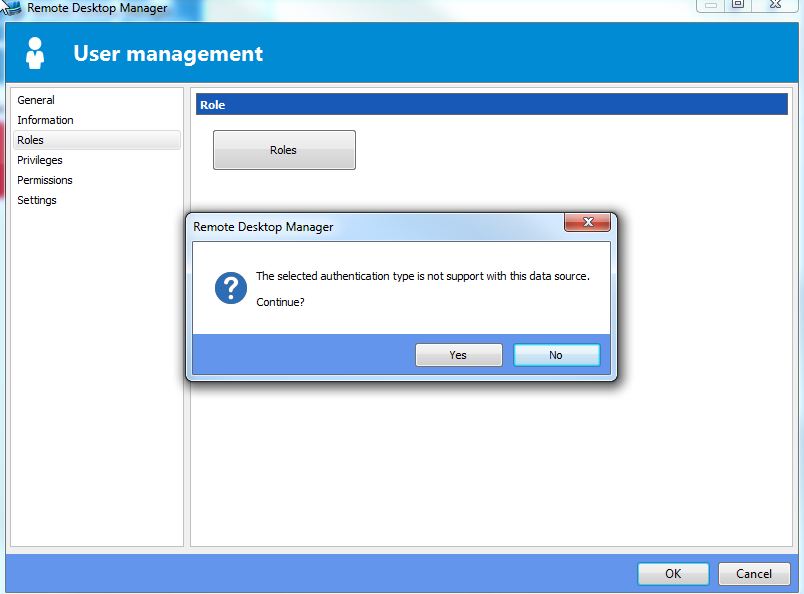
Changerole.jpg
Hello,
In your user management screen for your account, do you see an "Authentication type" dropdown?
Maurice
Yes Domain and Database,
For all user it's Domain
hmmm,
For SQL Server it should not even show that drop down
Even though it is a domain account it should be identified as a Database account (because we log in with that account directly)
We will discuss this with the CTO, but could you test switching your account? The dropdown shouldn't be displayed after that, and the Role error message shouldn't appear.
Best regards,
Maurice
Hi, I've install the 11.0.23.0 for another issue. I've try to change users to Database, but got the same error.
So unable to change, maybe if I downgrade again I'll be able to do it.
Thanks
errorcreateuser[1].jpg
Hello,
Please continue the process with Stefane.
Thank you,
Maurice
The issue was introduced about a month ago. I'm working on a fix.
The only workaround, which is really not feasible, is to have a SQL Server 2012 or above. I would suggest you wait for the next beta build it will have a the fix.
Sorry for the inconvenience.
Best regards,
Stéfane Lavergne
ok, There's a way to change it in batch? I've over 60 users to change.
Thanks
What are you trying to change?
Stéfane Lavergne
Because all user are set to Authentication type "Domain" and are suppose to be Database.
With Domain set i'm unable to change any account like roles etc... I've to change authentification to Database with RDM 11.0.16.0 for each user then I'll be able to do change on users.
So i've 60 users and I need to do it one by one. That's why I ask if it's possible to change de authentification in batch.
Thanks
I sent you an email with the script.
Stéfane Lavergne
Hi,
Script work fine. all users are change. But unable to change role to a user.
Always getting
Need to use older version RDM 11.0.16.0 to do the changes
errorcreateuser[2].jpg