Peer Connection was lost
When cutting from excel into a rdm session. I get a peer connection was lost. It immediately reconnects and then the pasting in excel I get the message again. Then it pastes and I can continue my session. This is a painful process especially when I am doing a lot of cutting and pasting. it is also happening when I run Jet reports in RDM session. In fact it refreshes so many times that it kills the connection all together and I have to completely reconnect.
All Comments (10)
Hi Peter,
What version do you use?
Regards
David Hervieux
Hi,
When you mean cut from Excel, do you mean cutting group of cells, content of cell? Are you cutting from Excel to the Excel app in the remote session?
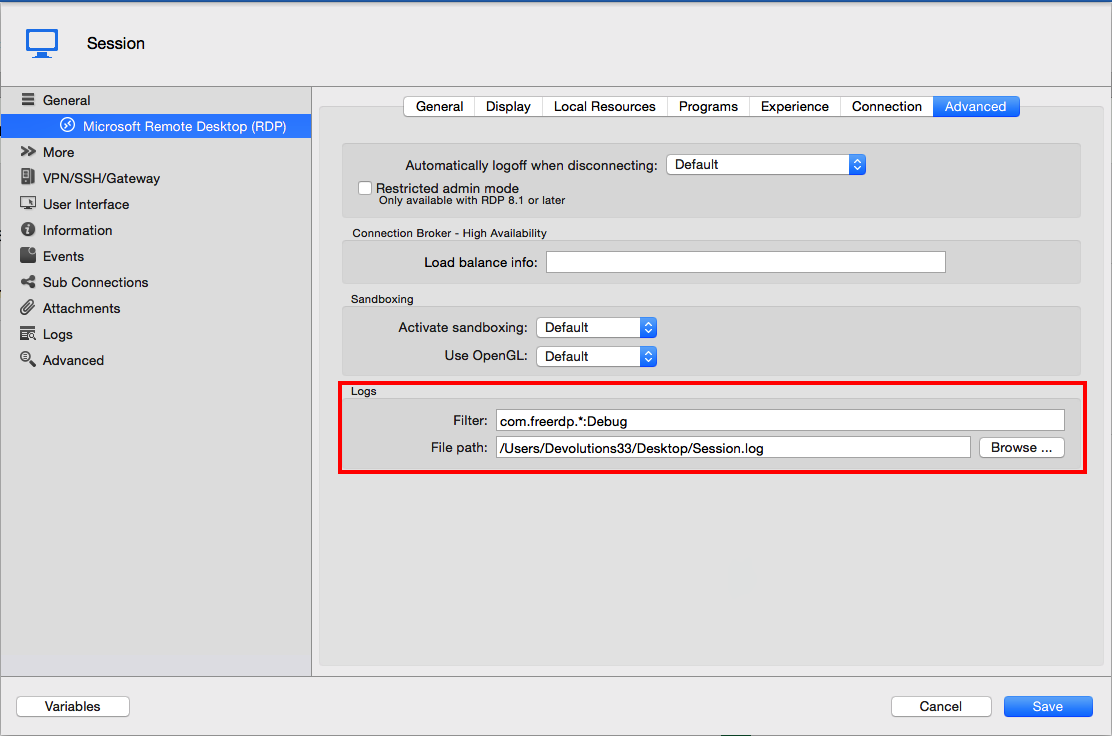
Could you also configure the log of said RDP Session. You can do so in the session properties under the Advanced tab:
Just insert "com.freerdp.*:debug" in the Filter field and the path to the file in the File path field.
Once you've reproduce the issue, send me the log through private message.
Best regards,
Xavier Fortin
RDP Log.png
Yes I mean when cutting and pasting cells in the rdp session. Not necessary across rdp sessions. Let me try as you suggested with logging and let you know.
sent info to Xavier Fortin have not heard anything back, are you needing additional information.
FYI Microsoft Remote desktop 8.0 for MAC is not having the same behavior. If that is any help.
We're looking into it. I'll come back to you as soon as we come up with something.
Xavier Fortin
Hi,
I've been trying to reproduce the issue with no success. Is there anything particular to what you're trying to paste?
It would be even better if you could send me (via private message) a simplified excel file with which you reproduce the problem and tell us pasting what from it will cause the Peer Connection was lost error.
Best regards,
Xavier Fortin

Hello team, am facing the same issue - frequent disconnects while RDPing to the Windows 2012 R2 Server. How can I private message the session.log file I got following the instruction provided by Xavier Fortin
Hi Sagar,
Are you using the latest version of RDM Mac (5.5.0.0)?
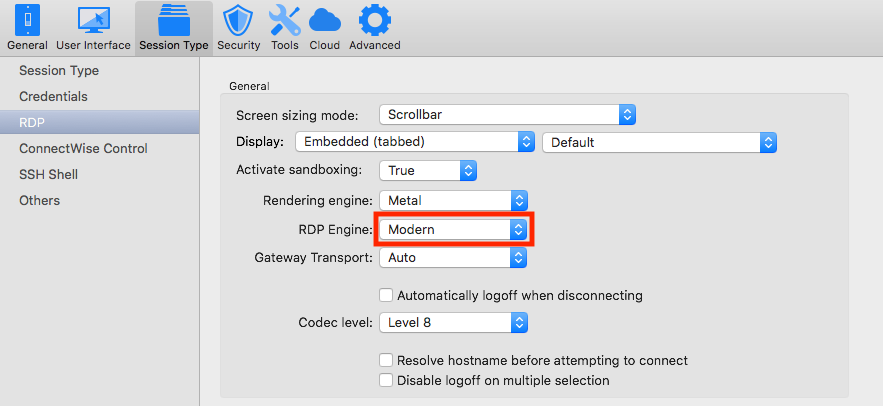
Could you try the Modern engine of RDP and see if it helps? Here is were you can find the setting:
Best regards,
Xavier Fortin
RDPEngine.png
Thank you Xavier, works with modern engine setting. Will update in case face issues later.
Regards,
Sagar