RDP Connections from a Mac

Please bare with me as I am not a Mac guy. We have been using RDM for 4 years now in the Windows world, but we recently added a new MacBook Pro to the mix. We are having issues connecting to our sessions. #1 when we launch an RDP session it gives the 131084 error. We are running OS X El Capitan (10.11.3) and RDM Enterprise 3.0.8.0. We connect to our customer sites through L2TP VPNs and the only way I can seem to get an RDP session to open is with quick launch. Here are the logs from a failed session launch:
[09:30:54:249] [1719:b029b000] [INFO][com.freerdp.client.mac] -[MRDPIPCClient initLoggingWithFilter:filePath:fileName:] 117 - Log initialized headless
[09:30:54:250] [1719:b029b000] [DEBUG][com.freerdp.client.mac] -[MRDPIPCClient configureInternal] 90 - configureInternal
[09:30:54:270] [1719:b039f000] [DEBUG][com.freerdp.channels.cliprdr.client] cliprdr_VirtualChannelEntry 1362 - VirtualChannelEntry
[09:30:54:270] [1719:b039f000] [INFO][com.freerdp.client.common.cmdline] freerdp_client_load_static_channel_addin 2335 - loading channel cliprdr
[09:30:54:270] [1719:b039f000] [DEBUG][com.freerdp.core.nego] nego_set_negotiation_enabled 1186 - Enabling security layer negotiation: TRUE
[09:30:54:270] [1719:b039f000] [DEBUG][com.freerdp.core.nego] nego_set_restricted_admin_mode_required 1198 - Enabling restricted admin mode: FALSE
[09:30:54:270] [1719:b039f000] [DEBUG][com.freerdp.core.nego] nego_enable_rdp 1220 - Enabling RDP security: TRUE
[09:30:54:270] [1719:b039f000] [DEBUG][com.freerdp.core.nego] nego_enable_tls 1232 - Enabling TLS security: TRUE
[09:30:54:270] [1719:b039f000] [DEBUG][com.freerdp.core.nego] nego_enable_nla 1244 - Enabling NLA security: FALSE
[09:30:54:270] [1719:b039f000] [DEBUG][com.freerdp.core.nego] nego_enable_ext 1256 - Enabling NLA extended security: FALSE
[09:30:54:270] [1719:b039f000] [DEBUG][com.freerdp.core.nego] nego_connect 148 - state: NEGO_STATE_TLS
[09:30:54:270] [1719:b039f000] [DEBUG][com.freerdp.core.nego] nego_attempt_tls 459 - Attempting TLS security
[09:31:09:271] [1719:b039f000] [ERROR][com.freerdp.core] freerdp_tcp_connect 1140 - failed to connect to 10.34.0.2
[09:31:09:271] [1719:b039f000] [ERROR][com.freerdp.core.nego] nego_connect 154 - Protocol Security Negotiation Failure
[09:31:09:271] [1719:b039f000] [ERROR][com.freerdp.core] freerdp_set_last_error 680 - freerdp_set_last_error ERRCONNECT_SECURITY_NEGO_CONNECT_FAILED [0x2000C]
[09:31:09:271] [1719:b039f000] [ERROR][com.freerdp.core.connection] rdp_client_connect 275 - Error: protocol security negotiation or connection failure
[09:31:09:272] [1719:b039f000] [DEBUG][com.freerdp.client.mac] -[MRDPIPCClient viewDidConnect:] 401 - viewDidConnect
[09:31:09:782] [1719:a3e69000] [DEBUG][com.freerdp.client.mac] __39-[MRDPClient invalidatePasteboardTimer]_block_invoke 132 - timer stop
All Comments (7)
Hi,
The 131084 error is a security negotiation error. Many user get this error when the Network Level Authentication is activated.
Could you try deactivating it and tell me how it went? To do so edit your RDP session under the Connection tab:
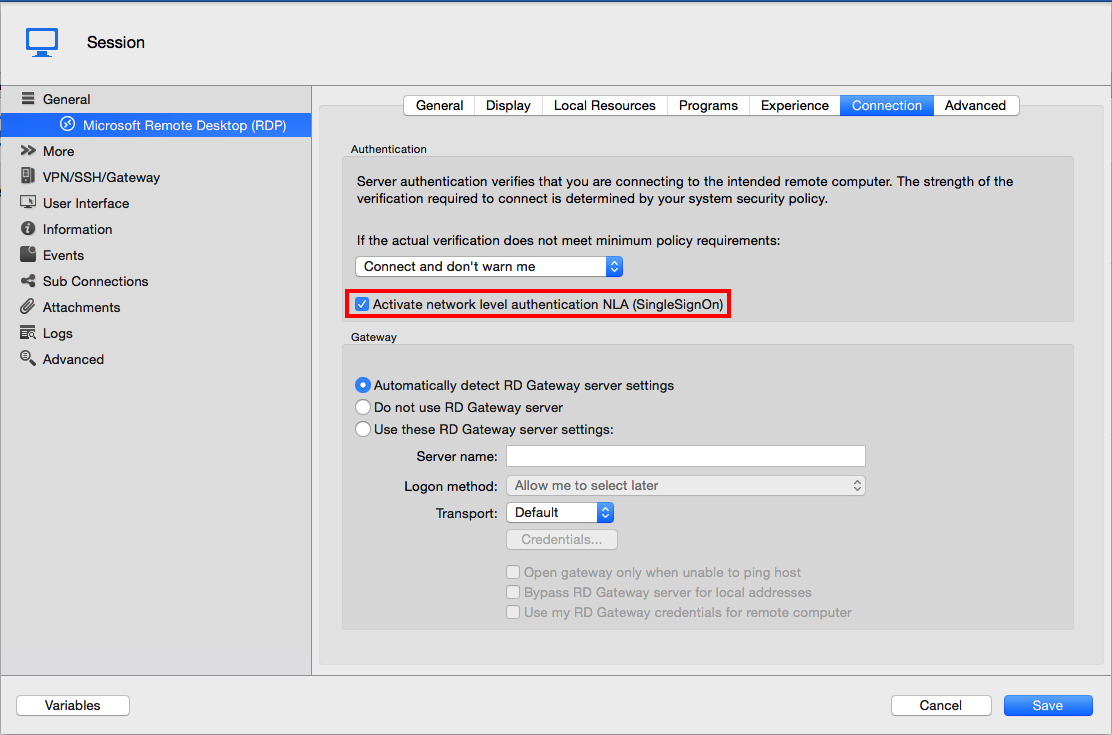
I'm not sure what you mean when you say you can't open any RDP session except with quick launch. Do you mean quick connect? Are all of your RDP session not working?
Best regards,
Xavier Fortin
NLA is already turned off on the sessions. It is also not required on the Server 2012 R2 devices we are connecting to. I am sorry I forgot to mention that. And yes I do mean quick connect. If I hit the quick connect button, enter the IP of the server (or the host name), enter the username, and enter the password it will connect fine. I just cannot get any existing RDP sessions to connect. The same RDP sessions work fine on Windows machines.