alt+tab in remote session
Hi,
is there any way to use alt+tab in remote session? it goes back to windows.
thanks!
All Comments (13)
Hello,
There are 2 methods for this, whichever is greater;
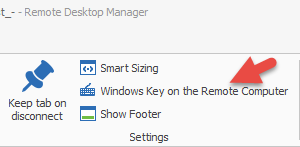
1. While the session is open, go in Actions -> Windows Key on the Remote Computer
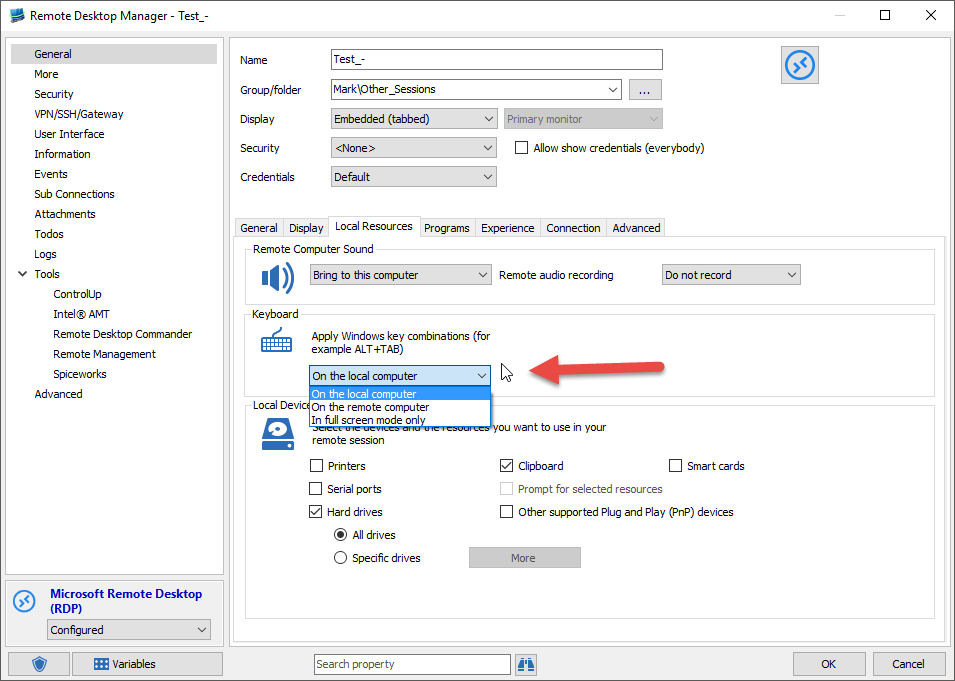
2. In the Properties of your session, You will find a drop-down menu in Local Resources and select On the remote computer;
Best regards,
Marc Beauséjour
2016-01-19_9-47-01.png
2016-01-19_9-49-46.png
Hi,
thanks for the response.
I have tried the first option (since the tool is in german I cant understand,)
and seems like it doesnt work. It doesnt make me go back to windows desktop but it doesnt switch into remote desktop opened windows.
Hello,
Have you tried the second option?
What version of RDM are you using?
Best regards,
Marc Beauséjour
its 11.0.12.0.
could you take a screen capture for the second option? where are the properties of the session located at?
thanks a lot.
Hello,
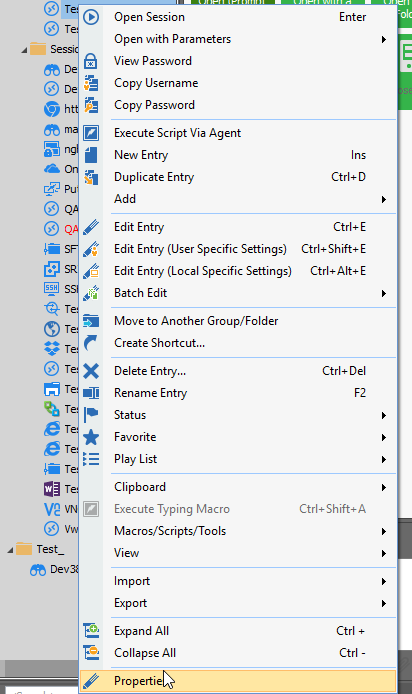
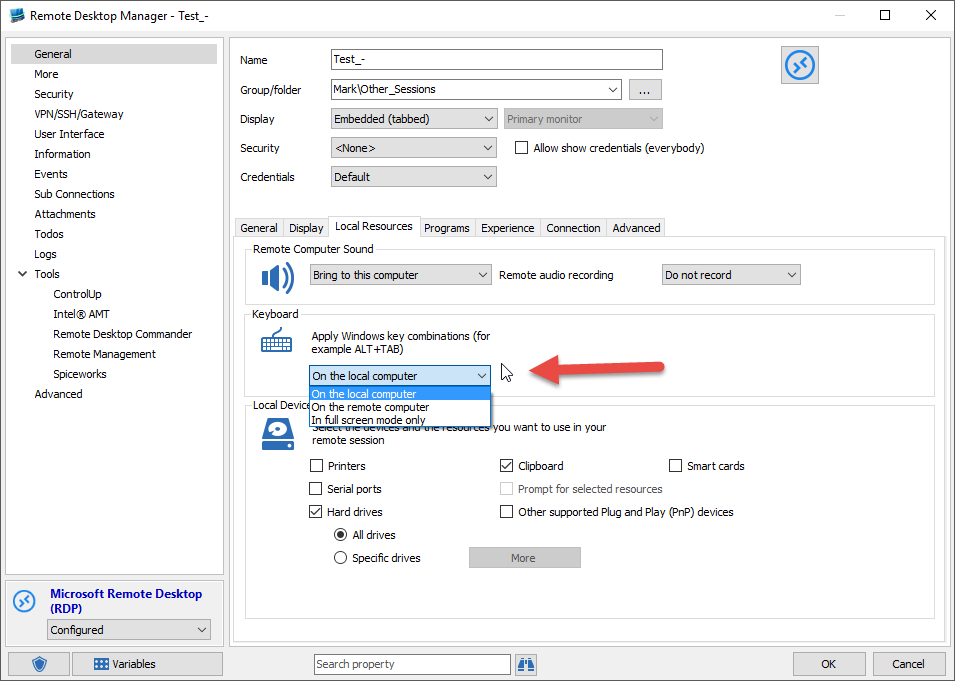
Simply do a right-click on your session and select Properties. In the General tab, go in Local Resources and in the drop-down menu select On the remote computer.
Best regards,
Marc Beauséjour
2016-01-19_9-47-01[1].png
2016-01-20_7-41-47.png
Seems like I dont have permissions, is disabled. But anyway its the version OK?
Hello,
There is no problem to use RDM 11.0.12.0.
If you are using an Advanced data source such as SQL Server, SQL Azure or Devolutions Server as example, it's possible that you don't have the edit permission.
You would need to verify with your RDM administrator if it's the case.
Best regards,
Jeff Dagenais

Hello,
Is there a way to have the "Windows Key on the Remote Computer" (or local resources windows shortcut keys on Remote Computer) a per-user setting?
I would prefer to forward alt-tabs, windows key combinations (windowskey+r or windowskey+e), to always be forwarded when RDM is the active window on screen.
I could not find something like this, other than changing all rdp entries, but this would harm my fellow colleagues in their way of working..
Greetings and thanks in advance!
Michael
@Michael,
Yes, this is possible. Your users would need to use the User Specific Settings feature (http://help.remotedesktopmanager.com/edit_userspecificsettings.htm).
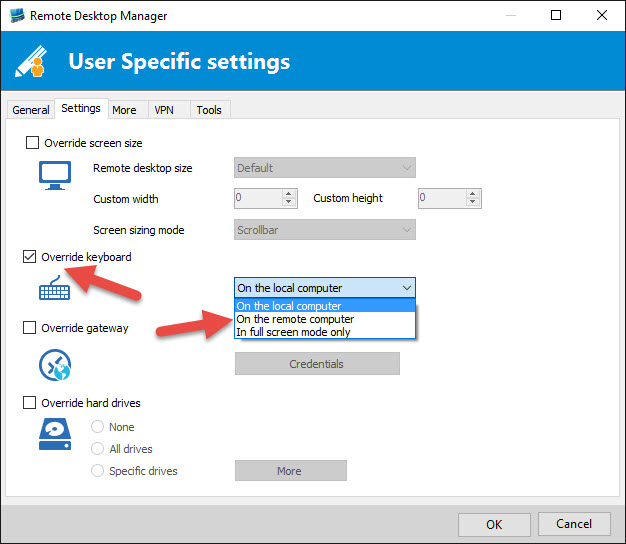
In the User Specific Settings, click on the Settings tab and enable the Override Keyboard.
Please note that the User Specific Settings is personal to each user, so each user would need to do this if they want to override the keyboard setting.
Best regards,
Jeff Dagenais
2016-08-11_08-14-59.jpg
Hello Jean-François,
I see, it is a way to work.
However, this means that all .rdp entries have to be adjusted per user?
There is no overall user-setting which overrules the default setting, fx 1 user setting to always override keyboard settings on RDP sessions?
Thanks for clearing things up
Michael
Hello,
You can override this setting per user (like mentioned in my previous post) or you can change it directly in the session, however, this will put it to On the remote computer for all your users.
If this is what you want, this can be done via our Batch Edit feature.
Please consult http://help.remotedesktopmanager.com/edit_batch.htm for more information.
Best regards,
Jeff Dagenais
Hi,
Batch Edit helped, thank you.
I expected that setting this in the Options will do the trick but it didn't work. Is this setting changing something else or is it only some bug? Thanks.
Hello,
Thank you for your swift reply!
In order for this setting to apply to your RDP entries, you need to make sure that they are using the "Default" setting under "Local Ressources" -> Keyboard:
Let me know if that helps!
Best regards,
James Lafleur