Sort priority change rendered treeview empty

As explained in Team video #5, I have set up two data sources, one for my DB admin (DBA for short) and one for a less privileged user called TG. In the DBA data source, I used the sort priority setting on folders to have more important ones on top. When I switches to the TG data source, I found the order to be different because sort priority value was at 0 still. So okay, sort priority is a per-user setting, which is actually very nice (although it won't help them much because I won't give them edit permissions ...).
Anyway, I modified the sort order from within the TG data source to my liking and then switched back to my DBA data source, and ... all my entries were gone. There was just the "Sessions" top node and nothing else. Switching back to TG, everything was in place, but only DBA is an administrator. When closing and re-opening RDM didn't help, I was afraid all my work was lost, so I tried many things in a panic which I don't remember exactly (most of that was me trying to get a debug log to see whether that would tell something).
Anyway, when I opened "data sources" for the DBA admin and closed the dialog with OK the tree view refreshed and all my entries came back. I didn't change the DBA data source definition (just testing server and database) before I clicked OK.
Best regards, Thomas.
All Comments (11)
Hello,
The sort priority is not per user.
Could it be that the cache was corrupt? In the advanced tab of the data source definition you will find a Manage Cache button, you could see if the analysis of the cache is good, or even delete it.
Best regards,
Maurice
Yes, one sort order value in the TG data source were different from the DBA user - likely the one I had changed not too long ago. I also thought I might be a caching problem because the TG account was showing the entire tree still and I found the Manage Cache button. It came up with one PRAGMA and three REINDEX lines but I feared "Vacuum" and "Delete" might increase my problem, so I tried Analyze once (which looked okay to me) and not even "Repair" ...
Anyway, it's fixed for me and I just wanted to let you know. Thank you for your thoughts on this. I'll try repair or delete if that ever happens again. The word "vacuum" scares me away though ;-)
Best regards, Thomas.
So we are in the process of documenting the Manage Cache form. Here is a quick explanation of what each button does:
Vacuum: Runs the SQLite command Vacuum, esentially it rebuilds the SQLite database. Linke: https://sqlite.org/lang_vacuum.html
Repair: Executes the following commands SQLite commands: PRAGMA integrity_check; REINDEX DatabaseInfo; REINDEX Connections; REINDEX Properties;
Delete: Deletes the physical file (offline.db) from disk, this is local data only, does not affect the server data, will be recreated
Analyse: reads the offline data and performs a read/write test to see if offline file is valid
Clear output: clears output window
Best regards,
Stéfane Lavergne
Thank you for that explanation - it will let me be more confident next time. Actually, "clearing the cache" could have helped in my other strange encounter reported in the Help forum when RDM was hanging on to credentials from the Windows CM although it was seemingly configured otherwise.
Best regards, Thomas.
Hello,
We know that our current cache implementation is best for users that have a single data source per database.
We are almost ready to publish a new cache engine that will hopefully handle things better.
Best regards,
Maurice
Something odd is going on. Could you please send us your applications logs (Help -> View Application Log -> Report (tab) -> Send to Support, please add "attn: Stefane" in the message)
I'm guessing your cache is getting corrupted, the logs will confirm this. If this is the case we have options to resolve it.
Best regards,,
Stéfane Lavergne
I tried sending the report twice but got a WebException error each time. Sending *that* worked however. In any case, here is what the report said for today:
[20.01.2016 08:22:48 - 11.0.18.0 - 32-bit] Error Silent: System.Net.WebException: The underlying connection was closed: An unexpected error occurred on a send. ---> System.IO.IOException: Unable to read data from the transport connection: An existing connection was forcibly closed by the remote host. ---> System.Net.Sockets.SocketException: An existing connection was forcibly closed by the remote host
at System.Net.Sockets.Socket.Receive(Byte[] buffer, Int32 offset, Int32 size, SocketFlags socketFlags)
at System.Net.Sockets.NetworkStream.Read(Byte[] buffer, Int32 offset, Int32 size)
--- End of inner exception stack trace ---
at System.Net.Sockets.NetworkStream.Read(Byte[] buffer, Int32 offset, Int32 size)
at System.Net.FixedSizeReader.ReadPacket(Byte[] buffer, Int32 offset, Int32 count)
at System.Net.Security.SslState.StartReceiveBlob(Byte[] buffer, AsyncProtocolRequest asyncRequest)
at System.Net.Security.SslState.CheckCompletionBeforeNextReceive(ProtocolToken message, AsyncProtocolRequest asyncRequest)
at System.Net.Security.SslState.StartSendBlob(Byte[] incoming, Int32 count, AsyncProtocolRequest asyncRequest)
at System.Net.Security.SslState.ForceAuthentication(Boolean receiveFirst, Byte[] buffer, AsyncProtocolRequest asyncRequest)
at System.Net.Security.SslState.ProcessAuthentication(LazyAsyncResult lazyResult)
at System.Net.TlsStream.CallProcessAuthentication(Object state)
at System.Threading.ExecutionContext.runTryCode(Object userData)
at System.Runtime.CompilerServices.RuntimeHelpers.ExecuteCodeWithGuaranteedCleanup(TryCode code, CleanupCode backoutCode, Object userData)
at System.Threading.ExecutionContext.RunInternal(ExecutionContext executionContext, ContextCallback callback, Object state)
at System.Threading.ExecutionContext.Run(ExecutionContext executionContext, ContextCallback callback, Object state, Boolean ignoreSyncCtx)
at System.Threading.ExecutionContext.Run(ExecutionContext executionContext, ContextCallback callback, Object state)
at System.Net.TlsStream.ProcessAuthentication(LazyAsyncResult result)
at System.Net.TlsStream.Write(Byte[] buffer, Int32 offset, Int32 size)
at System.Net.PooledStream.Write(Byte[] buffer, Int32 offset, Int32 size)
at System.Net.ConnectStream.WriteHeaders(Boolean async)
--- End of inner exception stack trace ---
at System.Net.HttpWebRequest.GetResponse()
at Devolutions.RemoteDesktopManager.Managers.RDMOManager.SendRegistrationTrial()
[20.01.2016 09:00:44 - 11.0.18.0 - 32-bit] Info: ClearCache - File does not exist (C:\Documents and Settings\Administrator.TGC\Local Settings\Application Data\Devolutions\RemoteDesktopManager\d3a1f584-9e7c-44bf-898b-12b4db9d9efc\offline.db)
[20.01.2016 12:55:34 - 11.0.18.0 - 32-bit] Info: ClearCache - File does not exist (C:\Documents and Settings\Administrator.TGC\Local Settings\Application Data\Devolutions\RemoteDesktopManager\591918f1-98c1-4e6e-934e-28eb6d73587f\offline.db)
Not more than these 3 lines.
Best regards, Thomas.
Hi Thomas,
Odd we didn't get the emails but it is not a big deal. The errors you posted don't help with the issue at hand either but we still have options.
Could you please try the following. First, download the latest beta (v11.0.20.0 or abaove), available here: http://remotedesktopmanager.com/Home/Download#beta
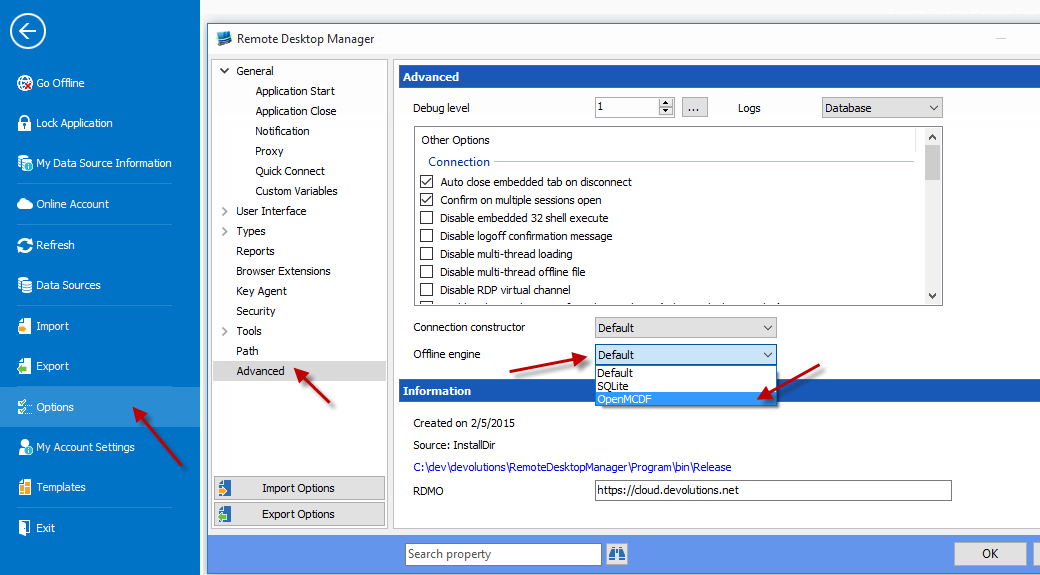
Start RDM & change the offline engine to OpenMCDF (Help -> Options -> Advanced (tab) -> Offline engine -> select "OpenMDF"
You will need to restart the application for the changes to take affect.
Once restarted, all three data sources should work flawlessly when changing from one to the other with the proper sessions filtered out for each given user.
Give it a try and let us know if it's any better.
Best regards,
Stéfane Lavergne
1-20-2016 1-05-28 PM.png
Hi Stefane,
I did exactly as suggested and also re-enabled "intelligent caching" which I had turned off to solve my problems. It will take a while to be sure that all is well when switching between data sources, but I will report back eventually.
PS. Many thanks for the "prompt host name" enhancement in the Host type. Works nicely!
Best regards, Thomas.
Hi Stefane again,
promised feedback: I've now used the OpenMCDF engine in 11.0.20 and 21 (now 24) and never experienced a problem anymore. I've even used 4 data sources, switching back and forth to verify effective permission settings. So, as you said, this engine seems to be a good fix when working with multiple data sources.
On another PC, I've kept the Default (SQLite) setting but disabled the caching in the Advanced tab for all Data Sources. That also prevented problems in the 18, 20, and 21 versions and seems to be a workaround for those who want to keep 11.0.18 until the next official release.
Best regards, Thomas.
Hi Thomas,
Thank you for the feedback and thorough testing. Much appreciated.
Best regards,
Stéfane Lavergne