Attachments bug

Hi,
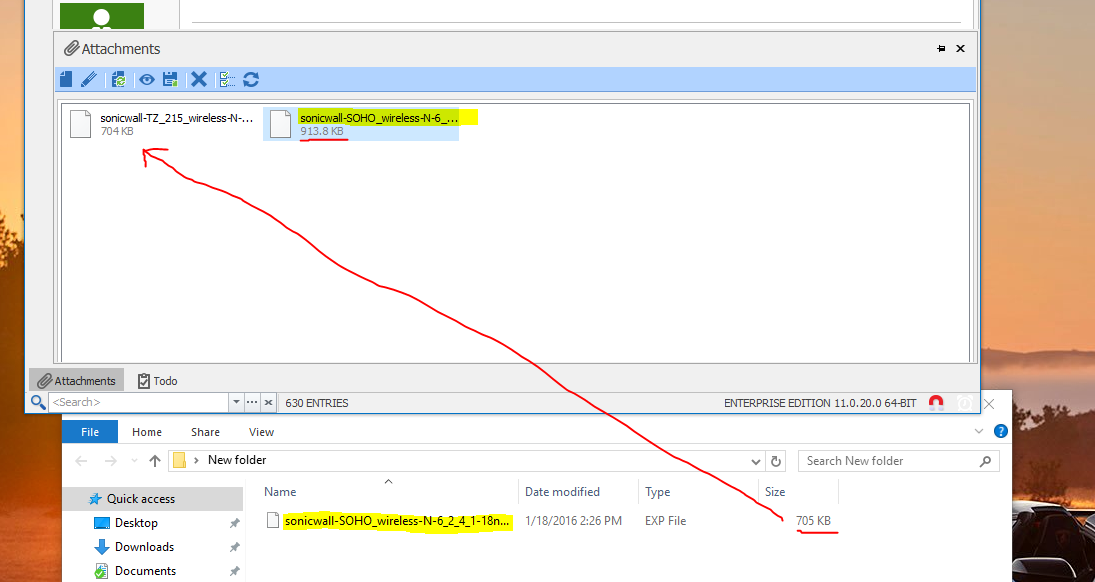
For the last couple versions of RDM I've been experiencing a bug when I save multiple files as attachments to an entry. The files will attach OK but no matter which file I select to 'Save As', only the first file that has been attached is saved. The file name and extension are correct when saving, but the file size and content are equal to the first attached file and not the selected file.
I have to delete the first file to get the second file, and have to delete the second file to get the third file. I've tested using different files and file types and multiple entries with the same results.
I was on RDM 11.0.18.0 and just tried 11.0.20.0. Windows 10 64 bit.
All Comments (16)
Hello,
If you right-click on the second file and click on Save As, does it save the proper file?
Best regards,
Jeff Dagenais
2016-01-18_14-22-47.jpg
No, whether I right-click or click on the toolbar it's the same result. Here's a pic:
Capture.PNG
Hello,
If you open the sonicwall-SOHO file that you have save on your computer, are you seeing the information of the sonicwall-TZ_215 file inside?
Best regards,
Jeff Dagenais
Hi,
That's correct. The file is intact and contains the contents of the TZ_215 file. There is no corruption of the contents.
I've deleted both files and added again, tried different file types, more than two files - all produce the same result.
I will assign this bug.
Regards
David Hervieux
Also, it would be a nice bonus if the timestamp of the file could be preserved when attaching and saving the file. We attach config files for network devices and the timestamp helps to know the age of the config.
Right now the time of the file changes when creating the attachment and again when saving the file.
Thanks
I will check if it's possible but we might need and database update to store the timestamp value.
David Hervieux
OK, thanks for the quick responses.
Hi,
How do you add multiple files? I must be doing something wrong but I'm only able to add one attachment at the time.
Regards
David Hervieux
Hi,
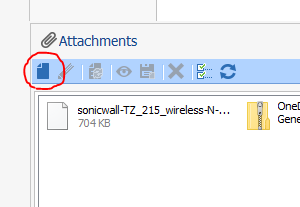
I add one file at a time by using the 'Add Attachment...' button on the toolbar:
It doesn't prevent me from doing that multiple times.
Capture[1].PNG
Thank you for the details.
David Hervieux
Could you post one your file that has a size issue?
David Hervieux
It happens with any file - here are two I just tried.
If you can't reproduce it it must be something to do with my computer. I'll test on another machine and report back.
WindowsServer2012R2_Licensing_Guide.pdf
Netwrix_Auditor_for_Active_Directory_Quick_Start_Guide.pdf
OK good news!
I tried on another computer with Windows 10 64 bit and same issue. But...
I've been suspecting it's a problem in the file selection logic of the Attachments window and I just thought to try disabling Auto Hide to see if that will help. There have been issues with focus and Window layout in the past with Auto Hide and perhaps it was messing up the file selection logic. That was the problem!
With Auto Hide disabled, the selected file is properly saved and there are no issues. With it enabled, it returns to the same issue.
Thank you. I will try this scenario and see what we can do.
David Hervieux