User Interface Does Not Work in 11.0.19.0!!!!!!

Just updated to 11.0.19.0 from 11.0.18.0 and if i select classic v7.0 interface nothing happens and on restart of the program I get back to the ribbon interface :banghead::banghead::banghead::banghead::banghead::banghead::banghead::banghead:
And I select the default "menu" interface the navigation pane covers half of the top menu :banghead::banghead::banghead::banghead:
All Comments (11)
Hi,
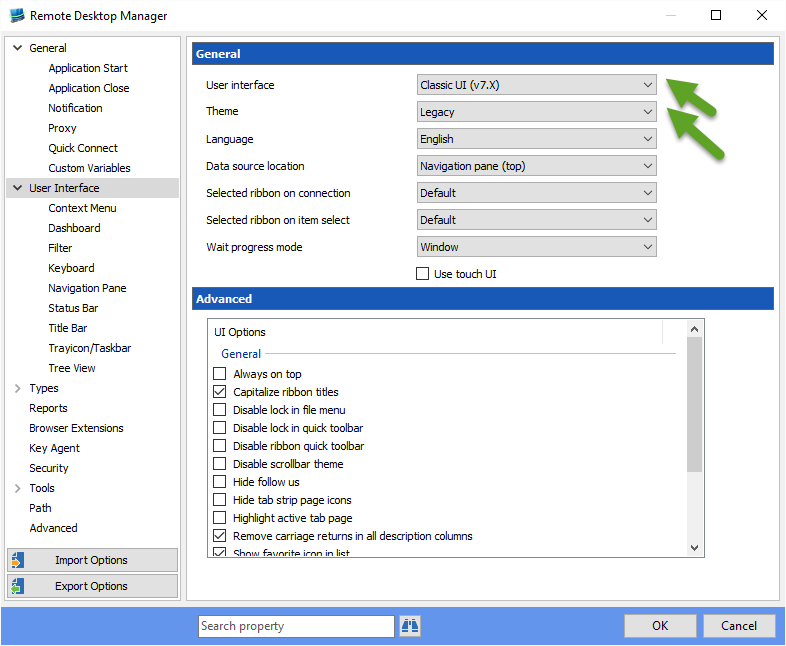
The version is a beta version and we have a new theme system. It works fine for me when I have those settings set in File->Options:
David Hervieux
Claissc.png
What version are you talking about?
The same happens to me and one of my colleague after upgrading from 11.0.18 to 11.0.20 on a Windows 2003 R2 server (used as a desktop). We had both been using RDM with the Classic UI in 11.0.18. On first launch after the upgrade, RDM came up with the "Default (Ribbon)" style. From that, we can switch to "Default (Menu)" but not to "Classic UI". "Classic UI" is seemingly accepted when closing the options dialog with OK, but no message pops up saying that the new settings will take effect on restarting RDM and when we re-open the options dialog, the user interface drop down shows the setting as it had been initially.
Note: There is no problem switching to the classic UI on Windows 7 or Windows 2008 R2, which I use as a RDM staging workstation - which is probably why it works for you, David.
The movie in the attachment shows what I mean. You may observe that I'm currently using that Windows 2003 R2 server in a RDP session. But that's not causing the issue because my colleague sits in front of his W2003R2 workstations and he reported the same.
PS. We can live with the "Default (Menu)" style ... we just don't like ribbons (and tiles) ;-).
Best regards, Thomas.
cannot-switch-to-classic-UI.wmv
Hi,
Could you try to upgrade to RDM 11.0.21.0 and retry to select Classic UI? I did a small tweak that could resolve your issue.
Regards
David Hervieux
It is "somewhat" better :). After changing the UI selection to "Classic" and clicking OK, the usual popup appeared saying that changes will take effect after restart of RDM. That didn't happen in 11.0.20. Immediately though, a NullReferenceException popped up. I sent the report, but just in case, here's a screen shot.
Best regards, Thomas.
rdm-nullref.PNG
Also, after installing 11.0.21, the UI started in Default (Ribbon) mode. I had set Default (Menu) mode before, though. I don't know whether an upgrade is supposed to reset my option settings ...
Best regards, Thomas.
After closing the NullRef-Exception and closing RDM, on the next start, RDM came up inClassic UI mode. That is to say: My setting was saved before the NullRef-Exception occured.
Best regards, Thomas.
This is strange. The upgrade should not have changed your setting. I will check.
David Hervieux
I've found the reason of the crash and made a fix.
David Hervieux
Also for me it lost all UI settings on upgrading to 11.0.19.0 from 11.0.18.0 but I could set the interface the way I want setting the user interface to "classic V7" and the theme to "Legacy".
With 11.0.24 I can confirm that the classic UI works again. Thanks for the fix!
Best regards, Thomas.