RDM Hangs when connecting to offline session

RDM 11.0.18.0
Win10 build 10586
Using Telnet (Rebex)
When starting a sessions to a host which is offline, RDM is unresponsive until a message pops up with "Unable to connect".
After that RDM works fine.
Is this normal behavior?
Thank you.
All Comments (9)
Hi,
Could you try the other Telnet session type?
David Hervieux
Putty (Telnet) = unresponsive
Telnet (Rebex) = unresponsive
Telnet = ok
We also experience RDM hanging when connecting to offline hosts, normally it hangs around 20 seconds.
Currently we use many Putty (Telnet, SSH, RAW, rLogin) sessions, where we always choose "SSH Shell (Rebex)" as sub-session.
The reasons are many and it seems to be the best solution when using Private Key settings and also when overridding private keys settings in user specific settings.
Is it not possible to keep RDM responsive when connecting to a host using "SSH Shell (Rebex)" ?
When connecting to Windows RDP sessions, it is currently possible to keep working in other sessions, while it connects to the new session i another session tab.
I have tried using the "Putty (embedded)" sub-session, it behaves like when connecting to RDP sessions, it does not leave RDM unresponsive, but there are many other settings like the private key settings, which are not possible using Putty as sub-session.
Regards
Michael
@Michael Leeming
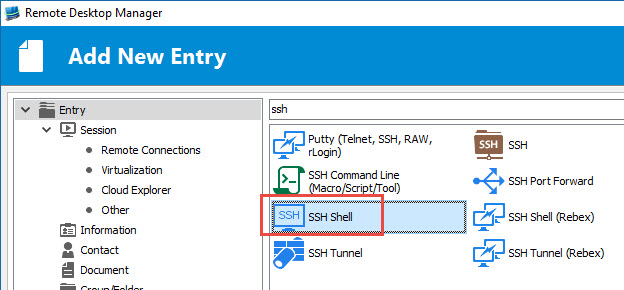
Could you try the SSH Shell session type instead of SSH Shell (Rebex) to see if there's a different.
The SSH Shell session is our own integration of Putty.
Best regards,
Jeff Dagenais
2016-09-19_15-38-27.jpg
Tried the "SSH Shell" session, but it has the following flaws and I have not tested it a lot futher than this.
1. Much slower startup compared to "SSH Shell (Rebex)"
2. Does not close the session tab after logout of the ssh session
3. Reconnect on a session tab does not remember the credentials you logged in with, it prompts for username in the ssh session.
Regards
Michael
Hello Michael,
I'll go over your points in order.
1. Are you running RDM in 32 or 64 bits? In 64 bits it is definitely slower, but in both cases, the startup should get much faster after you have opened a first SSH session. This is due to the control being initialized for the first time and there is not much we can do in that regard at the moment.
2. I've been unable to reproduce this. Can you describe what steps you take exactly? I've tried either manually closing the SSH session on the server as well as typing "exit" in the terminal to finish the session and both successfully closed the tab.
3. That would be an interesting feature to add. We'll see what we can do but it might not be possible with the way the reconnect works at the moment.
Regards,
Hubert Mireault
1. Yes, we only use 64-bit, as we encounter memory issues when using 32-bit and many opened sessions to Windows 2012 R2 servers.
2. I double-click the session, after shell prompt is ready, I press ctrl+D or type exit+enter or logout+enter, in all cases the session tab stays open with the Blue line in the top of the session-view, and total black screen below the blue line.
3. Yes I know the reconnect has changed a bit, I'm discussing this topic in another thread :-)
But, back to my main question, is it impossible to have the "SSH Shell (rebex)" not stall RDM when starting a session?
Regards
Michael
I confirmed that issue #2 is a known issue and only happens in the 64 bits version.
For the Rebex entries, I checked and it should be possible to connect asynchronously. This would require changing how we handle the connecting. We will add this to our todo list.
Regards,
Hubert Mireault
Sounds great, thank you for the quick support.
;o)