Embedded RDP scaling issues on Windows 10
I have upgraded my laptop from Windows 8.1 to Windows 10 Home. After the 8.1 to 10 upgrade I performed a clean install of Windows 10 Home.
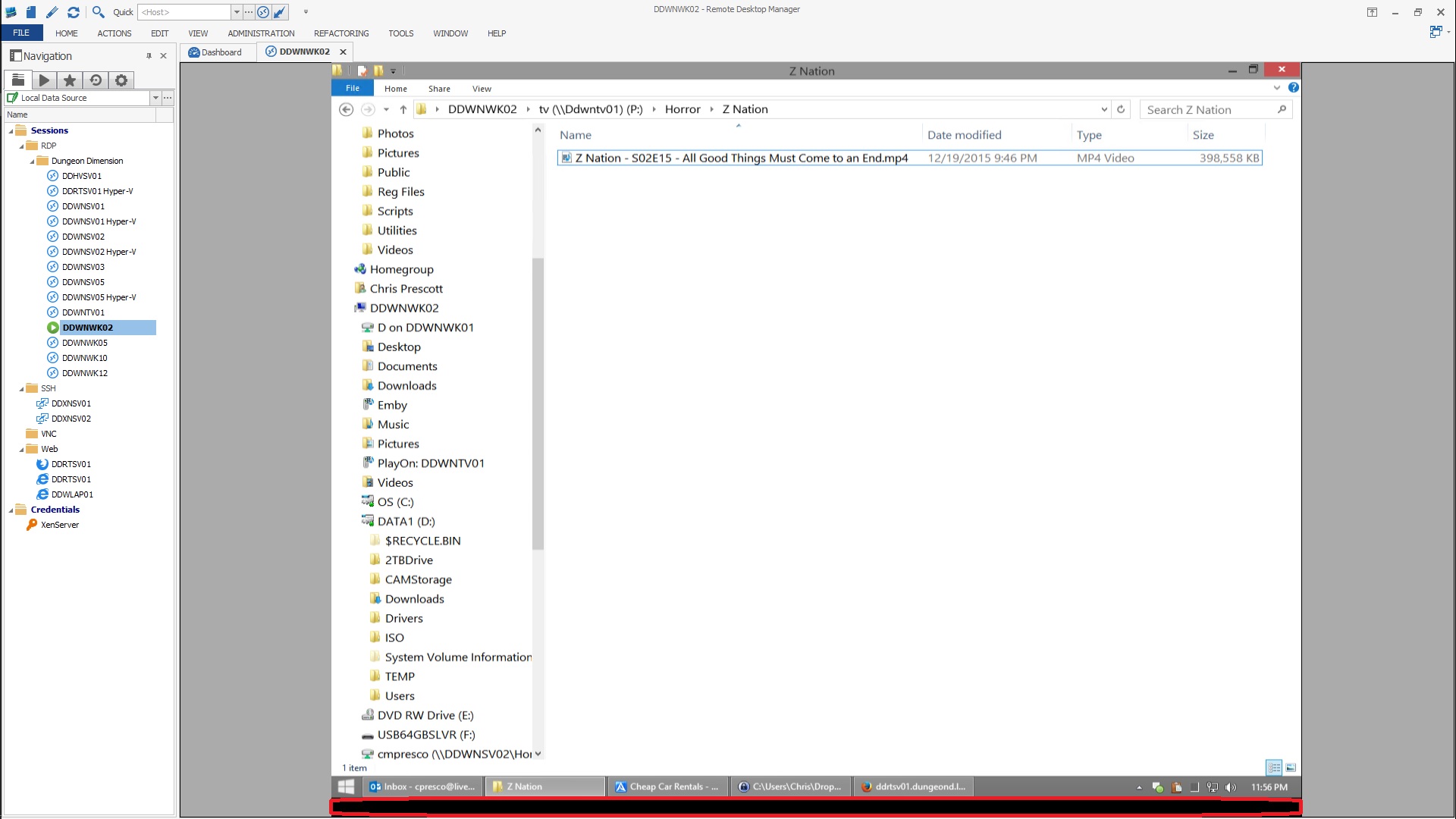
After the clean install of Windows 10 I installed RDM 11.0.18.0 Enterprise and found that embedded RDP sessions set to "Fit RDP window (smart sizing)" would no longer fit the 1280x1024 RDP session embedded in the RDM window on my 1920x1080 desktop. There is a blank section at the bottom of the embedded RDP session and that blank section must be clicked on to change to programs that are listed on the Task Bar.
I searched the forum before posting this and found information about RDP session issues on http://help.remotedesktopmanager.com/troubleshooting_rdp.htm which helped with my initial scaling issues (the embedded RDP session not only had the blank section at the bottom but was also improperly stretched within the RDM window). I have set my desktop scaling to 100% instead of 125% which has resolved the improperly stretched issue but it has not fixed the blank section at the bottom of the embedded RDP session.
The workstation I am connecting to is Windows 8.1 Enterprise.
I have attached a screen shot of the issue with the blank section outlined in red.
RDPscalingissue.jpg
All Comments (35)
Hi,
Could you one of export your RDP session without the credential? I will verify your settings.
David Hervieux
I have attached a copy of the session with the password removed.
DDWNWK02 - Copy.rdm
I usually have the status bar disabled but I have found that if I enable the status bar then disable the status bar then the embedded RDP session will correctly resize within the RDM window.
Hi, I'm experiencing the same issue.
Also in-place upgraded from Win8.1 to Win10 with RDM 11.0.18
Seems that any action that causes a re-size of the smart-size remote session will resolve the condition - dock/undock or hiding/showing any menu bars
I have seen the same results with other actions which cause the embedded RDP session to refresh in the RDM window.
@cpresco44
Could you try to remove the Smart sizing and set the resolution to default instead of a specific resolution like what you have set?
David Hervieux
Hi David,
Testing with display settings set to default does not experience the same condition, however application functionality is not as desired.
The skewed display only occurs when smart-sizing is enabled, and the RDM window is smaller than the server desktop, such as when connecting from a laptop.
the current quick-fix is to double-click a menu tab twice, to force a redraw of the desktop.
Our connections are all set to 1024x768 w/ smart-sizing, so that the server desktop environment is static.
@David
If i set the resolution for the session to default then the RDP session fills the RDM window. If I set the RDP session resolution back to 1280x1024 then the scaling issue reoccurs the same as the screen shot.
I have also updated to 11.0.19.0 and that has not resolved the scaling issue.
@Colin
What is the GPU in the system you're having the issue with?
I'm seeing the issue on an MSi GS60 laptop with intel HD 4600 and Nvidia Geforce GTX 860M GPUs.
@cpresco44
GPU is Intel HD 4400

Was any progress made with this?
I have the same problem with the free version (2.1.0.0) running oni Windows 10 (it works fine if I run RDM on Windows 8.1).
Smart scaling works fine if I connect to a Windows 7 desktop but doesn't scale properly connecting to a Windows 8 or later desktop.
Hi,
We don't have the control on that. We use the Microsoft ActiveX. Could you try RDCMan de Microsoft to vverify if you have the same behaviour?
David Hervieux
Hi David,
I still have the scaling issue with RDM Enterprise 11.1.0.0.
I have also installed the 2.1.0.0 free version on a different Windows 10 PC and have seen the same scaling issues there.
Forcing a refresh by right clicking on the top of the RDM window and selecting Top Pane (Ribbon/Menubar) still works as a workaround to the scaling issue.
At this time I only have Windows 8.1 or newer systems to remotely connect to so I can't say if the issue doesn't occur when remotely connecting to a Windows 7 system as Sally has commented on. I'll try building a Windows 7 system and see if I get the same results as Sally.
Thanks,
Chris Prescott
Just for a test could you try an old RDM version. Perhaps the version 9 or 10.
Regards
David Hervieux
Hi David,
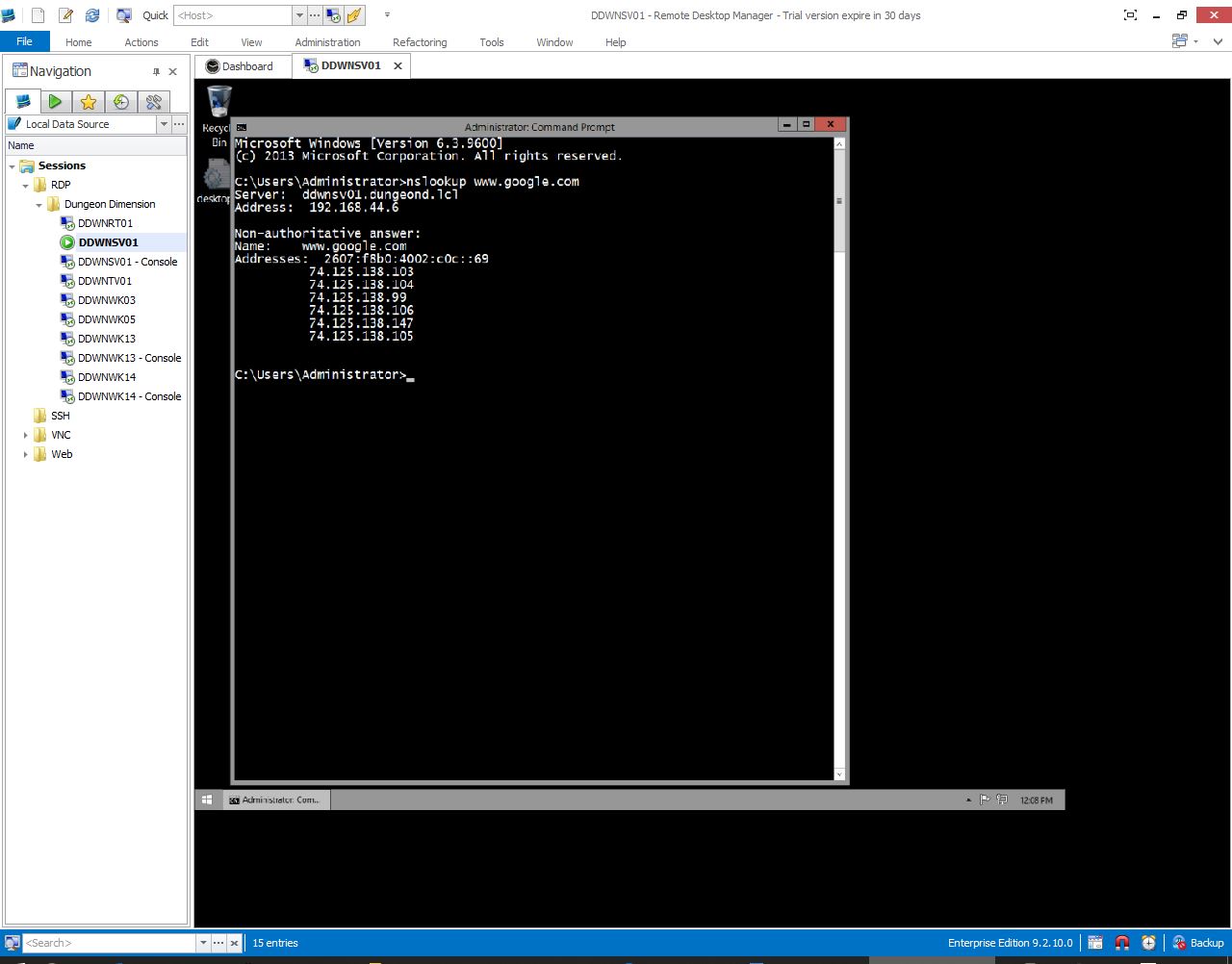
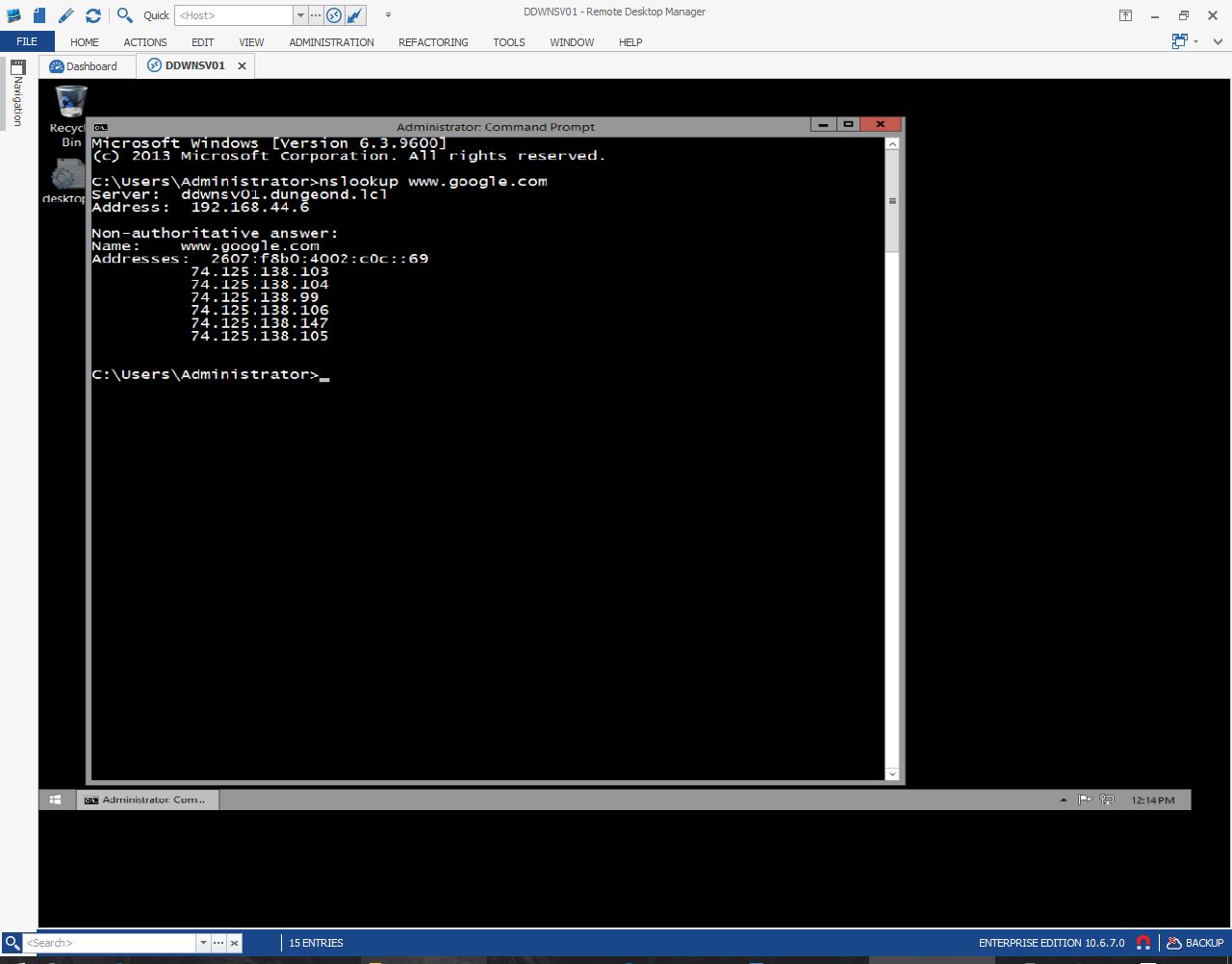
I tried versions 9.2.10.0 and 10.6.7.0. The attached screenshots show scaling issues with both of the older versions as well. The right click workaround refreshes the window and fixes the scaling issue the same as 11.1.0.0.
Thanks,
Chris Prescott
RDM10.6.7.0.JPG
RDM9.2.10.0.JPG
Could you try the Classic UI in File->Options - User Interface
I suspect a UI refresh issue with the third party we use.
David Hervieux
I have tried the classic UI but still get the same problems.
The screenshots Chris posted above are exactly what I get. The mouse actually works as if the screen was full size. i.e. the mouse actions don't match up with what is shown in the shrunken screen. I also find if I resize the Remote Desktop Manager screen then everything scales properly.
Any update on this?
We are unable to reproduce it for now.
David Hervieux
Hi David,
I'm pretty surprised that you haven't been able to reproduce this. I have seen this issue with both the free and Enterprise versions on 3 different systems plus the reports from colinm and sally.
Thanks,
Chris Prescott
I will assign this to our QA. He must do something wrong.
David Hervieux
Any update on this?
I still see this issue but there doesn't seem to be any traction about a resolution.
Hi,
Is there any update on this? We're still experiencing this issue, even after updating to v11.5.4.0, using smartsizing (1024x768) on Win 10
To replicate our configuration, to reproduce the error:
-Windows 10 client
-SQL datastore
-RDP Session. mostly default settings
-connect clipboard only (no other devices)
-keyboard combinations on remote computer
-display: 1024x768, smart sizing
-application window size < 1024x768, so as to force smart sizing
-remote server is Server 2012 R2. either a new session, or reconnect
clearing the issue can be done by forcing smart sizing:
-resizing RDM window larger than the 1024x768 desktop
-pinning and un-pinning the ribbon, by double-clicking a menu tab twice
this other thread appears to be the same issue
https://forum.devolutions.net/topic26189-screen-resolution-bug-in-windows-.aspx
Thanks.
Hi,
The problem is in the ActiveX. I can reproduce this issue with mstsc and also RDCMan. I haven't found a workaround yet.
David Hervieux
FYI, I didn't have this problem until I upgraded to 11.6. To fix it, I just rolled back to version 11.5.4.0 (64-bit).
Hi,
I've made a beta version with a potential fix for this issue
http://remotedesktopmanager.com/Home/ThankYou?f=RDMsetupBeta
Regards
David Hervieux
I've installed it and it looks to be working just fine. I'll put it through the motions and let you know if I see any further problems with this. Thanks for the update!
Great thank you.
David Hervieux
I'm using the free version so I presume the beta is no good for me?
I'm sure if it does fix the problem the change will filter through to that version in due course but unfortunately I can't test it for you.
Thanks for addressing the issue.
I've just released the fix in RDM Free. You can download it from our web site.
Regards
David Hervieux
Thanks David
On a quick 15 minute test it seems to work great.
Hi, Thanks David,
My experiences are one issue fixed, and one new issue occurring :-(
RDM Enterprise v11.6.5
All RDP connections have a 1024x768 desktop screen size defined
With the RDM application window smaller, the connection screen sizing is now working as it should - the remote desktop is "shrunk" to fit, with no distortions.
However, when the RDM application window is larger, the remote desktop is now expanded and skewed to fill all the window space available. The previous and desirable functionality is to have the remote desktop size remain at the maximum 1024x768 size, as occurs with no Smart Sizing.
screenshots attached:
Small1 - RDM window < desktop resolution
Wide1 - RDM window shorter, but wider than desktop. correct empty space padding.
Large1 - RDM window > desktop resolution. Skewed large smart sizing
Normal - RDM window > desktop resolution. Smart Sizing disabled. desired functionality
RDM-SmartSize-Normal.png
RDM-SmartSize-Large1.png
RDM-SmartSize-Wide1.png
RDM-SmartSize-Small1.png
Hello Colin,
Indeed it a new issue. I should have a solution next week
Regards
David Hervieux
@colinm
I've created a new beta release with a fix for the smart sizing
Regards
David Hervieux