Dell iDrac with Embedded browser?

Howdy,
We are trying to setup some Web links to the iDrac of our Dell Servers. We can get the iDrac page to open just fine but when we try to launch the Virtual Console it opens up a new tab but we get a bunch of script errors and it just doesn't work.
I tried setting it to open Externally but that gave us an error that it couldn't open the browser (Windows 10).
I did end up setting the default browser in Options to Chrome and then it was able to open it externally and it worked fine.
Is there any way to open up the iDrac in an embedded IE tab within RDM and have it be able to launch a new tab and function properly? Not sure if you have any Dell servers to test this on but I can provide any feedback if needed.
Thanks.
All Comments (8)
Hello,
Do you encountered the same issue with Google Chrome embedded?
Best regards,
Jeff Dagenais
How do I use Chrome embedded? Under File/Options/Types/Web I set the Web dropdown to Chrome. When I open the Web Session it still has the IE Icon so not sure if it's using Chrome or IE embedded.
Hello,
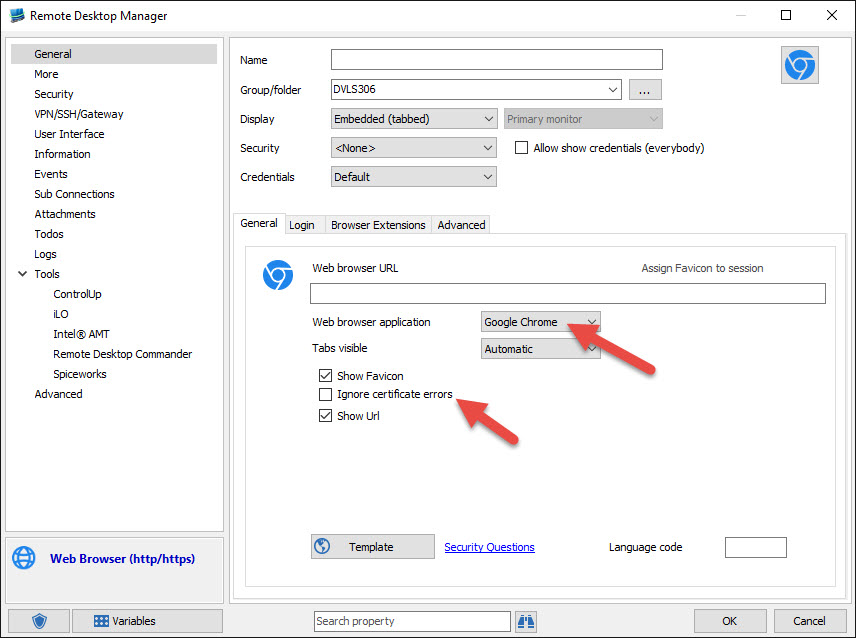
If you edit your web browser entry, in the General tab, you will found a dropdown menu and in this menu you can select Google Chrome
There also an option that you can checked to ignore the certificat errors.
Best regards,
Jeff Dagenais
2015-12-15_11-41-11.jpg
Aaaahhhhh. I had chosen "Web" for the type instead of "Web Browser". I'll give that a try and see if it works better.
Hello
I realize this is an old thread, but for anyone still looking for this information; the DRAC virtual console is now available as a standalone (native) session type as of RDM 2023.3.
Please don't hesitate to post with any questions or comments.
Kind regards,
Richard Markievicz
Hi,
Just upgraded to try it out.
I created an entry using the Dell iDRAC entry type, not the Dell iDRAC (Web) type.
I put in the IP for the host and our Drac username/password. I left Console Type as Default.
When I double clicked the entry, it opened up a black screen and then just kind of froze my RDM for a bit . After a minute or so, the program closed itself.
I changed Console Type to Native and tried again. That allowed it to open up normally. After clicking around a bit, I clicked the 'x' to close the tab and it hung for a few seconds before closing.
I changed Console Type to VNC over Websockets and tried that. It said it was connecting to 127.0.0.1 with a port but that failed to connect.
I then tried plain VNC, but that also failed to connect.
I went back to Default and tried that again, and that time it came up just fine. Maybe the first time was a fluke.
On a side note, I also tried the iDrac (Web) type to get to the web console. That brought up the iDrac background with some dots, but never brought up the login page or actual screen. I also tried a "Web browser" set to Chrome connection type which did the same thing,
I changed it to Edge and that brought me up a Certificate Warning which I then clicked OK and continued to the site normally. Maybe the Cert thing is getting in the way of the Web connections working.
I looked back at the iDrac (Web) entry and I see there is a Web browser application dropdown box, but it's grayed out so I can't try changing it to something else.
Anyway, thanks!
Hello
Thanks for the feedback!
To explain the different connection modes of the native session:
- Avocent - The virtual console codec used prior to DRAC firmware version 7.0.0.0
- VNC-Over-Websocket - The virtual console codec used on and after DRAC firmware version 7.0.0.0
- VNC - A regular RFB (VNC) connection; this needs to be enabled separately on the DRAC
Avocent is currently the default option. A future update will add an "Automatic" option to determine the connection type automatically.
So, based on your description, your DRAC is on a firmware version older than 7.0.0.0 and doesn't have VNC enabled.
I'm not sure why your initial connection attempt only brought a black screen, but it sounds like the two subsequent attempts with the proper protocol selected worked. Our implementation is based on reverse-engineering the Avocent protocol, which is closed-source and closed-spec; and it's a complicated protocol. There might be some rough edges so if you continue using the session type and keep experiencing issues, please let us know - we can ask for some further diagnostics from you that can help refine things.
There is a slight pause when closing the connection; internally things are quite complex as we need to synchronize multiple threads (the protocol sends video and other updates over distinct "channels") and it takes a moment to tear everything down carefully at the end. There could be room for optimization here as well.
Overall, I encourage you to keep using the new native session and report any consistent issues or bugs that you find to us here.
Thanks and kind regards,
Richard Markievicz
Hello again
RDM 2023.3.22 now adds an "Automatic" connection mode to the native DRAC session which will automatically negotiate the connection type. We've also made this the "Default", so if using "Default" or "Automatic" the port number should be the port that the management interface is running on, not the virtual console port.
I also added a fix for a potential crash where certain DRAC versions might send a frame before RDM is ready to process it.
Please don't hesitate to post back with any feedback or questions.
Thanks and kind regards,
Richard Markievicz