New client setup

I'm using this software for the first time and trying to set up my first client. I've entered the IP address in the field after "Quick" and when I clicked on the lightning bolt I am asked to enter my credentials. There are 3 options to choose from. I've selected the second option and entered the User Name and Password for my client's VPS, however, this is not working. Appreciate your advice on the following:
1. Am I correct to use the second option and enter the User Name and Password of my client's VPN
2. If no to the above could you please clarify which option to choose and which credentials I should enter.
Thanks
All Comments (17)
Hi,
Which version of RDM do you use? RDM for Mac or for Windows?
David Hervieux
Hi David
I'm using Windows 07. Just so you know I've copied the password making sure there are no blank spaces before and after then pasted it into the box. This woked on my partner's computer, but doesn't seem to work on mine. So' I'm wondering whether it is something to do with my computer. If so, do you have any suggestions as to what it could be.
Thanks
What data source type do you use? Could you post a print screen of you connection?
David Hervieux
Where do I "Post" the screenshot to. I can't seem to drad and drop it into this box and there is no option to attach a file. Let me know how I should do this.
In the meantime these are the details of the data source:
Name: Local Data Source
Database: C:\Users\Deidre\AppData\Local\Devolutions\RemoteDesktopManagerFree\Connections.db
Password: *this field is blank
Always ask password - Unchecked
Click on the Add reply instead of the quick reply. You will be able to Attach a files
David Hervieux
Thanks
Screenshot attached
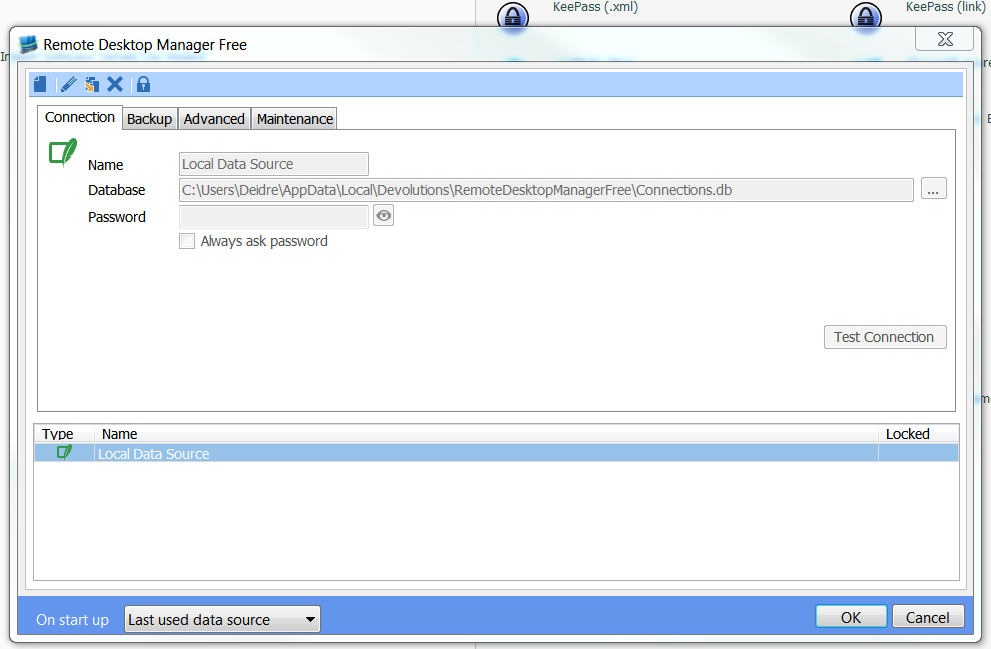
RDM Screenshot.PNG
Could you post a print screen of the rdp connection that does not work?
David Hervieux
Attached
RDM Connection not working.PNG
This is not the screenshot for the connection configuration. What I mean is the dialog when you edit the RDP connection. I want to verify if you have saved the password in the database.
David Hervieux
Sorry David I am not very good with technology and I don't know what you are asking for. Could you please send me step by step instructions as to what I am to take a screenshot of.
Thanks
Ok,
I think I know what you mean. You've just used the quick connect but you need to create an entry.
This getting started should help you:
https://www.youtube.com/watch?v=CD1EpGWMwQ0&feature=youtu.be
David Hervieux
Hello Deidre,
There's a few getting started tutorials that you can watch to help you start using RDM.
You can have a look at them here
http://remotedesktopmanager.com/Support/Video#GettingStarted
Best regards,
Jeff Dagenais
Thank you. The tutorials are about Getting Started for Teams. I don't wish to register for teams. I am an Amazon Optimization Consultant and I work on my own. Do you have any other getting started tutorials that cater for that?
Hi again
I've looked at the tutorials and the set up does not seem to be the problem. I'm still having trouble using the RDM (Free). When I enter the User Name and Password I get the message "The credentials that wer used to connect to xx.xxx.xxx.xxx did not work. Please enter new credentials".
Appreciate your assistance, pleeeeease
Thanks
Have you enter the domain? Could you verify if NLA (Network Level Authentication) is checked:
http://help.remotedesktopmanager.com/troubleshooting_automaticlogon.htm
David Hervieux
Thanks David
Where do I enter the domain?
Please see screenshots attached. My computer says NLA is supported, but in an area that looks different to that on the link that you sent to me. I don' have a 'connection' tab.
RDM Credentials.PNG
RDC_no_connection_tab.png
NLA Connection.PNG
As a matter of courtesy I'm just letting you know that, after much troubleshooting, I resolved my problem by upgrading to Windows 10. There must have been something wrong with my version of Windows 7. Thanks for your help anyway.
Cheers