SSH Shell : How to use keypad in vi or vim
Hi,
I am trying to migrate from "Putty" to "SSH SHELL (not Rebex)", but numeric keypad doesn't work in SSH SHELL.
the problem is not in linux terminal, but in vi or vim editor.
The problem and the solution is described here : http://vim.wikia.com/wiki/PuTTY_numeric_keypad_mappings
So with Putty, there is a parameter to disable application keypad mode, but it doesnt exist in "SSH SHELL".
Do you have a trick to avoid this problem ?
I tested RDM 11.0.9.0 , Putty 0.64 , SSH SHELL ( Parameters Keyboard tested = Default,ESC[N~, linux, Xterm R6, VT400,VT100+,SCO), Linux Server RedHat 5
Regards,
All Comments (16)
Hello,
We can add this easily, thank you for the feedback. We will add a field for "disable application keypad mode".
Regards,
Hubert Mireault
Hello,
I see that RDM 11.0.13.0 is available, with improvment "Added application keypad mode in SSH Shell", but i can't download it because only 11.0.12.0 is available :(
Regards,
Hello,
We had to remove RDM 11.0.13 because of some issues with DVLS. I can give you the download link if you don't use DVLS.
http://cdn.devolutions.net/download/Setup.RemoteDesktopManager.11.0.13.0.exe
David Hervieux
Hello,
Sorry, but i tried "SSH SHELL" and its new option "Disable application keypad mode" of RDM 11.0.14 ,and it doesn't seem to work.
I can't use keypad with an editor like "vi" : http://vim.wikia.com/wiki/PuTTY_numeric_keypad_mappings
Is there an another parameter to set, or to add (from "Putty" to "SSH SHELL") ?
Regards
Joel
Hello,
I will investigate this issue and get back to you as soon as possible.
Regards,
Hubert Mireault
Hi,
We looked a bit into it but it's not as simple as we thought. We'll have to look deeper in the terminal's code to find where the issue is, as we might have broken something when we made our implementation of it.
Regards,
Hubert Mireault
Hi
It is fixed with version 11.0.18.
Thanks
Regards,
Hi,
I tried to modify the new parameter "Application keypad mode" to all Linux servers in my DataSource, but it doesn't seem possible with "Batch actions".
Is there another way to modify massively this parameter ?
Regards,
Hello,
We will add a global option in File > Options > Types > Terminal for the next version to choose to disable or enable the keypad mode. When you choose "Default" in the entry, it will use the value in the options.
If you want to change all the settings right now, you can do it by using the custom powershell command batch action. Just select all your sessions, right click > Edit > Batch edit > batch actions > custom powershell command and enter the following:$connection.Terminal.KeypadMode = 2;$RDM.Save();
Setting the value to 2 disables the application keypad mode, 1 enables it, and 0 is Default.
Regards,
Hubert Mireault

Hi,
sorry for picking up this old thread, but the "Application Keypad mode" setting doesn't seem to work for me in RDM Free (3.0.5). The same setting in Putty works fine. Is this intended (i.e. a "pro"-exclusive feature)?
Regards,
Gerrit Kieffer
Hi,
This is not an enterprise feature for sure. I will ask Hubert to verify this with you.
Regards
David Hervieux
Hello,
Unfortunately I've been unable to reproduce the issue in our environment. When you change the setting in your entry's properties between enable and disable, does the behavior of the keypad change at all in the terminal?
Regards,
Hubert Mireault
Hi, thanks for your quick reply. I just realized that I didn't state this, but it's the title of this thread: I'm talking about vi/vim in particular. So here's what I tested:
Entry (Type "SSH Shell") with Options -> Types -> Terminal -> Keypad mode = Disable: in the standard shell, the numpad keys insert numbers as expected, but in vi/vim they act differently.
Entry (Type "SSH Shell") with Options -> Types -> Terminal -> Keypad mode = Enable: numpad keys won't insert numbers, neither in the shell nor in vi/vim
Simple Putty Session (outside RDM) with Terminal -> Features -> Disable application keypad mode = checked: numpad keys insert numbers, even in vi/vim
EDIT: And yes, I also tried to change the setting back and forth and to set it in the entry's properties.
Thank you for the information, I'll check to see what we can do. I'll give you more information once I have done more test in our environment both with our terminal and PuTTY.
Regards,
Hubert Mireault
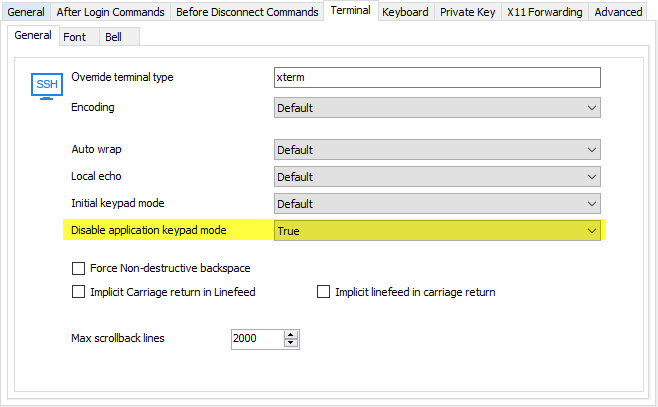
I looked into it and I found the issue. Starting in the next build of RDM there will be two distinct options:
Initial keypad mode will have the choice between default, normal and application. This is the default state of the keypad mode.
Disable application keypad mode will have the options of true or false.
This will more closely mimic the setting names and functionalities from PuTTY. If you change the "disable application keypad mode" to "true" it should work as expected (keypad will type numbers both in and out of vi).
Regards,
Hubert Mireault
2017-01-10 1-47-25 PM.jpg
Thank you so much! It's amazing how fast you guys respond to and fix issues. Really looking forward to the new build.