How to connect SSH via Private Key

Hi,
I'm using RDM Enterprise.
MyServer allow login via Private Key only. Password Login is disable
When i fill information without password at SSH Shell entry, it's cannot connect.
How can i connect ?
All Comments (22)
Hi Esther,
We found your issued it will be fixed in the next release, but since it might take a while here is a hot fix for you:
https://www.dropbox.com/s/4udas9yrvgr2uzk/Devolutions.RemoteDesktopManager.Mac.3.0.4.1448378416.dmg?dl=0
Tell me if it worked for you
Best Regards,
Benoît Sansregret
Hi,
It's Not work for me.
I'm using El Captain 10.11.1
And my Private Key Has Password
My Private key generate from my Mac
Hi Esther,
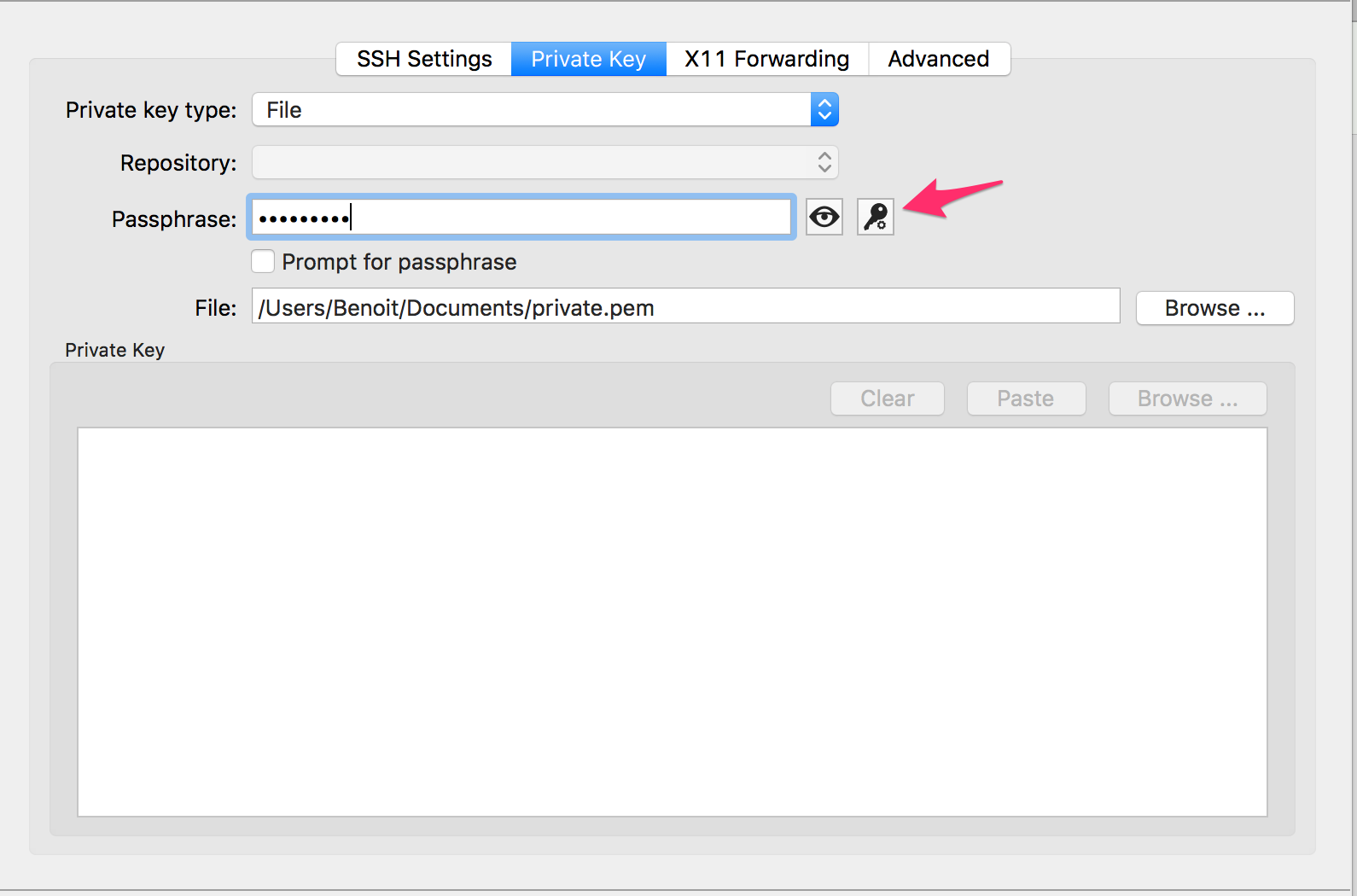
Did you configure the private key passphrase in the SSH Shell entry like this:
When you say you are using El Capitain 10.11.1 do you mean you are connecting to a Mac running El Capitain or that the Mac you are connecting from is running it?
If the computer you are connecting to is not running El Capitain what os and ssh server is it running?
Did you make sure your private key is working fine if you try to connect using your normal Terminal app?
When you say that it doesn't work for you do you have any error message?
Best Regards,
Benoît Sansregret
SSH Private Key.png
Hi,
I'm using my Mac connecting to my server using centOS 6.7
I'm make sure my private key work fine. Because i'm usually using connect it via command
ssh root@127.0.0.1 -p 22 -i /path/to/file
after that, i'm fill password to login my server.
And RDM said me:
Of Course, i'm make sure my connection to internet work fine
In your picture, that is generator password function.
My key included password inside
Hi Esther,
You said that normally you run this command to connect: ssh root@127.0.0.1 -p 22 -i /path/to/file
Then you are prompted for your Private Key passphrase.
Then your are connected.
Good that means that we are sure that everything should work.
In my Screen Capture you should have the fields filled as follow:
- Private Key type should contain File
- File should contain /path/to/file
- Passphrase should contain the passphrase you are normally using to connect
if you want to get prompt everytime you connect check the Prompt for passphrase field.
Is this what you have tried?
Thank you
Benoît Sansregret
SSH Private Key[1].png
Hi,
Here my current config and still not working

I fill Passpharse but not working
Ok Thank you
We will try to reproduce your work environment as close as possible and find what is the issue.
Benoît Sansregret
Hi,
Any update for me ?
Hi,
We had to install a CentOS environment and configure the public key authentication for ssh on it.
I made a test setting with these settings on the server:
RSAAuthentication yes
PubkeyAuthentication yes
PasswordAuthentication no
It worked correctly
I still need to test some ssh server configuration to try to find which one might cause trouble.
If it's possible for you I would like to see the content of your sshd_config file.
You can edit it to remove all sensible information and send it directly to me at bsansregret@devolutions.net
I just want to see how your server is configured to reproduce the same environment.
Best Regards,
Benoît Sansregret
Also may I ask you what version of OpenSSH are you using?
Thank you
Benoît Sansregret
Hi,
This is ssh verison
root@serv11 [~]# rpm -qa|grep ssh
alt-libssh2-1.4.3-8.el6.x86_64
libssh2-1.4.2-1.el6_6.1.x86_64
openssh-5.3p1-112.el6_7.x86_64
openssh-clients-5.3p1-112.el6_7.x86_64
openssh-server-5.3p1-112.el6_7.x86_64
root@serv11 [~]#
Hi,
I'm setting same config with you but not work.
And normally, i just type ssh root@127.0.0.1 -p 22 -i /path/to/file and connect it, don't need change setting sshd any more
Hi Esther,
We just released a new version that makes the verbose mode of the SSH Shell entry active.
If you check the verbose check box in the entry configuration we will get more information about what is going on.
You can download it here http://mac.remotedesktopmanager.com/Home/Download
Best Regards,
Benoît Sansregret
Hi,
This is error log 
I'm make sure password login is OK
Thank you Esther,
With this information we now know that the connection failed before authentication the server and the user. So the problem is not with your Private Key at this point.
Do you have a Ciphers config in your sshd_config file?
We are using libssh to establish the ssh connection and maybe there is a restriction that we are not aware of.
We will also try to add more information to this error in the verbose mode.
Best Regards,
Benoît Sansregret
Hi,
I don't use Ciphers on sshd_config. Just default sshd_config file.
HI,
I just sent you a Private Message with a version that will show more information with the verbose mode.
Hope it help us figure out what is going on.
Benoît Sansregret
Hi,
This is error and Terminal App Work Correct
HI Esther,
Is it taking a long time to connect when you are using the Terminal.app?
I just want to make sure that it's really timing out and it's not failing for and other hidden reason
Thank you
Benoît Sansregret
Hi,
No, it's very fast. Just [enter] and wait no more 1 sec i can logged !
Hi Esther,
That's unfortunate. It means that's even though we get a time out message it's not the real problem.
We are using the libssh component to establish our ssh session and we will need to find what is going on there.
Would you mind giving us the ip address of one of your server we can reach so we can reproduce directly?
We don't need a username or a key just the ip address.
You can send it to me in a Private message or by email at bsansregret@devolutions.net
If you can't I will completely understand and we will try to find an other to help you.
Thank you
Benoît Sansregret
Hi,
I sent you IP. Please check Private message