Multiple RDM installations ofr only one "physical" user

Hello.
We've bought RDM Enterprise 5 licenses pack at January. I would like to install RDM Enterprise in a VM in my personal PC (something like a "VM for remote working when I'm on call") and, obviously, I don't want to spend a license (because I'm the same user as for RDM at my office's PC.
At RDM Administration -> Users, we've created 5 users, AD integrated, for our Administrators group.
If I install RDM at another PC/VM that is AD integrated, and I login with my AD user, there isn't any problem, but my personal VM is not AD integrated.
How can I do to use RDM Enterprise without spending 2 licenses for only one person?
Thanks in advance.
Regards,
Hector
All Comments (3)
Hello,
RDM license are calculated per user, not per installation, so you can install RDM on your computer at work as well as on your VM.
Best regards,
Jeff Dagenais
Hello Jean-François.
Ok, I can do many RDM installations for the same user... but I don't know how to configure RDM when the PC is not at the same domain or it is a standalone PC , sorry :(
I've installed RDM in a notebook that belongs to another domain (but it is connected to an internal wifi network), I've set RDM Cloud account that is associated with the licenses pack, but I can't add the Data Source that I'm using at the other PC.
This is its configuration:
When I'm trying to configure it in the notebook:
- If I select "Integrated security (Active Directory)", I think it sends my credentials but from the other domain (the domain that notebook belongs to). The error displayed is "The target principal name is incorrect. Cannot generate SSPI context"
- If I don't check that option and set User as "domain\user" and my password, RDM shows an error "Login failed for user" perhaps it's trying to send this as SQL Server credentials?
So, please, can you help me to configure RDM to use this Data Source?
Thanks in advance.
Best Regards,
Héctor
P.S.: I can connect via telnet to SQL Server machine (at 1433 port) from the notebook, so connectivity is not a problem.
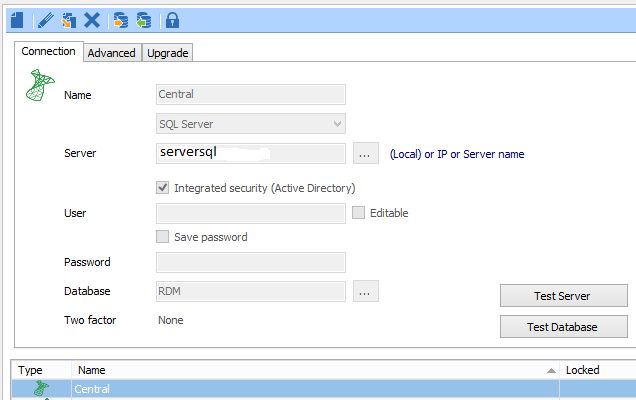
RDM-Datasource.jpg
Hello,
Do you have SQL Management Studio installed on that computer?
If yes, could you try to connect on your SQL Server using the same username/password that you wanted to use in RDM and see if you are able to establish the connection.
Best regards,
Jeff Dagenais