Credential Override -> Domain

Hello RDM Team
We have a lot of servers where we use Lastpass to login to them.
We now have a new user group where we have a patchadmin user in it, which should logon with another login. (which has no full admin rights)
We watched the videos regarding credentials and saw that we can use "credentials override" in the "edit entry specific settings" and add some local credentials with the coresponding domain.
So this would be a lot of work to change these settings with all servers, so the questions is, if there is a better solution or way to do that?
Can we create some user, which we can select for all of these servers, so we don't need to type it a hundred times, and in case of a change do it all over again? :-)
Thanks and best regards.
Patrick
All Comments (10)
You should be able to do this with a batch edit easily enough
Select your servers, right click, select Edit -> Batch Edit -> Change Saved Credentials...
David F.
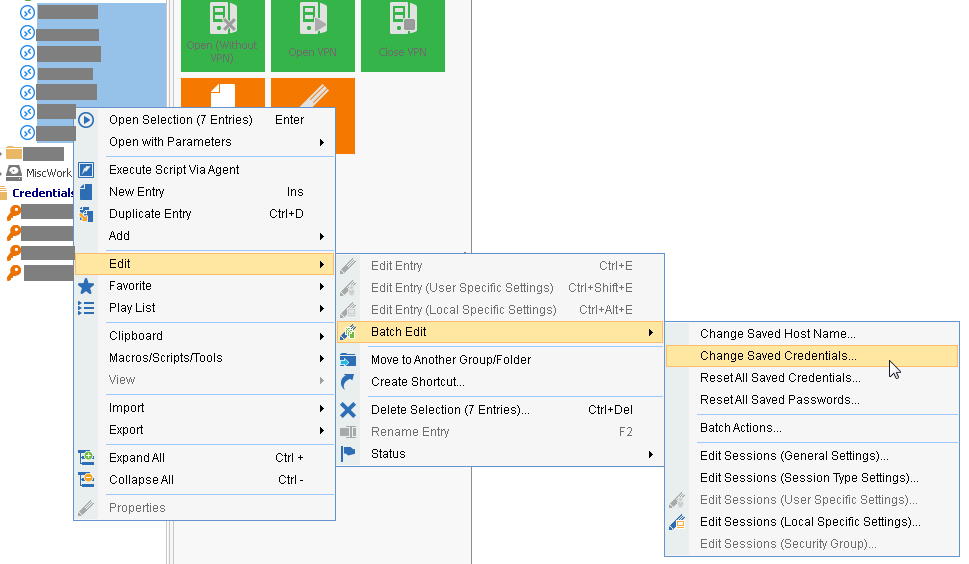
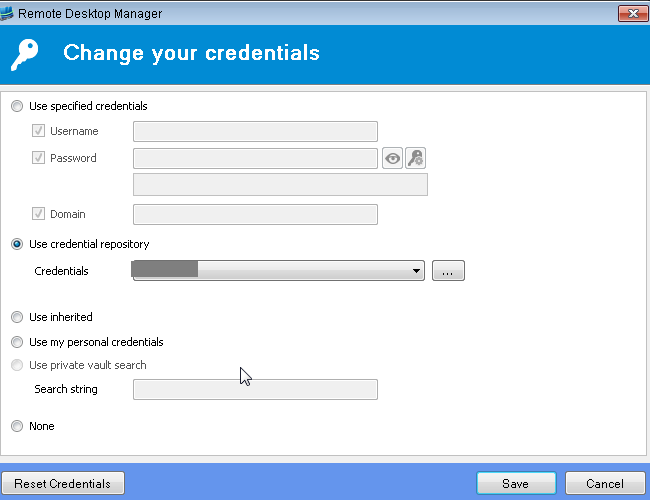
Devolutions_BatchEdit_2.png
Devolutions_BatchEdit_1.png
One problem, it's not the SAME dredential everywhere, as we have different DOMAINS for each server... :-(
So every server has individual domains? do they have individual credendials also?
You can script it by setting the credential ID string for each of those sessions.. it's not super-easy, or intuitive, but I can offer some help with this if that is what you need?
David F.
Hello David
Most of them use the same credentials (it's kind of a patch user, which has no admin rights, but rights to install patches).
So if you could give me two examples, on when we use the same credentials evrerywhwere and one when we have different passwords. This would help a lot and we could adapt from the examples.
Thank you so much, for the great help!
Cheers
Patrick
The base of it is something like this:
[guid]$CredentialInherited = "1310CF82-6FAB-4B7A-9EEA-3E2E451CA2CF"
[guid]$CredentialPatchAdmin = "45479560-173E-435D-8848-C22F863FDC96" #this is actually the Default setting, you would put in the correct GUID
$Session = New-RDMSession -Group $Group -Host $ServerName -Name $ServerName -Kind RDPConfigured
$Session.CredentialConnectionID = $CredentialInherited.Guid
Set-RDMSession $Session
You use the Get-RDMSession to get the correct GUID's for the user id's.
So, what I ended up doing was creating a function that would read in a CSV file and then use that to populate the sessions.
something like..
$RDMSessions = get-rdmsession
$CSV = import-csv -path .\sessions.csv
$CSV | foreach-object {
$entry = $_
$CurrentSession = $RDMSessions | where-object {{$_.name -eq $entry.name}
$CurrentSession.CredentialConnectionID = $CredentialPatchAdmin
set-rdmsession $CurrentSession
}
update-rdmui
Thanks David! I have to check this with a programer here ;-)
Just one question, I don't see the domain anywhere as an option, or do I miss something?
Thank you!
Patrick
The domain will be in the credential set that you create.. the GUID refers to the specific entry that will have the domain already in it.
David F.
Not unless you create the credentials on the fly and then assign them.. I imagine you might be able to do that part... I haven't tried creating the credentials in powershell, but conceptually it would be easy enough if it is possible.
I'll play with it and see what I come up with..
David F.
Hello David
Did you came up with a way to accomplish that?
Best regards.
Patrick
I don't think there is going to be a way to do this? (I could be wrong, but who knows..).. Since the user ID's are stored as GUID's and not as names, I don't know how you'd create the credentials like that on the fly. :-\
Let me knwo if you find something that will let you do that :-)
David F.