Document export not working

Hi,
I saved some .ini files (config files for VPN connections) in RDM. I used the default document entry type and selected the "stored in database" option. Database is MSSQL 2012. Since these files have to be imported in the VPN client, the whole purpose is to download them from RDM again. And now I have two entrys that I cannot export. If I try "Save Document as" the destination dcreen pops up, I can select a destination and a name, but after I click on OK, nothing further happens. No error message, no file created.
If I try to export all documents via special export, I get an error message, that's telling me, that two entry entries could not be exported.
What's really bothering me, is that I don't have any errors in the application log or anywhere else. The entry in RDM Looks absolutely fine to me. How can I first rescue my files and second check the entrys for consistency in the future?
Regards,
Michael
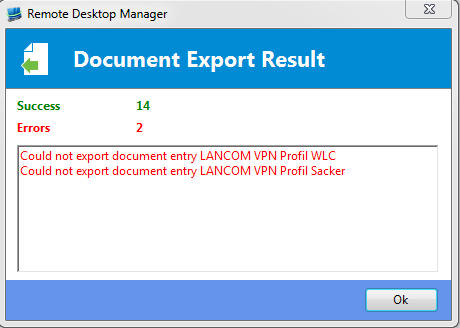
Unbenannt.PNG
All Comments (2)
Hello Michael,
Is this document has been saved as a sub-connection?
Best regards,
Jeff Dagenais
Hi Jean-François,
no, it has not. But I got a step further in my Investigation: The document was saved while in offline mode. I was able to reproduce the issue in creating a new one while offline. I'm not even able to download the document while beeing in the same offline session. Back online the sync seems to work fine, the document entry is still visible, but no download., If I create the entry while online, there are no Problems, I'm even able to download the file while offline.