delete log entries older than 30 days

Hi
Is there a possibility to remove log entries (usage log) older than 30 days automaticaly, for example? Do I need to create the delete job in RDM or in the database?
In case of RDM: Could you tell me the way, how and where I can create the job?
In case of database: Could you give me the name of the log-table? We have a MSSQL server in use.
Thank you in advance.
regards,
Aysun
All Comments (18)
Hello,
Please have a look at the following blog on the subject
http://blog.devolutions.net/2015/09/clean-up-time.html
Best regards,
Jeff Dagenais
Hello Jean,
is it possibile to delete the older log entries automatically in regular time? A Job in RDM or in the database, perhaps?
The blog describes the manual way to delete the log entries.
Thank you.
regards,
Aysun
For now it's not possible but that something we could add. I will enter a feature request.
Regards
David Hervieux
Hello,
any news regarding this feature?
regards,
Aysun
Hi,
This is not automated yet but that's something you could with a SQL Server SQL query executed on the server.
David Hervieux
Hello,
could you give me the correct Name of the database table (Usage Log)? I would delete the logs with a SQL query and I have to know the correct Name of tha database table. We use a SQL Server.
thank you.
regards,
Aysun
Hello Aysun,
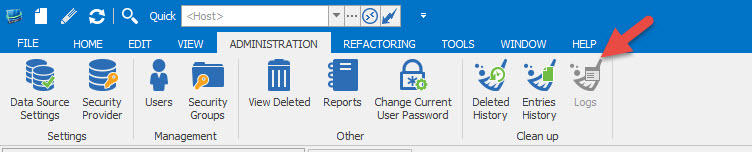
It's possible to do this via the application directly by clicking on the Administration tab
You can also consult our blog on the subject
https://blog.devolutions.net/2015/09/clean-up-time.html
Best regards,
Jeff Dagenais
2016-04-19_10-00-23.jpg
The delete logs function doesn't delete Activity Logs. I need a way to clear Activity Logs as well.
--------------------------------------------------------------------------------------------------------------------
I'm always using the latest beta RDM x64 version.
Local data source.
@Ricky,
As per the code, the logs should be deleted when you go in the Activity Logs and delete them.
What are you trying to delete exactly? Could you post some print screens.
Best regards,
Jeff Dagenais
Hi Jeff,
Sorry, but I'm not sure what you mean by "as per the code". I don't have access to your source code and do not work for your company, so I can't verify what the code is or what it's doing.
If I go into View -> Activity Logs, I see a bunch of entries (not shown below for privacy reasons):
There isn't a delete log or delete entry button under the Activity Logs tab. If I go into Administration -> Cleanup Logs, it doesn't delete the Activity Logs:
--------------------------------------------------------------------------------------------------------------------
I'm always using the latest beta RDM x64 version.
Local data source.
Hello,
In Administration - Cleanup Logs, you can delete the Activity logs but cannot delete the last 30 days of the activity.
Best regards,
Érica Poirier
As I have mentioned in my previous reply, If I go into Administration -> Cleanup Logs, it doesn't delete the Activity Logs. I can still see logs on February 5th 2018. I have set the "delete everything prior to this date" to today's date.
Also, why can't it delete anything past 30 days? I need to clear everything completely.
--------------------------------------------------------------------------------------------------------------------
I'm always using the latest beta RDM x64 version.
Local data source.
Hello Ricky,
I will check if I can find why it's limited. I don't think it's required and I think that we did that just as a safety.
Regards
David Hervieux
Have updated to the latest beta, which mentioned a change related to the cleanup logs. I thought that would have fixed my issue, but it hasn't. I'm cleaning up the logs as per my previous reply (and Erica's), yet I can still see log entries under Activity Logs.
--------------------------------------------------------------------------------------------------------------------
I'm always using the latest beta RDM x64 version.
Local data source.
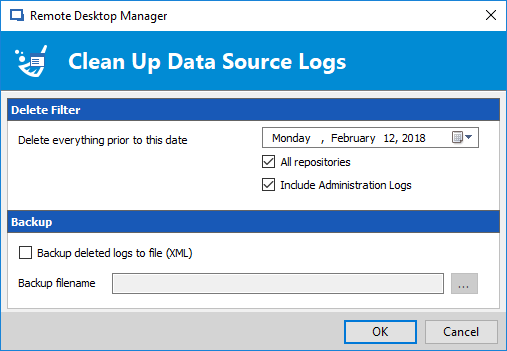
I've just tested with the beta (13.0.14.0) and all works on my side.
Are you seeing the new/modified clean log form?
Stéfane Lavergne
2018-02-12_9-10-38.png
I'm also on 13.0.14.0 (x64) and this is what I see:
As you can see, there are still log entries shown under Activity Logs:
To be specific, I'm trying to delete Activity Logs for a SQL Server data source.
--------------------------------------------------------------------------------------------------------------------
I'm always using the latest beta RDM x64 version.
Local data source.
Rick,
Make sure you select today's date in the "Delete everything prior to this date" field. We default to 30 days in the past. So according to the UI you've only deleted everything up to and including January 14, 2018.
The old screen had it locked down where you couldn't select a date earlier than 30 days, now you can but by default we still select 30 days.
Best regards,
Stéfane Lavergne
OMG, I'm an idiot.
I didn't even check the date, I just assumed it will default to today's date and clicked OK without really checking. It works now, but if you already have the Activity Logs view opened, you'll need to close it and reopen it for it to refresh. Otherwise, it will still show cached Activity Log entries.
Thank you guys!
--------------------------------------------------------------------------------------------------------------------
I'm always using the latest beta RDM x64 version.
Local data source.