Automatically detect RD Gateway server settings

I've been using Remote desktop manager for a while now and I love it. I just recently implemented a remote desktop gateway. As part of that implementation I've also deployed the group policy so that using the normal RDP client it detects the RD Gateway and uses it automatically without the users having to do anything. Remote desktop manager doesn't seem to be picking that up by itself though and i now have to go through all the connection items I've created and update them which is a pain.
Is this a bug or is there an easier way?
All Comments (1)
Hello,
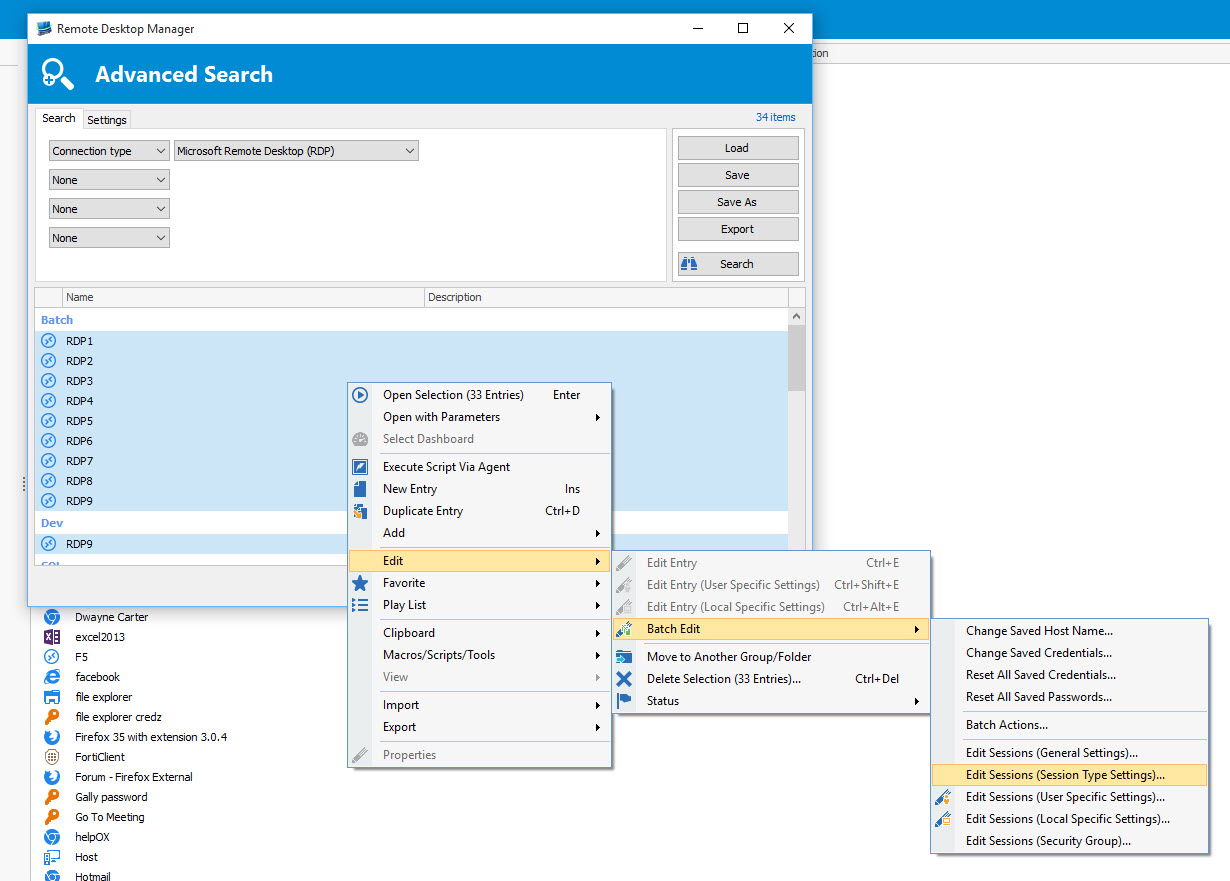
Using the batch edit feature, it would be possible for you to update all your RDP sessions at the same time.
http://help.remotedesktopmanager.com/edit_batch.htm
Click on View -> Advanced Search, select Connection Type -> Microsoft Remote Desktop (RDP) and click on Search. Select all the sessions and do a right-click -> Edit -> Batch Edit -> Edit Sessions (Session Type Settings)
Best regards,
Jeff Dagenais
2015-10-22_13-44-00.jpg