Problem with credentials
Hi,
I've just installed version 11.0.3.0, and is testing credentials in RDM.
I've found a couple of bugs so far. :)
(1 and 2 is also marked in the attached screenshot)
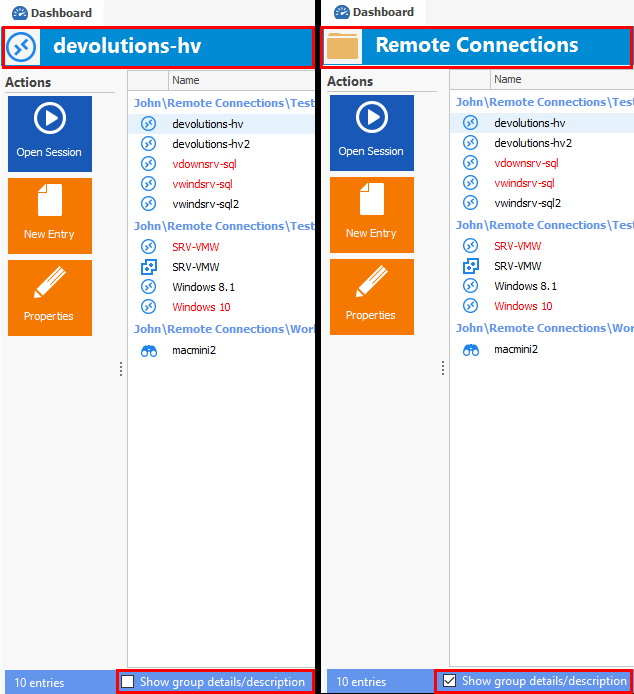
1: If I select a folder/group in the tree-structure, it will show the first username it finds in the structure in the top of the right window.
2: If I'm selecting "Credentials" tree-structure, and doing an "Import Login CSV Wizard..." (only tested with text-input in the wizard - not tested with a file), and the CSV contains a "Group", it will create the group-structure below the first folder/group containing an entry.
In the attached example, it will place the credential under "Environments\System1\Environments\System3"
I hope my descriptions make sense, and you're able to reproduce the problem. :)
Cheers,
Anders
RDM-bug.png
All Comments (2)

Hello,
If you want the name of the group you've selected to be displayed, you should check the "Show group details/description" box under the dashboard frame.
If the box isn't checked, the displayed name is the one of the first session found under the group.
For your second issue, I have created a bug ticket. It should be fixed in the next release.
Best regards,
Jean-Philippe Charest
show_details_description.png
Hi Jean-Philippe,
Thanks for the explanation for "bug" 1. :)
I haven't noticed those check boxes. If it make sense or not (with the default behavior - when the checkbox is unchecked), I'm not sure. Not to me at least. :)
But thanks again for "opening my eyes". :)
//Anders