Port Forward Import Not Working

Howdy,
I know this used to work because we did it when the port forward option first came out but now I'm not having any luck.
I have my CSV file setup as:
SourcePort,Destination,DestinationPort,Mode
30000,10.44.4.91,3389,local
30001,10.44.4.92,3389,local
30002,10.44.4.93,3389,local
I'm right clicking, doing Import, Import Sessions From, PortForward
I find my CSV file and open it.
It comes up with the generic name which I'm fine with as I have to edit it later.
I click the OK button and it says it imports but I get an empty Port Forward item that doesn't have any of the IP addresses that I have in my CSV file.
Not sure if I'm doing something wrong or if something changed or what. Any help would be great. :)
Thanks!
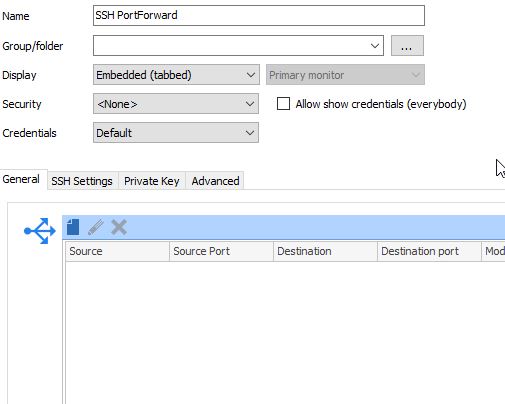
RDM Port Forward Import.jpg
All Comments (2)
Hello,
I believe you have to add the "Source" column as the first column now, since we added a way to specify this (which you can see in your screenshot). The "Source" column usually is your local host (so 127.0.0.1 would have to be entered for most cases).
Regards,
Hubert Mireault
Yep, that did it. I had noticed that my older entries didn't have the Source column but newer ones did. I guess it was added after I did my last import.
Thanks.