USERNAME environment variable in stored credentials
As of v11, our credential entries that use %USERNAME% to grab the Windows environment variable are not working...it comes back with the literal username of "%USERNAME%".
Is this a bug?
All Comments (4)
Hello,
Could you post a print screen of the credential entry? Could you give me more details on where it does not work? Is it when you open an RDP connection?
David Hervieux
Just found out that if you click cancel, it comes up with another dialog box that has the correct %USERNAME% variable inserted.
So it pops up once with %USERNAME% in the username field, you cancel on that one and then it works as expected.
And yes, it is when you open an RDM session that uses the stored credential with %USERNAME% for the Username field.

Hi,
I am currently trying to reproduce your issue and I would need some more information and screen captures.
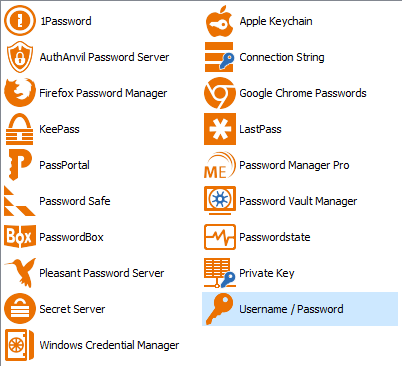
What type of credential entry have you created? Is it a simple "Username/Password" entry?
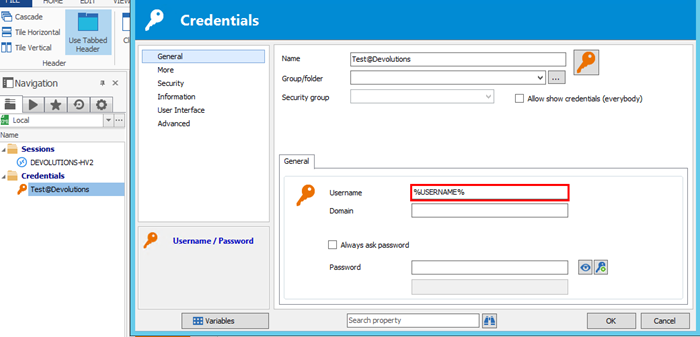
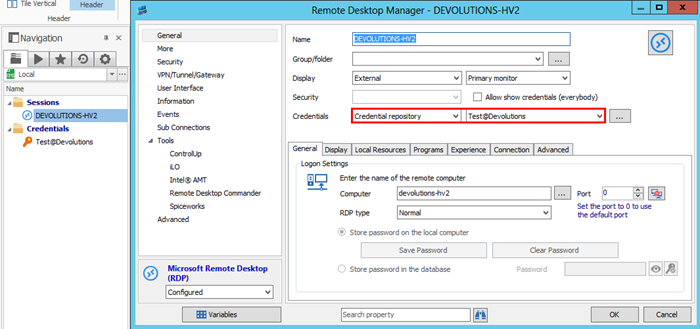
Here is the configuration I tried to reproduce your issue. Is it different from your's?
I created a simple "Uername/Password" with %USERNAME% in the username field.
And my RPD connection credentials are set to "Credentials repository"
With this configuration I am able to connect to the remote machine without any issue.
Best regards,
Jean-Philippe Charest
username.png
repository.png
credentialsTypes.png