DVLS Server datasource performance

Hello!
At the moment we have 35 users with about 2200 entries in our main datasource. Sometimes the software can get really slow and shaky.
We also added our admins from plants to our datasource - they complained much more about the performance. Our plants are connected with datalines.
Now I put them into an own datasource and they say that it is much faster and smoother.
What is a recommended amount of users and maximum entries per datasource? How should a recommended installation with more than one plant on a central server look like?
Best regards,
Andy
All Comments (31)
Hello,
We have customers that handle more entries than that without issues.
I know you have been working a lot with Stefane and have had a ton of issues. Hopefully todays release of RDM 11 and DVLS 3.0 will get you over these issues. I will work with you when your system is stabilized to implement a few best practices that will improve the performance.
Best regards,
Maurice
Hello Maurice,
in our tests RDM11 solved our issues. As soon as I've done the deployment of it and did the update of the server I'll inform you.
Best regards,
Andy
@Maurice,
I'm not trying hijack this thread, but we have Devolutions Server environment with around 6000 items, and everything feels a bit sluggish, saving a sessions properties takes a couple of seconds for example.
As I'm unsure if this sluggishness is caused by our environment or the high number of items, or something else I'm interested in the best practices you speak about?
Hello Maurice,
we've done the deployment and also the server is up to date. How do you recommend to go on?
Best regards,
Andy
@andy I will send you a link to book a remote session.
@Kees please contact us at support@devolutions.net
Best regards,
Maurice
Hello Maurice,
could you find out something with the debug information after our last session?
Best regards,
Andy
@Andy, Stefane has started implementing a "Provider" system for the cache, we intend to offer the choice of using either SQLite or other systems.
In a small segment of our community, the SQLite causes a lot of issues, in your case, you had ALL the issues related to this.
This is one step of a process, but we cannot go ahead with the others until we get rid of the performance issue related to SQLite.
Best regards,
Maurice
Hi there
Sorry, but i have to revive this topic.
We also have over-all performance problems with RDM 11.6 and DVLS 3.2.1.0
Tasks like edit entry, connect to database, change database (all on DVLS) takes much to long.
Should we analyse this issue here or via support email?
Hello,
Please follow http://help.remotedesktopmanager.com/help_profiler.htm and send us the trace. It is useful to also send us
If we do not find the cause we'll move to email.
We have seen issues when the data source is configured for Auto-Refresh and/or Ping online method is not None. Could you check if they are turned on?
Best regards,
Maurice
Auto-Refresh is set to 0 seconds and Ping online method is set to None
Please post any solutions as we just upgraded to server 3.2 and client 11.6.2 and have many performance issues also. 50 users and almost 5000 sessions.
If I do not find a solution soon they might tar and feather me. Many complaints from the team.
We are deploying RDM on a Windows server 2012 R2 RDS server with a backend database server with IIS intelligent cache data source.
We looking to cluster our app server to see if that helps. We have increased VM resources many times but it does not seem to help after 30 people start using RDM the performance just drops with many wait times and many times the screen goes white or (not responding) for seconds to minutes sometimes.
@Spooner
Please contact the support email. We will verify what could slow down the connection. Do you run RDM from a Terminal or from a Desktop?
Regards
David Hervieux
David,
This is Binoy and I'm working with Spooner on this issue. I've done a profile and have attached the file at the bottom of this message.
Couple of issues I see:
1. LoadConnections is taking 13 seconds. This is with the Classic gui, not too good but manageable.
2. It seems to find an issue with the Parameter Interval. Can you advise how to fix?
3. It seems to be loading the connections 512 at a time? Can we brute force a complete load and if so, do you think it will be faster?
4. Any other ideas on how to improve the performance of the load/datasource. The datasource is currently running on a WinSQL 2014 box remotely.
LoadConnections [Devolutions Server : Protera RDM - Internal]...
DisposeAndClearConnections : 6 ms
Offline engine: Default
OfflineManager.LoadConnections : 2 ms
HasOfflineChanges : 0 ms
LoadConnectionsFromDataSource...
LoadDataSourceSettingsFromDataSource...
IsDataSourceOnline : 0 ms
GetDataSourceSettings : 7739 ms
LoadDataSourceSettingsFromDataSource : 7748 ms
GetConnections...
RDMS.GetConnections...
this.dataSourceSettingsConnectionData : 0 ms
ConnectionInfos.Foreach...
DecryptData : 46 ms - Count : 8319
DeserializeData : 1240 ms - Count : 8297
Decrypt - multi-threaded : 0 ms
LoadObjectFromString - multi-threaded : 0 ms
ConnectionInfos.Foreach : 1324 ms
Fetched 8297 sessions
Fetched 22 removed sessions
RDMS.GetConnections : 1355 ms
GetConnections : 1368 ms
DoMergeConnections...
PrepareConnectionList : 44 ms
DisposeAndClearConnections : 0 ms
DoMergeConnections : 4074 ms
LoadConnectionsFromDataSource : 13345 ms
Connection override is null or empty
DisposeAndClearConnections : 0 ms
LoadConnections [Devolutions Server : Protera RDM - Internal] : 13786 ms
TreeView.LoadConnectionList...
GetGroupInfos : 0 ms
BeginUpdate...
ApplyGroupCustomImages : 0 ms
LoadConnectionInTreeNode : 705 ms
PreCreateGroups : 0 ms
BeginUpdate : 731 ms
TreeView.LoadConnectionList : 745 ms
4 - ThreadQueue.AddRow : 2 ms - Count : 1
26 - OfflineManager.SaveMeta...
26 - 6777d43f-ef85-41bb-847a-4f567d1739cb
Silent: System.ArgumentOutOfRangeException: Value '0' is not a valid value for Interval. Interval must be greater than 0.
Parameter name: Interval
at System.Windows.Forms.Timer.set_Interval(Int32 value)
at Devolutions.RemoteDesktopManager.Frames.ConnectionViews.FreConnectionDetails.LoadConnectionInControls(Connection connection)
4 - ThreadQueue.AddRow : 244 ms - Count : 512
26 - SetSecurityInfo : 243 ms
4 - ThreadQueue.AddRow : 261 ms - Count : 512
4 - ThreadQueue.AddRow : 287 ms - Count : 512
26 - UpdateOffline : 552 ms
4 - ThreadQueue.AddRow : 307 ms - Count : 512
4 - ThreadQueue.AddRow : 425 ms - Count : 512
26 - PrivateConnectionManager.Saving : 748 ms
4 - ThreadQueue.AddRow : 376 ms - Count : 512
26 - ConnectionOverrideManager.Saving : 379 ms
26 - OfflineManager.SaveMeta : 3546 ms
4 - ThreadQueue.AddRow : 602 ms - Count : 512
4 - ThreadQueue.AddRow : 576 ms - Count : 512
4 - ThreadQueue.AddRow : 645 ms - Count : 512
4 - ThreadQueue.AddRow : 555 ms - Count : 512
4 - ThreadQueue.AddRow : 564 ms - Count : 512
4 - ThreadQueue.AddRow : 657 ms - Count : 512
4 - ThreadQueue.AddRow : 679 ms - Count : 512
4 - ThreadQueue.AddRow : 1186 ms - Count : 512
4 - ThreadQueue.AddRow : 1142 ms - Count : 512
4 - ThreadQueue.AddRow : 1718 ms - Count : 512
4 - ThreadQueue.AddRow : 1117 ms - Count : 27
Hi Binoy,
Thank you for the trace, here are a few comments/questions.
What version are you running? If you are not running v11.6.6.0 could you please try it and post us your trace.
FYI when posting trace information please insert the text within [ code ] [/ code] tags (remove the spaces between / & code) this will make a block of text that will keep it's formatting a white spaces. It's much easier to read the trace this way.
All the trace lines that start with a number (4 & 26) in this example are background threads (not UI) and the number you see is actually the thread ID. Why is this important? Well it's being done in the back ground. In this case it's populating the cache. On a single machine it's not a big deal since you can still work with RDM during this time. Where it becomes problematic is when you run RDM on a terminal server with many users, CPU/memory/drives may become an issue.
Also note we have been working on more optimizations for the cache and more are to come. We expect to have v11.6.7 out in the next day or so.
I will look at the Parameter Interval issue.
Best regards,
Stéfane Lavergne
Stefane,
Thank you for the quick answer. We are currently running 11.6.2.0. Let me see if we can do a quick upgrade.
Your comments on running it on a terminal server with many users is exactly the issue we're facing. We just bumped up CPU last night as we saw it taking a hit when starting RDM. Is there any way to cache the datasource locally so that each user doesn't have to read the remote data source? We are using intelligent caching already.
Definitely looking forward to further optimizations and the new version.
thanks,
binoy
Are the user profiles wiped between remote sessions?
The reason I ask is since the local cache (intelligent) writes to the users profile. If you wipe the profile it could be an issue.
If not then yes, on second start, RDM will load from local offline file and sync any changes from the server. When you perform a CTRL + Refresh, you are clearing the local cache and starting over. I you want to profile a "normal" load of RDM you can start RDM with the /profiler switch via command line (RemoteDesktopManager.exe /profiler). This will trace the RDM startup with a load from local cache + sync. Your load times, especially with RDM v11.6.6.0 should be quicker. If you start with /profiler please post the trace, we would like to see it.
Best regards,
Stéfane Lavergne
No I don't believe we wipe the profiles, could you advise where that setting is at to check?
I've uploaded a few traces here - https://drive.google.com/open?id=0BxHnM2hpVUTgamJwX3JrR1pOanc
I've uploaded two profile traces. The princely one is done on first startup and the sbakas2 one is for a second start up. Do you see a difference? For the princely one I see a lot of the "Interval" failures and I did a screen share and see his RDM performance is very slow often going to "Not Responding". Not so with Stefano or myself.
Standby on 11.6.6.0. Hopefully we can either do that or wait for 11.6.7.0 and do that shortly.
thanks for all your help,
binoy
Thanks, I will have a good look at the traces.
As for the exception, I'm looking into it. For now you could set your refresh interval (File -> Options -> General (tab) -> Connection details refresh delay) to something not 0, say the highest value 1000 (default is 300). At the moment 0 (disabled) is not working.
Best regards,
Stéfane Lavergne
I'm not expert at managing user profiles with Remote Desktop Services (Terminal Services). No clue how/where to configure user profiles.
RDM writes the local cache file in the "%localappdata%\Devolutions\RemoteDesktopManager" folder. So if it is wiped between terminal sessions that will be an issue.
Best regards,
Stéfane Lavergne
Got it. Let me check with the team.
thanks Stefane,
binoy
Correction on terminal services it goes into %appdata%\Devolutions\RemoteDesktopManager not %localappdata%\Devolutions\RemoteDesktopManager.
Best regards,
Stéfane Lavergne
Thanks Stefane. Can you update here when 11.6.7 is out so we can give that a shot?
Stefane,
Could you explain the Intelligent caching option and how it works. In old MSSQL version we used to auto refresh every 1 min and then 5 min after performance hits. I was told that we should not have to use auto refresh with the intelligent caching on but what we are seeing is users are not seeing changes unless they manually refresh. So in some cases sessions are getting locked out because the password changed but users do not get the update and lock account out after several people click on.
If intelligent caching is not offering us convenience should I turn back on the auto refresh option on each client datasource? I do not want to degrade performance again so I am not sure what to do. I can give users auto refresh option but then they will complain the performance is bad.
Next question is would it be better to have all clients go offline and then do a auto refresh? So the caching is local and the auto refresh would update the local list.
We are trying many things. Like we just added a second application server to our RDM farm so now we have 2 terminal servers to split up the team of 50 users.
Also the option to turn off per character search and only search with enter key seems to have helped performance a great deal so far.
Intelligent Caching - consists of saving the state of the data on the client. When a refresh is requested we send a token representing the state of the client and the server will respond with the delta, as a set of instructions to be applied by the client. Say on a big data source the data may be a few MB in size but with Intelligent Caching only a few hundred KB would need to be transferred to keep the client in sync. Much more efficient, especially on a terminal server.
Refresh on DVLS & MSSQL is much different. Since with DVLS the work is done in DVLS, it already has the sessions cached in memory. With a MSSQL data source, the work is done on the MSSQL server via a large/complex SQL statement. So Auto-Refresh set to 1 minute with 50+ users on MSSQL you might see degradation of performance, regardless of having caching on or off.
I'm currently in the process of analyzing the profiler logs supplied by binoy. I've already optimized both background threads to keep the client cache up-to date. The threads were pretty CPU & disk intensive and may have been taking enough resources to adversely affect the UI. I'm also currently working on tweaking few things on the load that should shave a few hundred milliseconds (if not seconds) from the initial load. For example, on contrived data that exploits a slow section of code, I've dropped from 7+ seconds to about 2.7 seconds and I'm only getting started. I haven't tested in a Terminal Services environment yet but I expect it to behave as expected.
So for Auto Refresh. With a working cache + DVLS, auto refresh is a very good idea and won't affect performance (it's practically a big ping/keep alive). Although I would wait for all my other optimizations prior to enabling auto-refresh since some of the stuff I working will affect load times and hence CPU utilization which then affects all other users load times... In other words, getting the data is fast, refreshing the UI has issues (I'm working on those).
My goal is to get his out before the end of next week (leaving for a two week vacation on Friday next week).
Best regards,
Stéfane Lavergne
The newest v11.6.7.0 build should be better. Could you please give it a try?
Note: v11.6.7.0 was rebuilt (this week) but with the same version number. Therfore, if you already have v11.6.7.0 installed either uninstall and reinstall or use the zip file and copy over the existing files.
http://cdn.devolutions.net/download/Setup.RemoteDesktopManager.11.6.7.0.exe
http://cdn.devolutions.net/download/Devolutions.RemoteDesktopManager.Bin.11.6.7.0.zip
Best regards,
Stéfane Lavergne
Stefane,
I hope your vacation was nice. I was not able to roll out your 11.6.7 version as we had several large go live events in the company and they did not want me experimenting on RDM during these times. Since you sent this new version 11.6.7 i see that the latest release is version 11.7.2 came out. Since i have a green light to upgrade the RDM client this coming Friday should i just go with the 11.7.2 version are your performance changes rolled into the latest release?
@Spooner - yes take the latest version available. All optimizations have been rolled up into the latest version.
Let me know how it goes.
Best regards,
Stéfane Lavergne
Stefane,
Updated profiler file - don't see too many changes, want you to verify please.
thanks,
binoy
RDM_performance_log.txt
@Binoy,
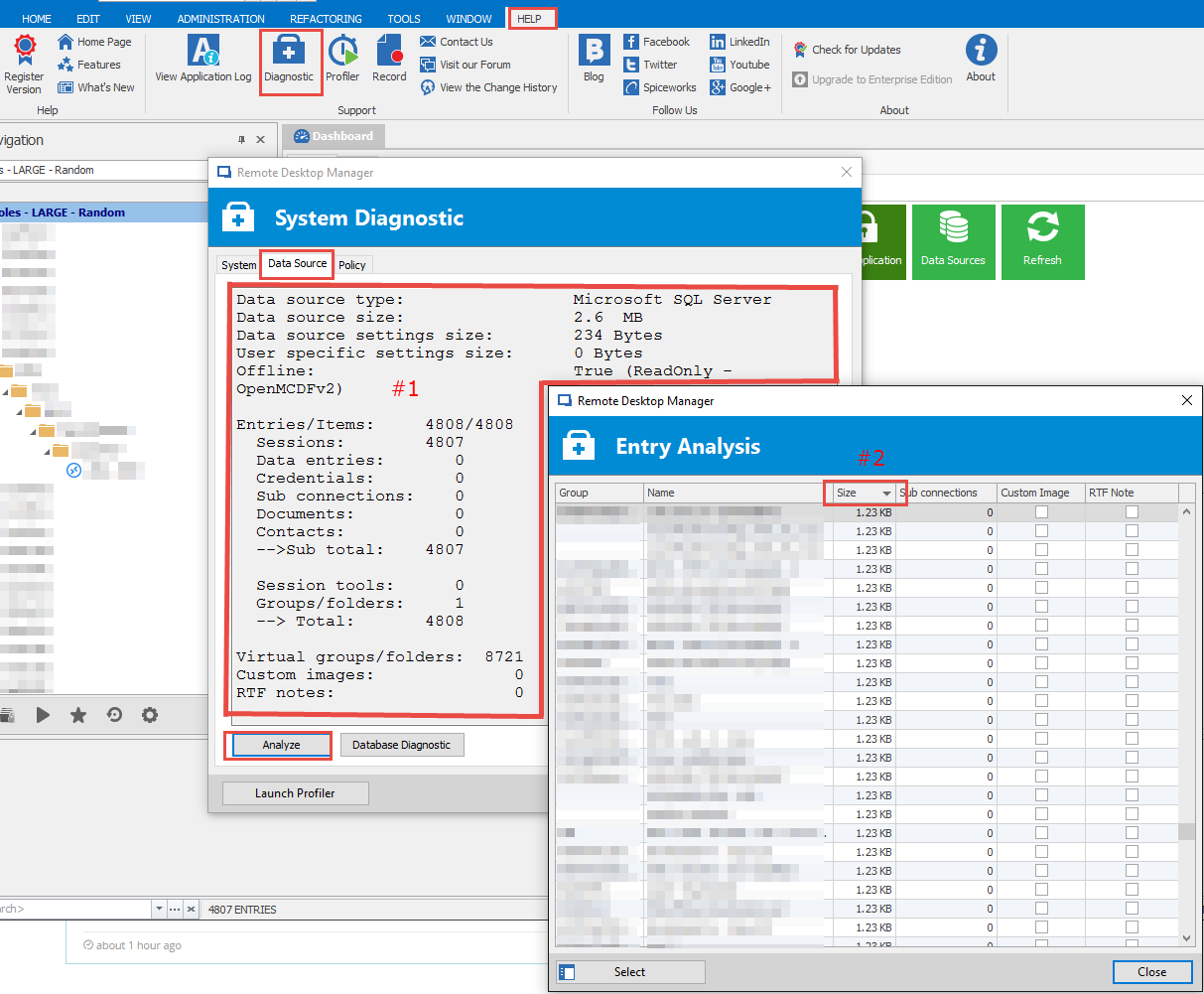
Your profiler shows a very long load time. We need to figure out why.
Could you send me (or post) the following information about your data set?
File -> Help -> Diagnostics -> Data Source (tab)
Make sure you protect any private information before posting.
Best regards,
Stéfane Lavergne
2016-09-12_9-26-23.png
Dear Devolutions,
At this moment we have around 2000 entries in RDM. After migrating our password manager to RDM it will be approx. around 7000 entries.
Can you confirm if the performance issues with such numbers of entries still exists?
Last recommendation i received from Devolutions is to split the data sources.
We use DLVS 3.2 with a SQL backend and RDM client v 11.7.3.0.
Hi,
We did a lot of optimisation recently. 7000 it's could work if you don't use any custom images and make sure to keep your description without images.
Regards
David Hervieux