Can`t connect RDM to SQL database.

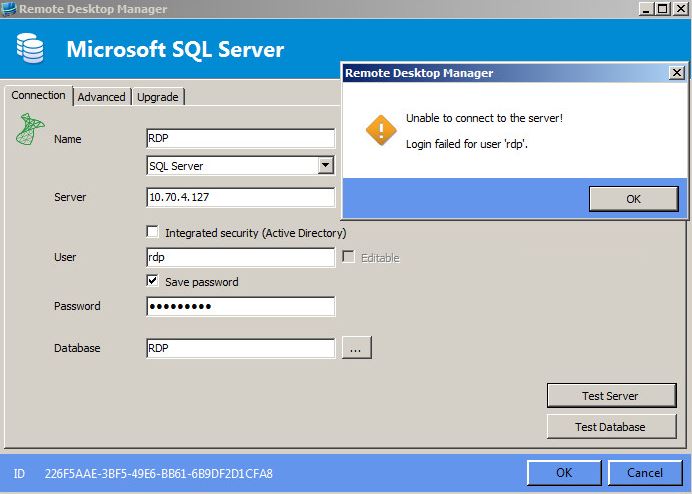
Hi all. I am doing an evaluation of RDM before we decide to implement it in our company. I have installed RDM on application server and when I try to connect to database server with service account that I created I get error message: Unable to connect to a server! Login failed for a user "rdp".
I have given all the required access to "rdp" account on SQL server and when I log in with "rdp" account to application server and use - Integrated security to connect to SQL, it works fine.
Can someone help me with this, what am I missing in the configuration.
I have also attached an image with a error message.
Thank you,
Capture.JPG
All Comments (9)
Hello,
Why dont you check the integrated security option in that form?
Under windows, you cannot send credentials over the wire if integrated security is required by the DB Instance.
Best regards,
Maurice
I want to use different account to connect to SQL databse than the account that is running actual application. The application will be installed on 10 - 15 users and all of them must be able to use their own account and connect to the same SQL databse.
So in your opinion DB instance is the one who is requiring integrated security. I`ll have a look in to that. Thank you.
You should enable Mixed Mode authentication.
This will allow each user to have a DB account
Maurice
I have changed the authentication to mixed mode and enable log on on SA account, restarted the SQL services and still I am getting the same message.
Hello,
So you are logged in using a domain account which has access to the DB, you have configured the data source to use "integrated security", and when you try to open it you are told that the account doesnt have access?
Please send us a screenshot of help-about to support@devolutions.net
Maurice
Sorry Maurice, looks like I did not explained correctly. I am trying not to use "integrated security", but rather service account to connect to database. That is the issue, "integrated security" works fine. I know it is something on SQL side but I am unable to find out what it is.
Try this
Right click on your desktop, create a new text file, change the extension to UDL
double-click on the file, you will see a dialog to connect to a server. Fill in the instance name, username, password then press "Test connection"
If it works, we will have proven that the server is reachable.
Maurice
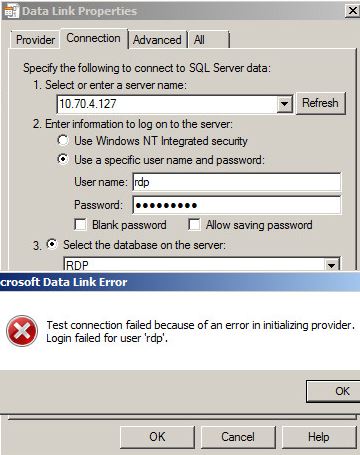
This helped, looks like I am not able to connect to a server, not sure why since the firewall is not up for Domain network and user account has been added to Remote desktop and Administrators group. I am also able to RDP from my application server to my database server with"rdp" account and to telnet to 1433 port.
Capture2.JPG
If this is a new server, you must configure it to "enable remote connections"
Here's a guide for SQL Express 2012. I searched on MSDN and it gives me a StackOverflow page...
http://stackoverflow.com/questions/11278114/enable-remote-connections-for-sql-server-express-2012
Maurice