New group/folder for credentials is incorrect placed

Hi,
When I'm creating a new folder under "Credentials", it's placed under sessions.
Here's what I'm doing:
Right-click on "Credentials" and select Add -> "Add Group/Folder"
Fill in the name and click "OK".
The folder is now created under "Sessions".
I'm using version 10.6.7.0.
Br,
Anders
All Comments (4)
Hello,
Please consult http://help.remotedesktopmanager.com/howto_folderstructure.htm
Best regards,
Maurice
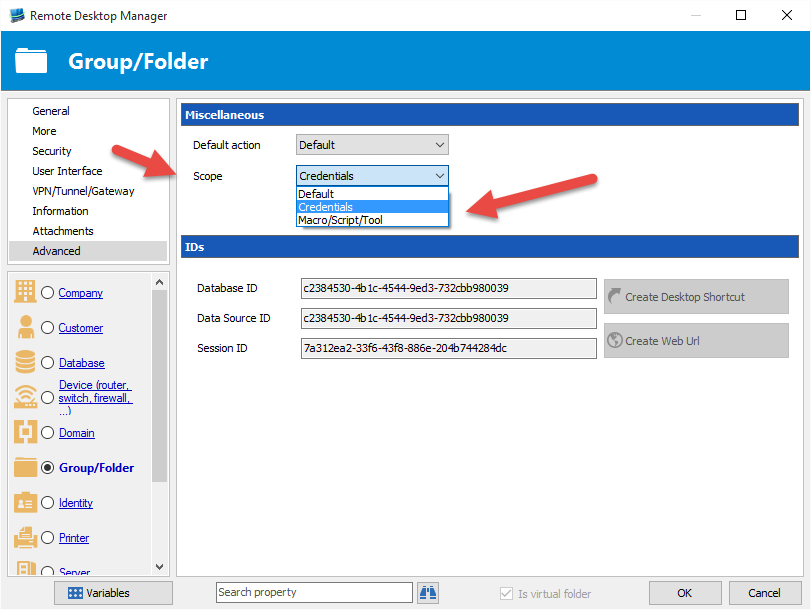
You need to specify the group in the credential directly. The groups creation are only for the Sessions if you don't specify in Advanced "Only available for credentials"
Regards
David Hervieux
Hi,
Thanks for your replies.
In my opinion, that's not logical. Groups should also be able to be used for credentials (and should be able to created in the same way as for sessions).
Feature request? :)
//Anders
Hello Anders,
I have changed the checkbox for a combo. We will try to improve this later but that the best I can do before the RDM 11 release.
David Hervieux
Scope.png