RDM 2.5.5.0 Crashes on Mac OS X Yosemite 10.10.5

When I login to multiple sessions and then try to logoff of some of them the mac client crashes. This happens with RDP. I use the MySQL data source. The problem seems to be related to using multiple, tabbed RDP connections at the same time.
Logs from console:
8/27/15 2:33:24.254 PM RemoteDesktopManager[92351]: Failed to connect (colorGridView) outlet from (NSApplication) to (NSColorPickerGridView): missing setter or instance variable
8/27/15 2:33:24.254 PM RemoteDesktopManager[92351]: Failed to connect (view) outlet from (NSApplication) to (NSColorPickerGridView): missing setter or instance variable
8/27/15 2:42:48.478 PM RemoteDesktopManager[92351]: handleRequest request: An exception was caught while attempting to create a return message, and will be squashed: [NSMachPort sendBeforeDate:] destination port invalid
All Comments (7)
Hi IronMan,
How many tabbed RDP connections do you usually keep open?
What versions of Windows do you use?
Do you actually logoff or do you simply close the tab?
Thank you
Benoît Sansregret
How many tabbed RDP connections do you usually keep open? Usually 4-8. When the error occurred I had 4 sessions opened.
What versions of Windows do you use? 2008 r2 and 2012 r2
Do you actually logoff or do you simply close the tab? logoff - The session screen draws slowly when I logoff. If I close the tab without logoff it works fine, but then that leaves idle connections on the server.
Thank you I just wanted to make sure I test the same thing you are testing
Benoît Sansregret
I just tested the issue and it crashed with only 1 rdp session. It is easily reproducible by logging on to the windows server, changing focus away from RDM, clicking back on RDM then logging off the RDP session via the start menu in Windows.
Could you send me the crash report related to your issue?
You can get them by using the Console.app
Under User Diagnostic Reports you will find a crash report that starts with RemoteDesktopManager follow by the date and time.
If the Sandboxing is activated for your session the there might be a second crash report I will be interested in. It starts with MacFreeRDP-headless
With these two crash reports I should be able to find what is going on.
Thank you
Benoît Sansregret
I do not see the crash reports you refer to. See attached screenshot.
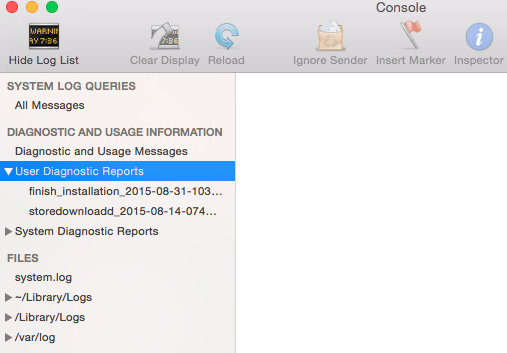
Screen Shot 2015-08-31 at 12.12.07 PM.png
That's really strange. I'll try to find a reason why the app doesn't produce a crash report.
In the mean time, we just released a new version that fix a crash that seems to be similar with yours
You can download it here http://mac.remotedesktopmanager.com/Home/Download
Try it and tell me if it worked for you
Benoît Sansregret