Cannot downsize dashboard height

Hello,
I had the dashboard window once enlarged to full screen size - not fullscreen. Since then I cannot shrink the dashboard window in height. Bigger is no problem, but smaller.
To resize bigger or smaller the window in the width is not a problem.
I close the app or reboot my mac - nothing worked. RDM is the only window on my desktop with this strange problem.
How can I minimize the window in height again?
Regards
Jochen
All Comments (4)
Hi Jochen,
Could you try double-clicking on the title bar? Depending on your system preferences it can either minimize your app or switch between full screen size and the previous size you had.
I was not able to reproduce your issue so I would appreciate a screen shot of your Remote Desktop Manager to help me understand with dashboard are you seeing and might be preventing you from resizing.
Also what version on OS X are you using?
Best regards,
Benoît Sansregret
Benoit,
I use OS X version 10.10.5 with a retina display.
If I double-click on the window title the window is minimizing.
I attach four screenshots this message.
My dashboard is on the left side, because i was able to make it smaller in width but not in height. Then I moved the window down and try to minimize the window from the title bar. But I can only enlarge the window height, not reduce. If I move the window to the top of the desktop it resize to maximum height and I get the display errors.
Next I tried the function windows-reset layout, but nothing happens.
Can I reset the windows settings only without loosing all my server configurations ?
Regards
Jochen
rdm-dashboard-window_border2.png
rdm-dashboard-move_down.png
rdm-dashboard-window_border.png
rdm-dashboard.png
Hi Jochen,
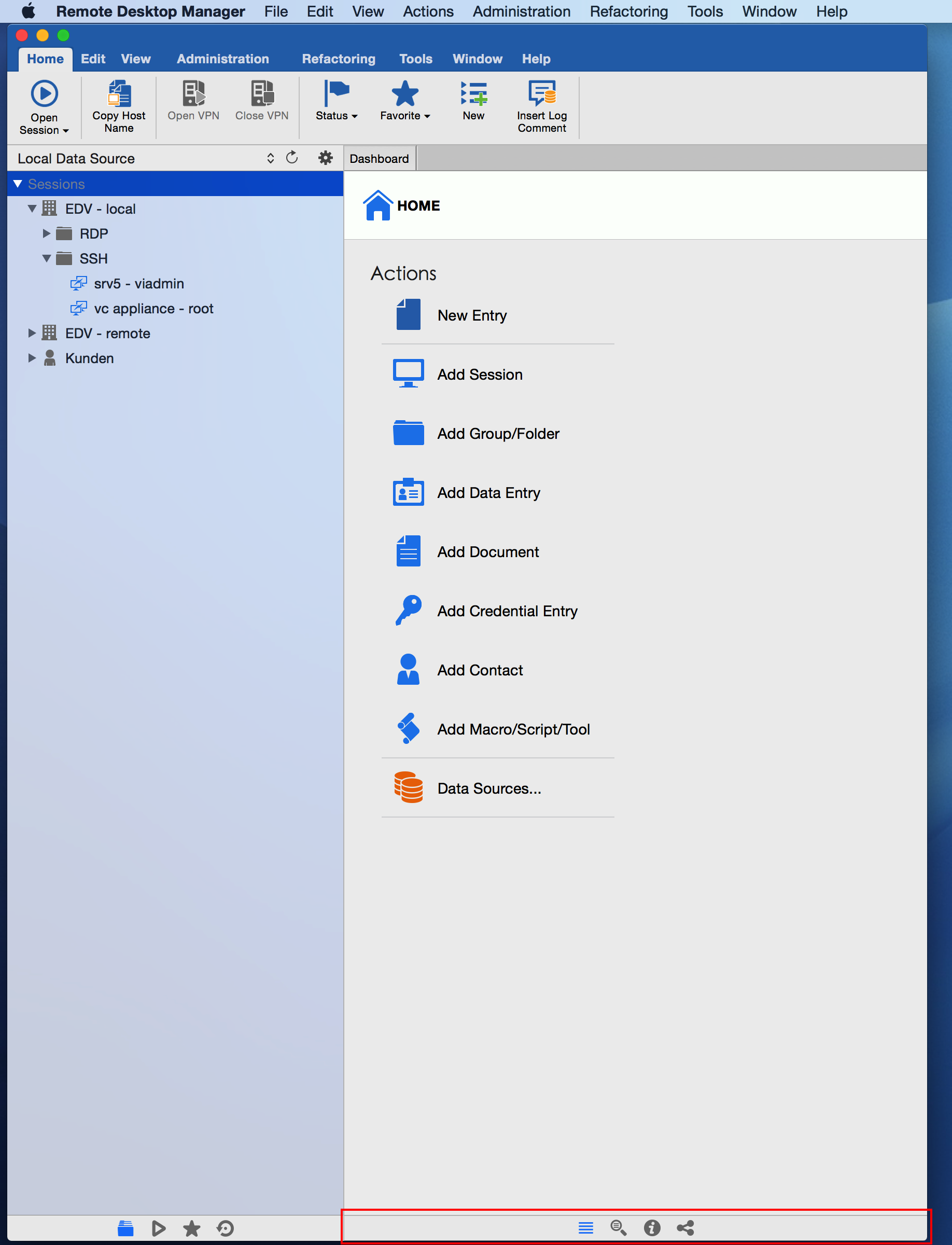
I noticed that your details view at the bottom of your screen is fully minimized (see the attached DetailsView.png). It's is a known issue that we haven't fixed yet that prevent the window height to be reduce when the details view is fully minimize.
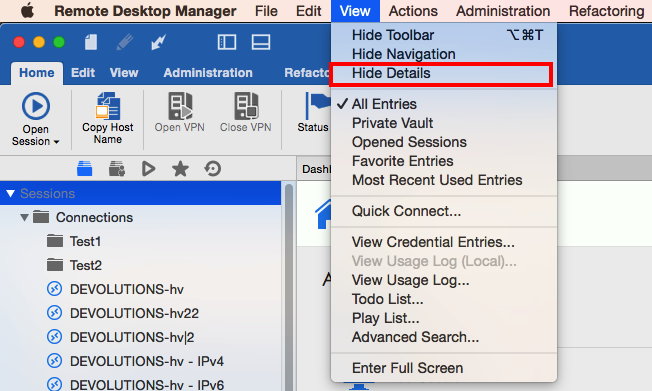
To fix your issue in the mean time, you can either completely hide the details view (see the attached HideDetailsView.png) or increase the details view size.
Sorry for the inconvenience,
Regards,
Xavier Fortin
HideDetailsView.png
DetailsView.png
Xavier,
after disabling the detail view I can reduce the window height.
thnx
Regards,
Jochen