private vault loses connection to database

Hello,
I have the problem that the private vault occasionally loses connection to the database, while the "all entries" tab keeps its connection. When I refresh my private vault, it no longer says "not connected" and shows the "sessions" main folder, but no entries are there. I have to exit RDM and start it again to get my private vault back.
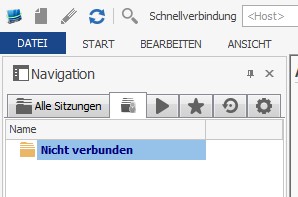
RDM - Private Vault.jpg
All Comments (6)
Hello,
The next time that the issue occurred, could you try to do a CTRL+Refresh to refresh your local cache.
This should bring back your private vault entries.
Best regards,
Jeff Dagenais
CTRL-Refresh has no visible effect. The entries in the private vault still are not visible.
Any other suggestions?
Hi,
which version of RDM do you use?
Did you try to uninstall RDM, Delete Folder %USERPROFILE%\AppData\Local\Devolutions and reinstall?
regards
markus
Kind Regards
Markus
======================
@klages - if you are on the beta (please confirm), it might be due to a issue with the changes to support private vault in offline mode (read/write) I will investigate.
Regards,
Stéfane Lavergne
@klages - Do you have anything in the application logs (Help -> View Application Logs)? Can you reproduce it, if so what are the steps?
Stéfane Lavergne
I'm using version 10.9.8.0. The Application Logs show nothing since 20.08.2015, but the last time problem occurred was yesterday.
Reproducing seems difficult, because I cannot say in which situation this occurs. It seems to happen when I'm longer on the "all entries" tab and then switch to my private vault. But it happens not every time when I switch the tabs.
I'll also try uninstalling, deleting the folder and reinstalling.
Thanks so far,
klages