Using SmartCards for RDP authentication

Hello all!
I would like to know if it is possible to set a RDP Session to open the username/password (and smarcards) prompt like the Microsoft Remote Desktop Connection does:
We are now enforcing SmartCards to RDP to our servers and it would be nice to have that available.
Thank you,
Claudio
edited by audiolomb on 8/24/2015
edited by audiolomb on 8/24/2015
edited by audiolomb on 8/24/2015
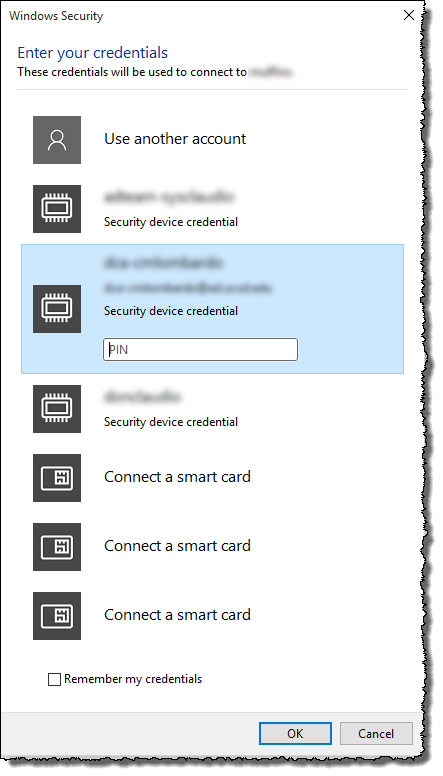
smartcards.png
All Comments (15)
Hello audiolomb,
Have you tried to check the Smart Cards option in the Local Resources tab of your RDP session?
Best regards,
Jeff Dagenais
That option is just to pass-through the smartcard to the RDP session, not for the initial authentication.
Hi,
How do you configure it in the Microsoft client?
David Hervieux
I don't.
As soon as I open rdp, I get the option to use "username/password" or the smartcards. This is the default behavior for Microsoft RDP.
If you don't have a smartcard yuo'll just see two options:
1) username and password
2) "Insert a smartcard"
Could you try in RDM to use the external mode to see if you get the prompt for the smart card.
David Hervieux
With External mode works fine.
However, I need the tabbed mode. Using RDM with external mode is useless to me.
edited by audiolomb on 8/24/2015
Hi,
I'm not sure that we can do anything in tabbed mode. Are you able to make it work with rdcman?
https://www.microsoft.com/en-ca/download/details.aspx?id=44989
We use the same Microsoft ActiveX in embedded mode.
David Hervieux
I just found out another interesting thing.
IF the RDP session is made on a different port (not 3389), then I get the prompt in both modes (tabbed and external).
Remote desktop connection manager works fine. I migrated from that to RDM.
This is strange. Could you export me in private the .rdp file that work with the port changed and the same with the original port.
David Hervieux
Sure, who should I send it to?
Hi David, did you receive the files?
Do you need anything else?
Thank you!
I've got them. I will look into it and come back to you soon.
David Hervieux
This thread looks a bit stale, but is there any plan to fix the Smart card passthrough in the RDM product for Macs? I work for a national laboratory and we are under federal mandate to move to smart card authentication for all computers. There is currently not a RDP solution for passing smart card credentials from a Mac to a remote Windows system (at least that we have been able to find). This is a big issue for Mac users that remote to Windows systems.
-Brian Van Hook
Hello Brian,
Smart card on Mac is really complicated. We will see what we can do with it.
Regards
David Hervieux