With 2factor enabled the program disappears to the background after unlocking the next morning
With 2factor enabled the program disappears to the background after unlocking the next morning

Hi,
i have this issue for some time now. I tried to update to beta versions but the problem still exists for me.
Currently on version 10.9.5.0.
I have 2 factor enabled by using Google Authenticator. The application is set to lock after 60 minutes of idle time and when it's minimized.
When i leave for the night and i lock the application by minimizing it, it asks for authentication the next morning, but after giving the correct code it disappears the the background, where i'm unable to open the application.
Clicking the icon on taskbar doesn't do anything, but i can see that there still is a process running. After killing the process, i can reopen the application and after entering the 2 factor i can use the application again.
All Comments (6)
Hi,
Michael,
I will ask JP to reproduce it.
Regards
David Hervieux
Hi Michael,
I've been trying to reproduce your issue and Google Authenticator seems to work fine for me.
Could you post a video showing your issue, please?
Best regards,
edited by Jean-Philippe Charest on 8/18/2015
Jean-Philippe Charest
Hi JP,
i've uploaded the video: https://youtu.be/_6BHIlUCnH0
My mouse isn't visible, but you should see the clicks on screen.
thanks!
Hi Michael,
I can see that the Remote Desktop Manager icon in the task bar fades out once you validated the code. Like if the application locks again right after the validation.
After validating the code, could you try a right click on RDM icon in the tray and choose "Maximize" or "Restore" instead of clicking on the taskbar icon?
Best regards,
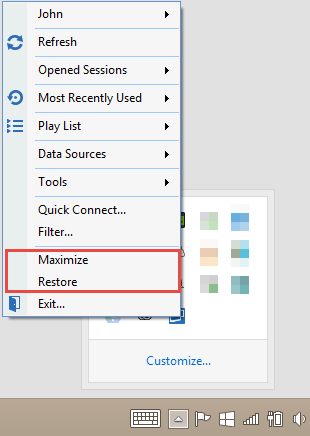
Jean-Philippe Charest
trayMenu.png
Hi JP,
This works, i'll remember this way.
Thanks!
Great!
On my side, I'll keep tracking your issue and will create a bug as soon as I manage to reproduce it.
Best regards,
Jean-Philippe Charest